
Home › VST Plugins › Arturia Modular V
Arturia Modular V 3.13.3 (Mac)
Updated
The catalogue note
Arturia Modular V runs on any Mac with macOS 11 or newer, and it works on both Intel and Apple Silicon machines. The minimum spec asks for a 4-core CPU at 3.4 GHz or an M1 chip, 4 GB of RAM, and 3 GB of free disk space. In practice, that means most studio Macs from the last several years will handle it without complaint.
| Detail | Value |
|---|---|
| Developer | Arturia |
| Kind | Plugin (VST) |
| Version | 3.13.3 (6106) |
| macOS | 11 and later |
| Architecture | Intel and Apple Silicon |
| Interface languages | English |
As a software recreation of the classic 1960s Modular series, it brings that era's patching flexibility into a modern DAW. Polyphony is built in, which the original hardware never offered, and in-app tutorials get you past the initial patch-cord confusion. Host support covers the major DAWs on Mac and Windows, so it slots into an existing setup without surprises. The Arturia Software Center handles downloads, updates and licence management across machines. If you want that vintage modular character without the physical patch bays, this is the way in.
In-app tutorials show hidden features
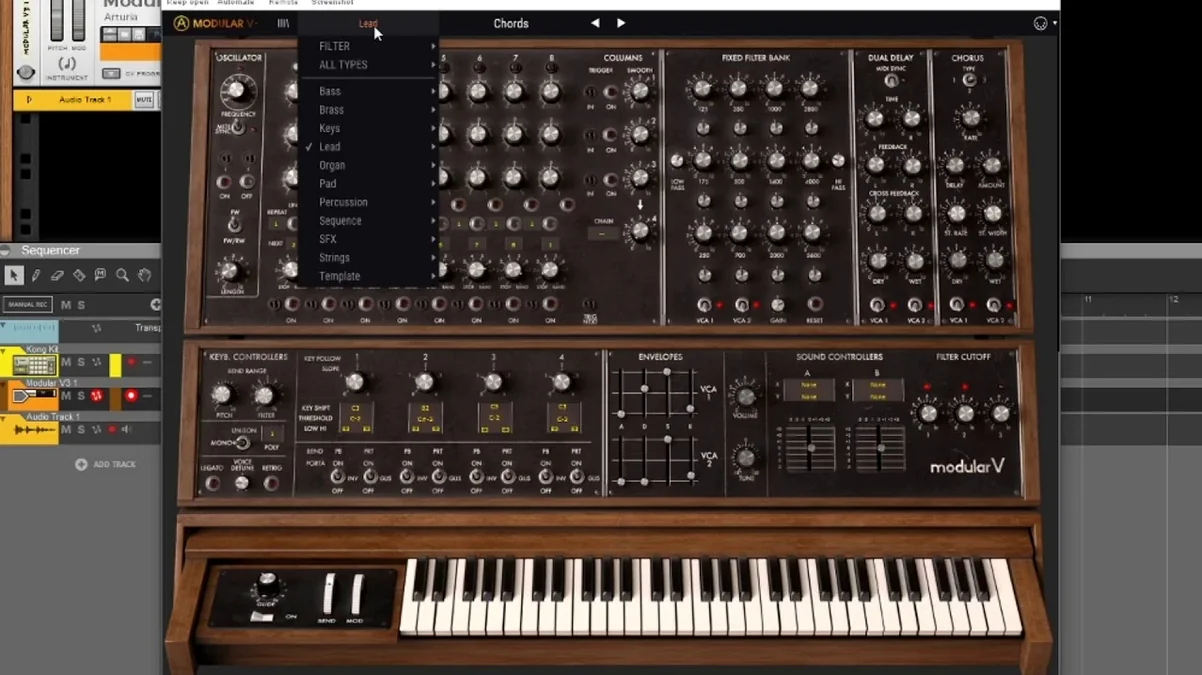
The interface is laid out like the original, but Arturia added a few things that aren't immediately obvious from the front panel. The in-app tutorials, for instance, are worth a look even if you know modular synthesis — they show specific patch examples that map directly to the controls on screen. You can step through them at your own pace, and they save you from hunting through PDF manuals.
Patch management is straightforward. The browser organises presets by category, and you can save your own with a name and tags. There's no need to navigate the macOS file system unless you want to. Loading a patch from the factory library or your own collection takes a couple of clicks.
MIDI learn is available on most parameters, which means you can map hardware controllers to filter cutoff, envelope amounts or anything else without opening a separate editor. The mapping sticks with the patch, so a live setup or a mix session stays consistent when you recall the preset later.
The plugin also remembers its window size between sessions. If you prefer a compact view on a laptop screen or a larger one on a studio display, it keeps that choice. Small, but it saves a step every time you open the project.
A session for a soundtrack composer
I work with a composer who builds electronic textures for documentary films. He doesn't think in terms of synthesiser patches; he thinks in atmospheres. For a recent cue about arctic landscapes, he wanted something cold, metallic and slow-moving. He loaded Modular V, selected a preset called something like "Glass Pad" from the factory library, and played a few low notes on his MIDI keyboard. The sound was close, but not quite right — too warm.
He went into the patch and pulled the filter resonance up a little, then adjusted the envelope decay to make the release longer. The in-app tutorial on filtering helped him understand which module controlled the cutoff slope. After a few minutes of small tweaks, the sound sat exactly where he needed it: thin, airy, with a long fade that didn't clash with the strings in the arrangement. He saved the patch under his project name and moved on. No cable patching, no hardware hunt. The session took maybe ten minutes from load to mix-ready part.
No modular knowledge needed for presets
Do I need to understand modular synthesis to use it?
Not really. The factory presets cover a wide range, from bass and leads to pads and effects. You can treat it like any other synth plugin and just browse patches. If you want to edit, the in-app tutorials walk you through the basics of patching without assuming prior knowledge.
Will it work in my DAW?
It ships as a VST plugin, so it works in any DAW that supports the VST format on Mac — Logic, Ableton Live, Cubase, Studio One, Reaper, and others. The installer places the plugin file in the standard location, and the host should pick it up on the next scan.
Can I use it with a standard MIDI keyboard?
Yes. Plug in any USB MIDI controller, select the track, and play. The plugin responds to note on/off, velocity, pitch bend and modulation wheel. Polyphony means you can play chords, not just single notes.
Is the installation complicated?
The standard procedure: download the installer, run it, and then use the Arturia Software Center to authorise the licence. The Software Center also handles updates, so you don't need to check the website manually. The whole process takes a few minutes.
Start from the default patch or browse presets
Open your DAW, create a new instrument track, and load Arturia Modular V as the plugin. The interface appears — a large panel of modules with patch cables drawn on screen. If you're starting from scratch, you see the default patch, which is usually a simple oscillator routed through a filter and an envelope.
From here, you can browse presets using the built-in browser. Click a category like "Bass" or "Pad", preview a few sounds, and pick one that fits your track. The plugin loads the patch instantly; no disk access delays.
Once the patch is loaded, play a few notes on your MIDI controller. If the sound needs adjustment, reach for the on-screen controls. Turn a filter knob, change an envelope time, or move a slider — the change is immediate. If you want to route a modulation source differently, you can drag a virtual patch cable from one module to another, exactly as you would on the hardware.
When the sound is where you want it, record your performance directly into the DAW. The plugin responds to automation, so you can record filter sweeps or parameter changes as part of the track. At the end of the session, save the patch with your own name. It appears in the browser the next time you load the plugin, alongside the factory library.
That's it. No hardware calibration, no cable management, no extra gear. The session moves from sound design to recording to mixing without leaving the DAW.
Before it goes on the Mac
- macOS 11 or later
- Intel or Apple Silicon
- 4 GB RAM
- 3 GB free disk space
- 4-core CPU at 3.4 GHz or M1
- OpenGL 2.0 compatible GPU
Questions from the room
Is Arturia Modular V compatible with Apple Silicon Macs?
Yes, it runs on both Intel and Apple Silicon Macs, as long as you have macOS 11 or later.
What are the minimum system requirements for Arturia Modular V on Mac?
You need a 4-core CPU at 3.4 GHz or an M1 chip, 4 GB RAM, 3 GB free disk space, and an OpenGL 2.0 compatible GPU.
Does Arturia Modular V work in all major DAWs?
Yes, it is compatible with major DAWs on both Mac and Windows.
Installing it on the Mac
- Run the standard installation procedure for the plugin.
Notes from the control room
Sign in or open a catalogue account to leave a note.
No notes from the room yet. If you have used this build for a week, a short note helps the next person.
Also filed under VST Plugins
The whole VST Plugins rack Arturia Mellotron V1.9.3 VST Plugins 2.1 GB
 Arturia Rotary CLS-2221.2.0 VST Plugins 359 MB
 Arturia Emulator II V1.6.2 VST Plugins 700 MB
 Arturia Dist TUBE-CULTURE1.2.0 VST Plugins 370 MB
 Arturia CMI V1.13.2 VST Plugins 638 MB
 Arturia Buchla Easel V1.13.2 VST Plugins 406 MB
 Arturia Analog Lab V5.12.6 VST Plugins 2 GB Updated
 Baby Audio IHNY-21.5.0 VST Plugins 28 MB