
Home › VST Plugins › Arturia Analog Lab V

Arturia Analog Lab V 5.12.6 (Mac)
Updated
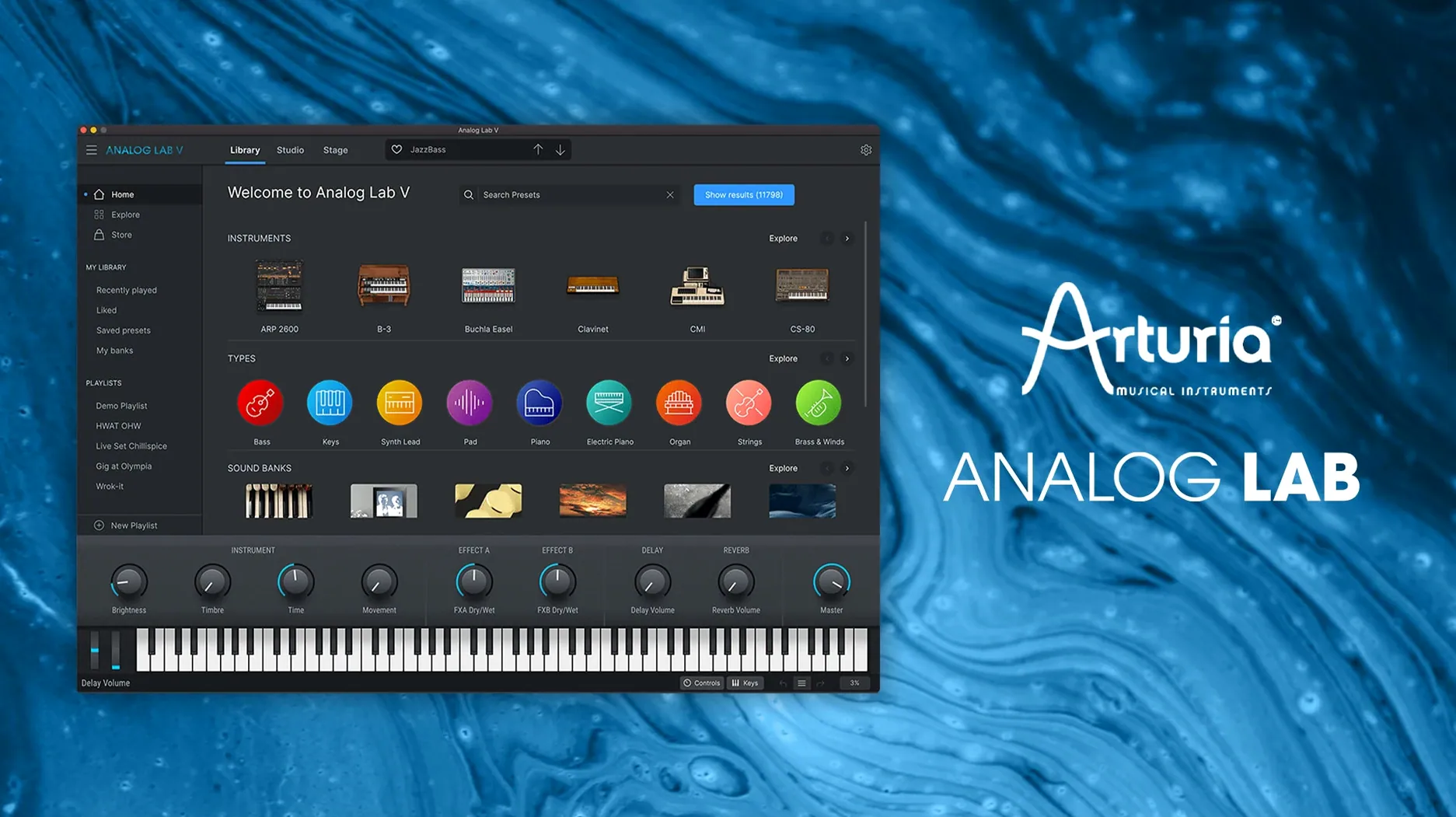
The catalogue note
Analog Lab V (now also labelled Analog Lab Pro) remains the same plugin underneath — the name change doesn't alter the plugin formats or how it works on Mac. Version 5.12.0 brings no new features, just maintenance and compatibility fixes.
Ships as VST, VST3, AU and AAX on all Macs
The plugin ships as VST, VST3, AU and AAX, covering every major DAW on macOS. It runs natively on both Apple Silicon (ARM) and Intel (x86) 64-bit Macs, with macOS 11 as the minimum. Instant integration means you drop it on a track and browse presets without extra routing — the plugin handles multi-timbral layers from Arturia's instrument engine internally. CPU load is moderate on an M-series Mac; Intel users with older machines may want to stick to the AU or VST3 variants for slightly better efficiency.
What the sound is about
The preset library draws from dozens of Arturia instruments — vintage synths, organs, pianos, modern hybrids — all curated into a single browser. You get thousands of patches without owning the full V Collection. The sound quality is identical to the standalone instruments because the same DSP runs underneath. If you need one plugin that covers bread-and-butter analogue tones alongside more experimental textures, this is the most practical way to get them.
Once the installer finishes and you launch Analog Lab V for the first time, a few minutes spent on configuration will save you repeated trips back to the settings later.
Drop the buffer to 128 or 64 for live playing
The default audio buffer size in the standalone application is usually 256 samples. For live playing with a MIDI keyboard, lower it to 128 or even 64 if your Mac handles it without glitches. For recording or mixing, 512 is safer — you won't notice the latency when sequencing or playing back existing parts.
The browser's filter defaults to "All Instruments". If you know you only need presets from the Mini V or the CS-80V, set the instrument filter immediately — it narrows the list and makes browsing faster. The intelligent filter (the one with the sliders) is worth exploring: it sorts patches by character rather than name, so "bright" or "soft" actually returns relevant sounds.
MIDI channel assignment matters if you layer multiple parts. The plugin defaults to Omni mode (all channels). For split or layered setups, assign each instance its own MIDI channel early on. The settings panel also lets you map the eight macro knobs to hardware controllers; if you use a keyboard with assignable encoders, map them before you start building a setlist.
Which plugin formats and DAWs are covered
Works with its own preset library, no V Collection needed
No. The plugin works with its own preset library — thousands of patches from the same instruments — without any additional licences. If you later add a V Collection licence, Analog Lab V unlocks the full instrument editing views, but you don't need that to play or record the sounds.
Will it break my existing projects if I update?
No. Version 5.12.0 uses the same plugin identifiers as earlier 5.x releases. Your DAW will load the new version without asking you to reassign tracks. The preset format hasn't changed, so any custom patches you saved remain accessible.
Audio Units format makes it work inside GarageBand
GarageBand supports Audio Units, and Analog Lab V ships in AU format. It works as an instrument plugin inside GarageBand, though the browser interface is designed for a larger screen — you may find the preset list cramped on a laptop display. Logic Pro, Ableton Live, Cubase, Pro Tools and FL Studio are all supported through their respective plugin formats.
Is there a difference between Analog Lab V and Analog Lab Pro?
Marketing name only. The software and plugin files still identify as Analog Lab V. The Pro label appears on the website and in some menus, but it is the same binary, the same formats, the same preset library.
Runs on macOS 11+, Intel and Apple Silicon, no background services
Based on the published requirements: the plugin needs macOS 11 or later and works on both Intel and Apple Silicon Macs. The installer is standard — no extra daemons, no background services. The standalone application and all plugin formats are installed together; you don't choose which formats you want. Disk usage depends on how many Arturia instruments you already have, but expect several gigabytes for the preset library alone. The plugin does not require an internet connection after installation. No iLok or hardware dongle is needed — the activation is handled by the installer itself.
For Intel Macs running macOS 11 or 12, the VST3 or AU formats tend to be more efficient than VST2 in most DAWs. On Apple Silicon, all formats run natively (ARM64). Rosetta 2 is not required. The plugin's interface is Retina-ready; scaling is automatic on built-in and external displays.
Cover band setlist: Hammond, Juno pad, Wurlitzer in one session
You play keys in a band that covers everything from 80s pop to modern rock. You need a Hammond B3 sound for one song, a Juno pad for the next, and a Wurlitzer for the third. Instead of loading three separate plugins or carrying a hardware synth rack, you load Analog Lab V on one track. The intelligent filter lets you search by instrument type ("organ", "pad", "electric piano") without scrolling through a thousand patches. The eight macro knobs are mapped to the most expressive parameters — tone, release, chorus, reverb — so you can adjust the sound live without opening the full interface. You save a setlist of ten presets and switch between them with a footswitch or a MIDI program change. The standalone mode runs on your MacBook on stage; the same setlist loads in Logic for rehearsals. One plugin, one track, one workflow for the whole gig.
Changes in this build
- MiniFreak V 5 and AstroLab 2.0 compatibility added. The browser now sees both instruments — presets and macros map across without a restart.
- Update handling reworked. Delta downloads are smaller and the progress bar no longer hangs on slower connections.
- Connection stability with hardware tightened. AstroLab and other USB devices stay locked during long sessions; fewer dropouts when switching banks from the controller.
- File transfer reliability improved. Sending playlists and multisamples to AstroLab completes with fewer checksum failures — the app verifies the payload before declaring it done.
- AstroLab users: install Analog Lab 5.12.6 first, then update the instrument firmware. Doing it the other way around can leave the hardware in an incomplete state.
Before it goes on the Mac
- macOS 11 (Big Sur) or later
- Apple Silicon or Intel 64‑bit
Questions from the room
Does Analog Lab V run on Apple Silicon Macs?
Yes, it supports both ARM and x86 64-bit Macs natively, with macOS 11 as the minimum requirement.
What plugin formats does Analog Lab V support?
It comes as VST, VST3, AU and AAX. That covers Logic Pro, Ableton Live, Pro Tools, Cubase and most other DAWs.
Installing it on the Mac
- Run the installer package from the downloaded disk image.
- Follow the on-screen prompts — no custom options needed.
- Authorise the plugin inside Arturia Software Center after installation.
Notes from the control room
Sign in or open a catalogue account to leave a note.
No notes from the room yet. If you have used this build for a week, a short note helps the next person.
Also filed under VST Plugins
The whole VST Plugins rack Arturia Buchla Easel V1.13.2 VST Plugins 406 MB
 Arturia CMI V1.13.2 VST Plugins 638 MB
 Arturia Dist TUBE-CULTURE1.2.0 VST Plugins 370 MB
 Arturia Emulator II V1.6.2 VST Plugins 700 MB
 Arturia Mellotron V1.9.3 VST Plugins 2.1 GB
 Arturia Modular V3.13.3 VST Plugins 707 MB
 Arturia Rotary CLS-2221.2.0 VST Plugins 359 MB
 Ample Guitar M4.1.0 VST Plugins 5.2 GB