
Home › VST Plugins › Arturia Buchla Easel V
Arturia Buchla Easel V 1.13.2 (Mac)
Updated
The catalogue note
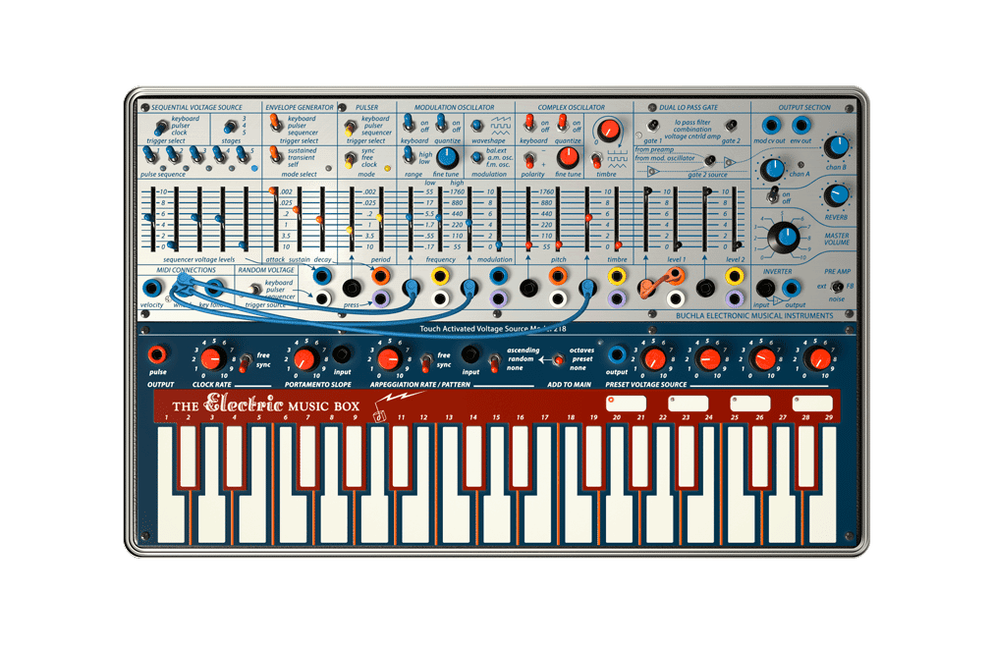
Four fixed control voltages can be routed to selected destinations inside Arturia Buchla Easel V, which is one of the reasons this plugin behaves less like a preset box and more like a patchable instrument. It is a recreation of Don Buchla's early-1970s Easel, and Arturia has kept the spirit intact while adding the conveniences a modern DAW expects.
Complex oscillator gives West Coast bite without extra processing
- Complex oscillator for harmonically rich tones – it generates waveforms with enough partials to give you that West Coast bite without extra processing.
- Modulation oscillator that runs into audio range – flick it from LFO duty to audio-rate and it becomes a second voice, not just a vibrato source.
- Keyboard modeled after the Buchla 218 – with octave shifting, so you can jump the whole playing range quickly during a performance.
- Easy MIDI learn on most parameters – assign hardware knobs or faders in seconds, then automate everything as the plug-in runs.
The plug-in wrapper does the heavy lifting
Running as a virtual instrument inside a DAW, Buchla Easel V gives you parameter automation and MIDI control that the original hardware never had. The fixed control voltages add a patchable logic layer, letting you route modulation to specific spots rather than everything at once. It is a West Coast sound design playground that fits into an ordinary mix session.
A patch-from-scratch workflow for a simple drone
Start in standalone mode with the patch bay cleared. Click the complex oscillator section and set its waveform to a pulse or saw — something with enough harmonics to fold. Turn the waveform folder knob to about halfway; you should hear the peaks begin to distort against themselves. That is the core of the Easel’s West Coast character: the oscillator folds its own waveform rather than filtering it.
Next, take the modulation oscillator and switch it to audio range. Route its output, via the drag-and-drop patch bay, into the modulation input of the complex oscillator. The coloured outputs and black inputs make this step obvious. Adjust the modulation oscillator’s frequency until you hear a second set of partials locking into the first. You are effectively running two oscillators in series, which gives a metallic, almost bell-like texture.
Now engage the arpeggiator from the Buchla 218 keyboard section. Set it to a slow rate — maybe a quarter note — and hit a single key. The arpeggiator cycles, and because it is patched into the same signal path, the pitch shifts add movement without needing a sequencer. Finally, send one of the four fixed control voltages to the waveform folder depth. That voltage modulates the fold amount over time, so the drone breathes without manual intervention.
Record this into your DAW as a plug-in instance, automate the arpeggiator rate, and you have a foundation layer that sounds alive. No MIDI sequencing needed after the initial note.
Works on Intel and Apple Silicon under macOS 11 and later
Does it work on Intel Macs as well as Apple Silicon?
Yes. The current version 1.13.2 (5305) runs on both architectures under macOS 11 and later. Arturia’s installer handles the correct binary automatically.
Which plug-in formats are in the package?
Audio Units, AAX, VST2 and VST3. Most DAWs will recognise at least one of these without extra steps.
Can I use the patch bay without a hardware controller?
Yes. The patch bay is entirely mouse-driven — you drag cables from coloured outputs to black inputs. MIDI learn is there if you want to map physical knobs later, but it is not required to make patches.
Is the arpeggiator tied to the keyboard only?
The arpeggiator lives in the keyboard section, modelled after the Buchla 218, but it can drive the whole instrument. Octave shifting works independently, so you can change range without affecting the arp pattern.
Patch bay silent? Route modulation oscillator to complex oscillator input
The patch bay shows cables but no sound comes through.
Check that the modulation oscillator’s output is actually patched into an input that accepts audio-rate signals — the complex oscillator’s modulation input is the usual spot. Also confirm the modulation oscillator’s frequency knob is turned up; at zero it produces nothing.
MIDI learn seems to ignore certain knobs.
Not every parameter exposes MIDI learn. Arturia has enabled it on most, but a few internal modulation destinations are learn-only via the fixed control voltage system. Use the four CV slots for those targets instead.
The arpeggiator does not follow the DAW tempo.
In plug-in mode, the arpeggiator syncs to the host tempo by default. If it drifts, open the keyboard section and verify that sync is enabled. In standalone mode you set the rate manually from the panel.
Waveform folding sounds harsh at high settings.
That is the intended behaviour — the original Easel folds aggressively.
Before it goes on the Mac
- macOS 11 or later
- Apple Silicon or Intel
- English interface
Questions from the room
Can the modulation oscillator be used as an LFO?
Yes, the modulation oscillator can run as an LFO, and it can also be switched into the audio range for audible frequency modulation.
Installing it on the Mac
- Run the installer included in the package.
- Follow the on-screen prompts to place the plugin in your preferred format folder.
- Activate the software when prompted; instructions are inside the package.
Notes from the control room
Sign in or open a catalogue account to leave a note.
No notes from the room yet. If you have used this build for a week, a short note helps the next person.
Also filed under VST Plugins
The whole VST Plugins rack Arturia CMI V1.13.2 VST Plugins 638 MB
 Arturia Dist TUBE-CULTURE1.2.0 VST Plugins 370 MB
 Arturia Analog Lab V5.12.6 VST Plugins 2 GB Updated
 Arturia Emulator II V1.6.2 VST Plugins 700 MB
 Arturia Mellotron V1.9.3 VST Plugins 2.1 GB
 Arturia Modular V3.13.3 VST Plugins 707 MB
 Arturia Rotary CLS-2221.2.0 VST Plugins 359 MB
 Ample Guitar M4.1.0 VST Plugins 5.2 GB