Disk Drill 6.3.2326 (Mac)
Updated
The catalogue note
People who keep irreplaceable audio sessions, client masters or wedding footage on external drives eventually face the moment when a disk stops mounting or a partition vanishes. Disk Drill has been the go-to recovery tool for many of them, and version 6.3.2326 keeps that reputation intact while polishing a few rough edges.
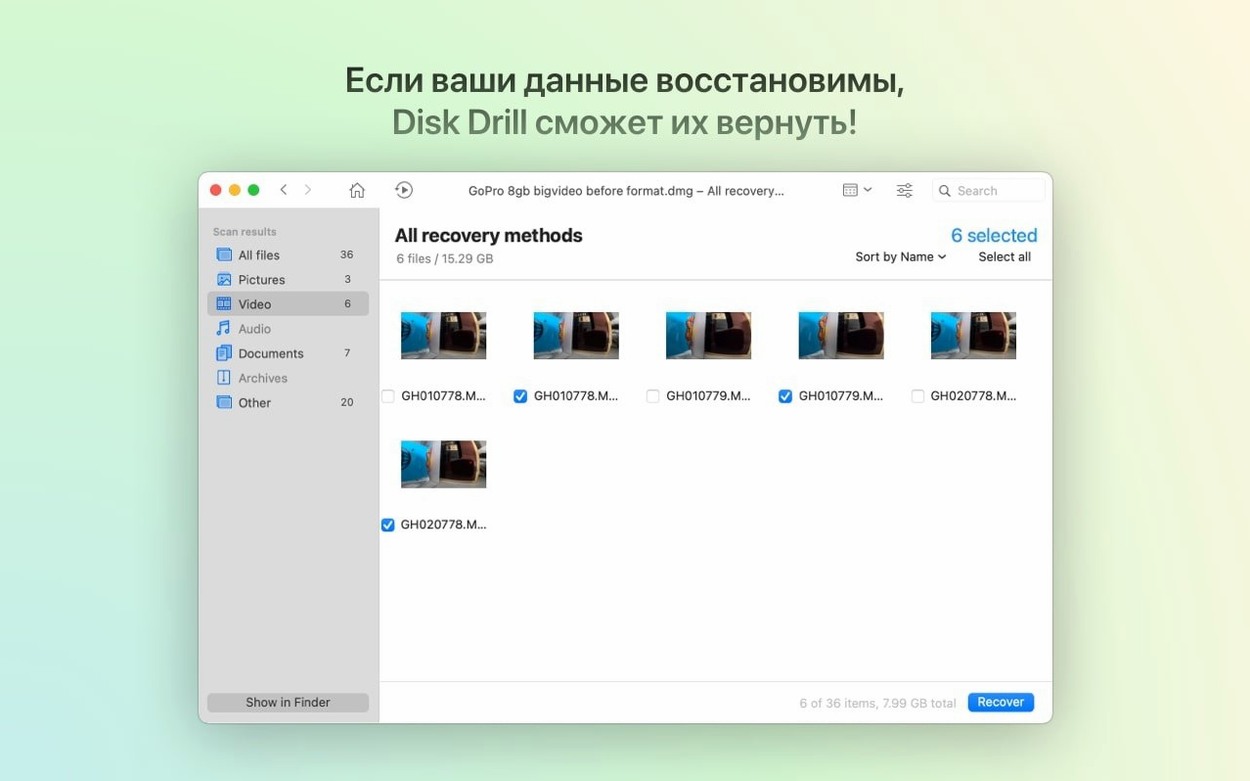
The headline addition is detection and recovery of lost BitLocker partitions. That matters if you move drives between Windows and Mac environments, or if you format a drive without realising it held an encrypted volume. Recovery also covers deleted files, formatted devices, damaged storage and unreadable media, with file preview before you commit to restoring anything.
For iPhone and iPad users, the ACR module now handles .m4a files and fixes sluggish grouping of photos and videos. Support for .p8 and .pfx files rounds out the certificate recovery side, and byte-to-byte DMG scanning no longer trips over itself. Encrypted APFS partitions are treated more reliably too.
The app runs on both Apple Silicon and Intel Macs, needs macOS 10.15.7 or later, and speaks seventeen languages. If you need a disk drill download mac, this version is a solid update for anyone dealing with storage mishaps.
Offers more than a simple undelete tool but stops short of professional recovery
Data recovery on macOS is a small market, and the tools that survive tend to focus on different pain points. Disk Drill sits somewhere in the middle of the spectrum: it offers more than a simple undelete tool but stops short of the forensic-level feature set that some enterprise packages carry.
Take Data Rescue, another long-standing Mac recovery app. Its scanning engine is thorough and handles physically failing drives with more aggressive read-retry logic. Where Disk Drill pulls ahead is in the breadth of device support — internal drives, external drives, iPhones, iPads, Android devices, Kindle readers, cameras and memory cards all appear in the same interface. Data Rescue focuses mainly on hard drives and SSDs, which makes it narrower for users who recover from phones and tablets regularly.
EaseUS Data Recovery Wizard for Mac offers a similar feature list to Disk Drill, including partition recovery and file preview. Its scan speeds are comparable, and it supports many of the same file systems. EaseUS keeps those functions in separate products. For someone who manages a studio or an IT support desk, having one application handle both recovery and routine disk maintenance saves time.
UFS Explorer Professional Recovery is the heavyweight option. It supports RAID arrays, virtual machine disks and advanced file system structures that Disk Drill does not touch. But its interface assumes you already know what you are looking for. Disk Drill's preview system and guided workflow make it the better choice for users who recover data only a few times a year and want clear feedback before restoring files.
None of these alternatives handle BitLocker partition recovery as of their current public releases, which gives Disk Drill 6.3.2326 a clear edge for mixed-format environments.
Checks compatibility and limitations before you install
Will scanning wear out my SSD further
Reading data from a modern SSD does not shorten its lifespan in any meaningful way for a single recovery session. The drive controller manages read operations efficiently, and a full scan reads every sector once. Writing recovered data to a different disk is the safer approach, and Disk Drill prompts you to choose a recovery destination before it begins restoring files.
Can I recover files I deleted months ago
That depends entirely on whether the original data has been overwritten. macOS marks deleted file space as available for new writes. If you have been using the drive normally for months, the sectors holding your old files may have been reused. A quick scan finds recently deleted files; a deep scan searches for file signatures on remaining data, but nothing guarantees success on old deletions. The earlier you stop writing to the drive and start scanning, the better your chances.
Scans Time Machine backup volumes and recovers individual files
Disk Drill can scan a Time Machine backup volume and recover files from it, provided the backup disk mounts and is not itself damaged. It treats the sparse bundle as a standard volume. For recovering individual files from a backup that Time Machine itself cannot read, this is often the quickest workaround.
Will the iPhone recovery module need a jailbreak
No. The iOS and iPadOS recovery functions work within the constraints Apple allows for connected devices. Call history, contacts and messages are accessible through the standard backup and sync protocols. Full file-level recovery from an iPhone without a backup is not possible due to iOS sandboxing, but the module handles what the platform permits.
Is a disk drill torrent safe to use
This question comes up often enough that it is worth addressing directly. Torrent files for any application carry the same risks: the download may contain modified code, additional payloads or outdated versions that lack recent fixes. The safest approach is to download from the developer's own distribution channel. A disk drill mac torrent found on an unofficial site may not match the release version and could introduce unexpected behaviour on your system.
Steps in when Disk Utility cannot repair or mount a volume
Disk Drill does not replace macOS Disk Utility, but it complements it. Disk Utility handles partition maps, formatting, First Aid repairs and mounting operations. When Disk Utility reports that a volume cannot be repaired or mounted, Disk Drill steps in to scan the raw data on that drive and pull recoverable files off it before you reformat.
For users who rely on the command line, dd and hdiutil remain the tools for creating byte-level images of failing drives. Disk Drill's byte-to-byte DMG scanning has been fixed in this version, so a DMG created with hdiutil can be scanned without the errors that plagued earlier releases. That workflow — image first, scan second — is still the safest approach for drives with mechanical issues.
The disk health monitoring tool works alongside the built-in SMART status that macOS reports. Disk Drill presents the data in a more readable form and adds a history view, which is useful for tracking whether a drive's condition is deteriorating over weeks or months.
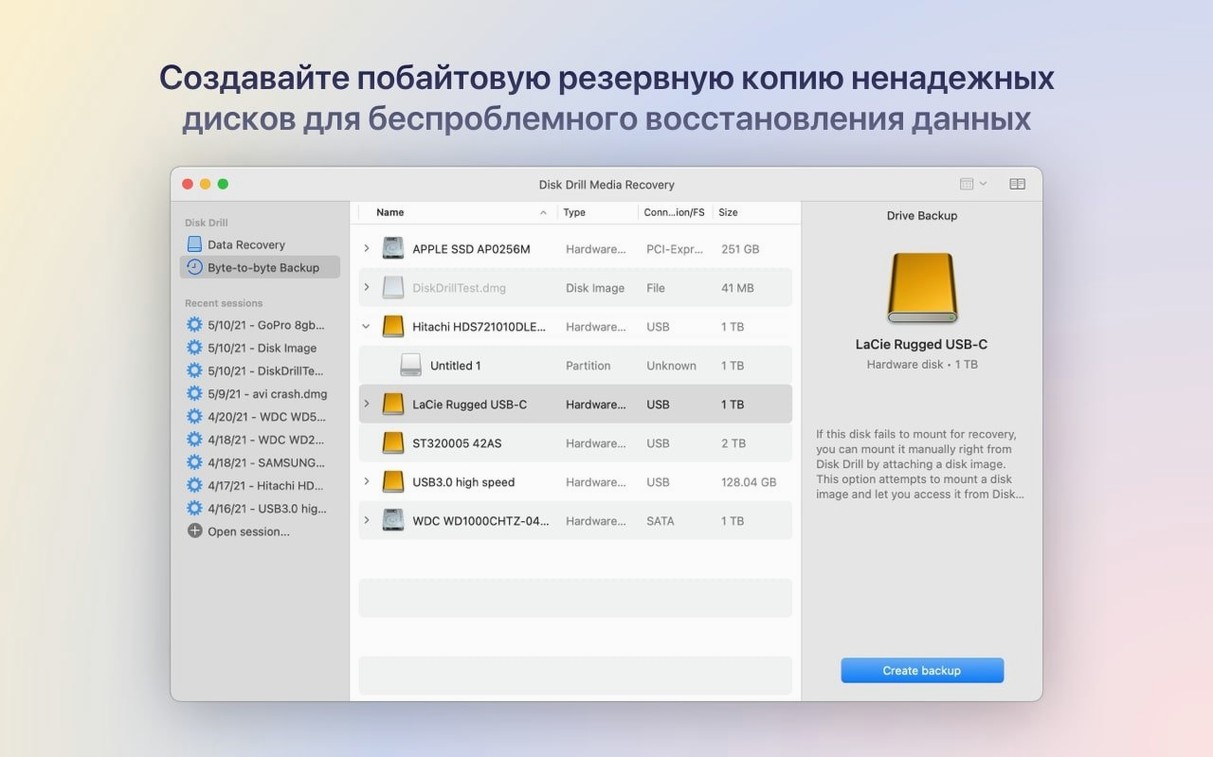
If you use third-party backup software, Disk Drill's own backup creator can serve as a secondary safety net rather than a primary backup strategy. Creating a byte-level backup of a questionable drive before attempting recovery gives you a fallback if the scan itself stresses the hardware.
In studio environments, Disk Drill coexists with media asset managers like Neofinder or Adobe Bridge. The preview system lets you confirm that a recovered audio file or raw photo is intact before restoring it, which saves the step of opening each file in its native application first.
Stop using the drive immediately and unmount it before scanning
- Stop using the drive you want to recover. Before launching Disk Drill, unmount or disconnect any drive that holds data you need. Every write operation, including macOS background tasks like Spotlight indexing or Time Machine snapshots, reduces the chance of recovery. If the drive is internal and contains the lost data, shut down and boot from another volume or use target disk mode.
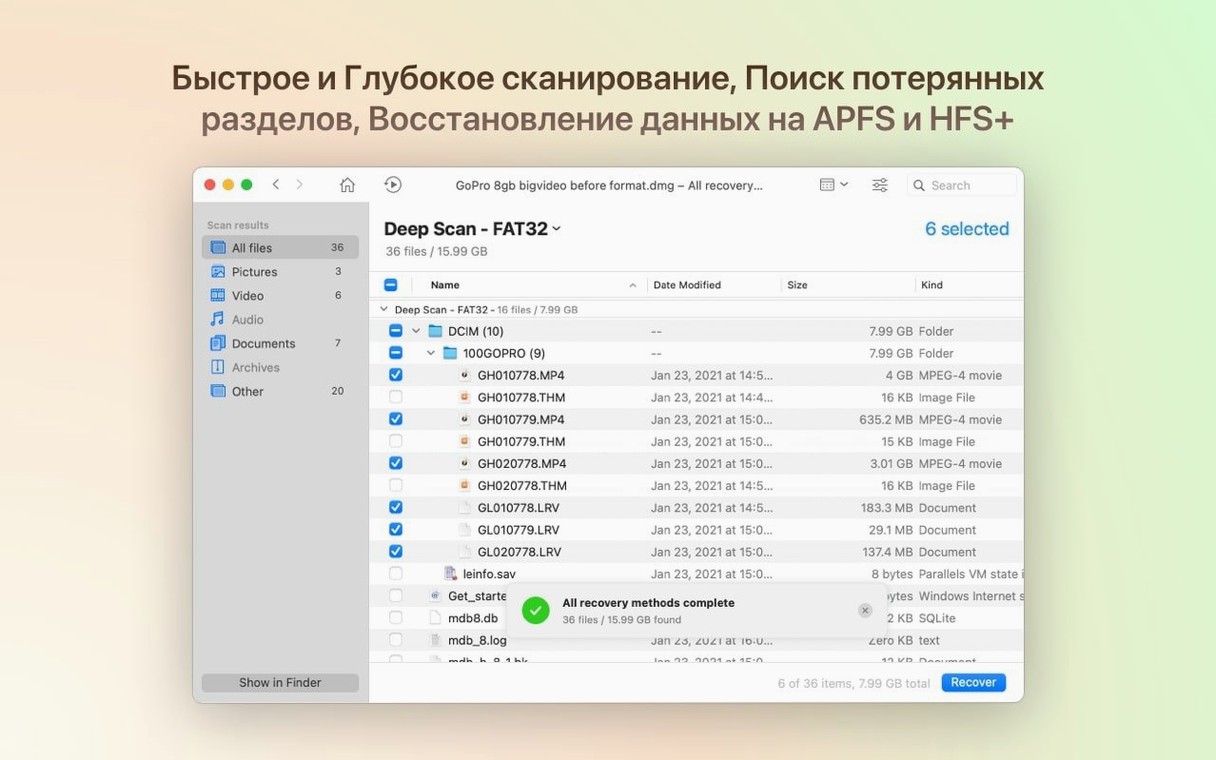
- Run a quick scan first. Quick scanning takes minutes, not hours, and finds recently deleted files that still have their directory entries intact. Deep scanning runs sector-by-sector and should be reserved for drives where the quick scan returns nothing useful.
- Use the preview before restoring. Preview confirms that the file is not corrupted and that you are recovering the correct version. This is especially useful when multiple copies of a file with the same name appear in the scan results.
- Set up disk health monitoring early. If you manage multiple drives, enable health monitoring for each one. The dashboard gives you a single view of SMART status across all connected storage, which helps catch failing drives before they cause data loss.
- Create a byte-level backup of any suspect drive. If a drive makes unusual noises, mounts intermittently or shows a high pending-sector count, clone it with Disk Drill's backup tool before scanning. Scanning a failing drive directly can push it past the point of readability.
- Test recovery to a different drive. Always restore files to a separate physical drive, not to the one being scanned. This avoids overwriting the very data you are trying to retrieve.
Selecting the wrong drive is the most common scanning error
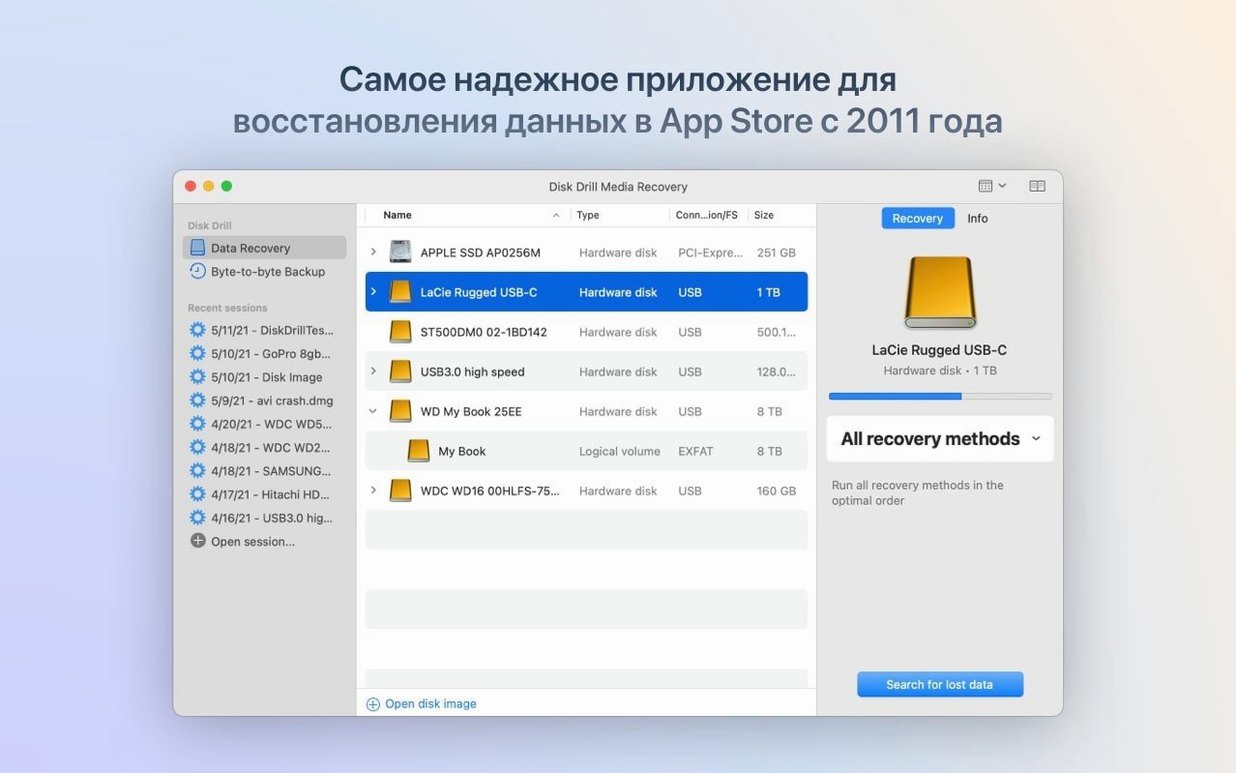
Scanning the wrong drive. The most common error is selecting a system volume when the deleted files were on an external drive, or vice versa. Disk Drill lists all mounted and unmounted volumes in its scan window. Beginners should double-check the drive name and capacity before starting a scan, especially when multiple drives with similar labels are connected.
Installing Disk Drill on the drive that needs recovery. The installer copies the application to your Applications folder, which is on the boot drive. That is fine for most scenarios. The mistake is then running the recovery and saving files back to the same boot drive. The recovered data overwrites sectors that may still hold other deleted files. Always save to a different volume.
Skipping the deep scan after a quick scan finds nothing. Quick scanning relies on file system metadata. If the directory structure is damaged or the volume was reformatted, quick scanning sees an empty directory tree. Deep scanning reads raw data and matches file signatures, which often finds files that the file system no longer lists. Beginners sometimes assume that no results from a quick scan means nothing is recoverable.
Recovering everything without filtering. Scanning a large drive can return tens of thousands of files, many of which are system caches, temporary files or duplicates. Beginners often hit the Recover All button and end up with a cluttered folder full of unrecognisable filenames. Filtering by file type, date range or size before recovery saves hours of sorting afterwards.
Not checking file preview for audio and video. Disk Drill's preview supports many media formats, including .m4a and .rwl files in the current version. Beginners restore files based on filename alone, only to find that the audio clip is truncated or the video is unplayable. Previewing even a few seconds confirms the file is intact.
Assuming recovery always succeeds. Disk Drill is thorough, but it cannot restore data that has been physically overwritten or that resides on a drive with severe mechanical damage. Beginners sometimes wait until a drive has been clicking for weeks before attempting recovery, at which point the platters or NAND chips may be beyond reading. The tool works best when used promptly after data loss is noticed.
Changes in this build
- Detects and recovers lost BitLocker partitions.
- Adds support for .p8 and .pfx files.
- Adds .m4a support in the ACR module.
- Improves encrypted APFS partition handling.
- Fixes byte-to-byte DMG scanning.
Before it goes on the Mac
- macOS 10.15.7 or later
- Apple Silicon or 64-bit Intel
Questions from the room
Can Disk Drill recover data from a formatted drive?
Yes, Disk Drill can restore data from formatted devices, including lost partitions and files on damaged or unreadable storage.
Does Disk Drill support Macs with Apple Silicon?
Yes, Disk Drill supports both ARM and 64-bit Intel Macs, and requires macOS 10.15.7 or later.
Installing it on the Mac
- Mount the disk image and run Open Gatekeeper friendly.
- Press Enter in Terminal to bypass Gatekeeper.
- Drag the app into the Applications folder.
- Launch the app when installation is complete.
Notes from the control room
Sign in or open a catalogue account to leave a note.
No notes from the room yet. If you have used this build for a week, a short note helps the next person.