

attn LED 1.0 (Mac)
Updated
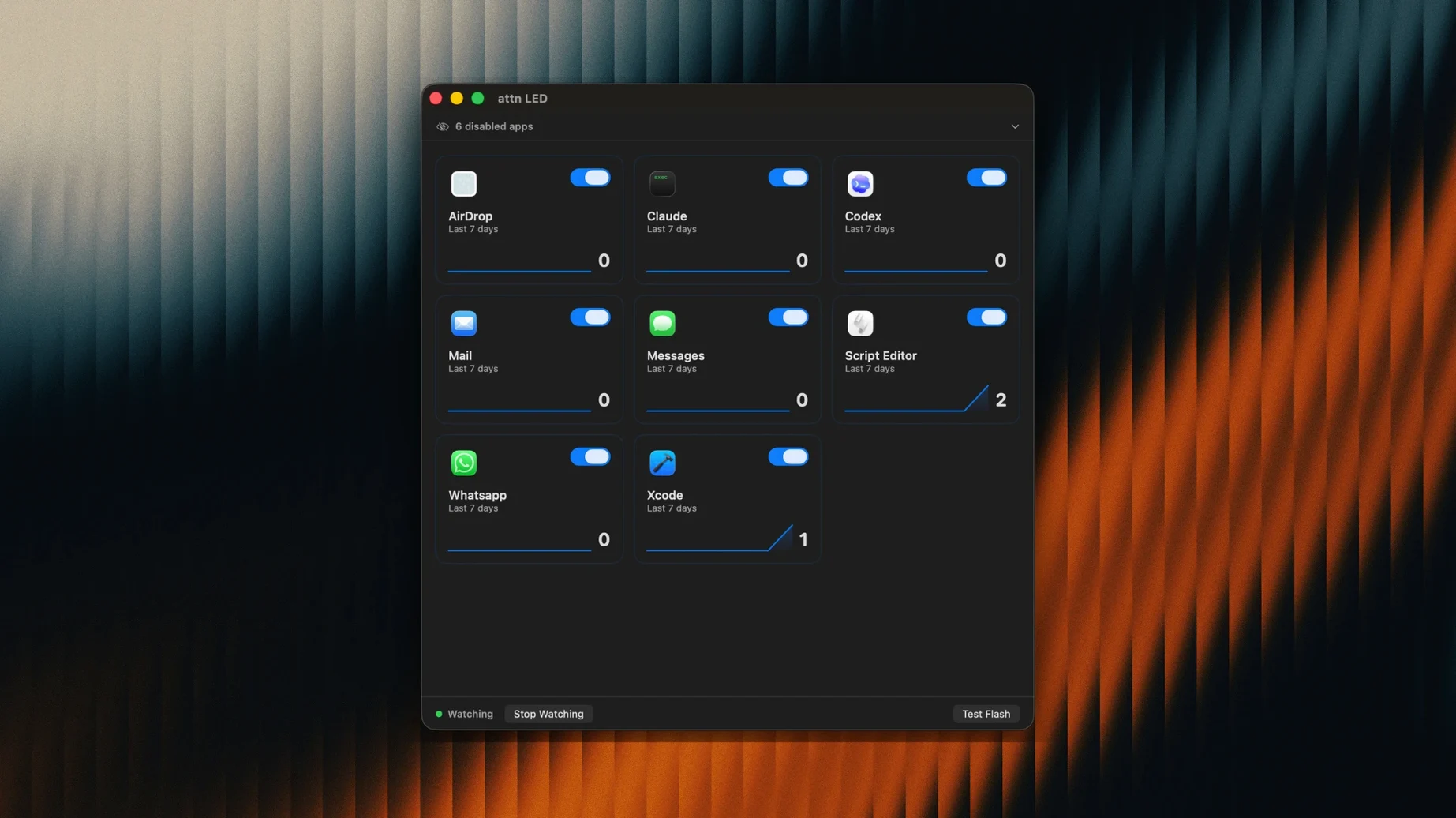
The catalogue note
Version 1.0 of attn LED monitors the macOS notifications database through FSEvents, then blinks the camera LED until the related app is opened.
What attn LED does
Camera LED as notification indicator — The MacBook's green camera LED is visible from anywhere in the room. attn LED uses it instead of sounds or banners.
Works around Focus Mode — By reading the notification database directly, the app stays active when Focus or Do Not Disturb would silence normal alerts.
Blinking stops only when the app is opened — The LED keeps blinking until you switch to the app that sent the notification. No banners to dismiss.
Pauses during video calls — FaceTime and other video conference apps suppress the blinking so the LED behaves normally during calls.
No sounds, no banners — The app provides a purely visual alert. It does not add audio or on-screen notifications.
Fixing the LED when it doesn't blink for a new app
A few things trip people up early on with attn LED. Most are straightforward to fix once you know what to look for.
- LED doesn't blink for a new app — The app relies on macOS notifications, so the target app must have notification permissions granted in System Settings. If you recently added an app like Telegram or Discord and the LED stays dark, check that its notifications are enabled first. attn LED can auto-detect new apps, but it can only work with apps that macOS already knows about.
- LED blinks for everything — By default the app watches selected apps only. If the LED seems overactive, open attn LED and review which apps are allowed. The app can limit notifications to Slack, Mail, Messages, Discord, Teams, Telegram and others you choose. Removing an app from the allowed list stops its LED alerts.
- LED stays on solid — The camera LED on some Mac models is a system status indicator, not a general-purpose light. If the LED is solid and not blinking, it may be that macOS is using it for its own camera activity. Close any app that might be accessing the camera, then relaunch attn LED.
- No response after installing — Make sure you have macOS 12 or later. The app supports both ARM and Intel Macs (x86 64-bit), but older macOS versions won't run it. After dragging the app to Applications, launch it from Launchpad — it won't appear in the menu bar or Dock unless you've started it that way.
Monitors macOS notifications silently in the background
attn LED is a small utility that runs quietly in the background. Version 1.0 requires macOS 12 or later and works on Apple Silicon and Intel Macs. The app monitors the notifications database through FSEvents, a macOS file-system event system that has been part of the OS for years.
The app does not add any sounds, banners, or pop-ups. It does not install a kernel extension or system service. It communicates only with the camera LED and the notification database. During FaceTime calls or other video conferences, it pauses blinking automatically — the LED behaves exactly as macOS intends during those moments.
Because it uses the camera LED, the indicator is visible from across the room. There is no on-screen overlay, no Dock badge, and no menu bar icon that demands attention. The blinking continues until you open the app that triggered it.
Uses FSEvents instead of repurposing the MacBook's built-in LED
Several apps attempt to solve the same problem: silent notification cues on a Mac. attn LED takes a distinct approach.
Vs. Headless (or similar LED-based tools) — Some utilities repurpose the MacBook's lid-closed LED or the MagSafe connector's light. attn LED uses the camera LED instead, which is already present on every MacBook with a built-in camera and is visible from more angles. The trade-off is that the camera LED is not available on Mac desktops that lack a built-in camera.
Vs. Banners and badge apps — Apps that rely on macOS notification banners or Dock badges still require you to be looking at the screen. attn LED's camera LED is a physical indicator that can be seen even when the Mac is in clamshell mode or when you are across the room. It also works when Focus or Do Not Disturb would suppress banners entirely.
Vs. HUD overlays — Overlay apps that flash a coloured circle or bar on screen can be missed if you step away. attn LED's LED stays lit until you act, and it pauses during video calls so it does not interfere with screen sharing or presentations.
Designed for deep-focus workers who keep Do Not Disturb on for hours
attn LED suits specific workflows more than general use. The people who benefit most are those who:
- Work in deep focus — Writers, developers, editors and anyone who keeps Focus or Do Not Disturb on for hours at a time. attn LED provides a physical cue that a message has arrived without breaking concentration.
- Keep the Mac at a distance — Users who dock their MacBook in a stand, connect external displays, or sit across the room. The camera LED is visible at a glance, unlike screen-based alerts.
- Prefer silent setups — People in open offices, libraries, recording studios or shared workspaces where sound notifications are disruptive. attn LED replaces audio cues with a visual signal that only you see.
- Use selected apps only — Anyone who wants alerts from Slack, Mail, Messages, Discord, Teams or Telegram but not from every app on the system. The app's per-app control keeps the noise down.
Users who rely on the camera LED for other purposes — such as dedicated webcam apps or streaming — may find the blinking interferes with those tools. attn LED pauses during video calls, but it does not detect non-call camera use. For most studio and office setups, though, it is a practical addition to a silent notification workflow.
Before it goes on the Mac
- macOS 12 or later
- Apple Silicon or Intel
- Interface: English
Questions from the room
Does attn LED work with Focus Mode?
Yes. It monitors the macOS notifications database through FSEvents, so it works around Focus Mode and Do Not Disturb limits.
Does the LED blink during video calls?
No. attn LED pauses blinking during FaceTime and other video conference calls so the camera LED behaves normally.
Installing it on the Mac
- Open the downloaded disk image.
- Drag the app into the Applications folder.
- Launch it from Launchpad after copying finishes.
Notes from the control room
Sign in or open a catalogue account to leave a note.
No notes from the room yet. If you have used this build for a week, a short note helps the next person.
Also filed under Utilities
The whole Utilities rack Bartender7.0.4 Utilities 31 MB
 BetterDisplay Pro4.0.4 Utilities 16 MB
 BetterTouchTool6.726 Utilities 61 MB
 BetterZip6.1 Utilities 25 MB Updated
 AppZapper2.0.3 Utilities 4 MB
 Bloom1.5.48 Utilities 19 MB Updated
 App Cleaner & Uninstaller10.0.3 Utilities 47 MB Updated
 Apeaksoft Screen Recorder2.2.16 Utilities 35 MB