
Home › Logic Pro Plugins › Sonible pure:level

Sonible pure:level 1.0.2 (Mac)
Updated
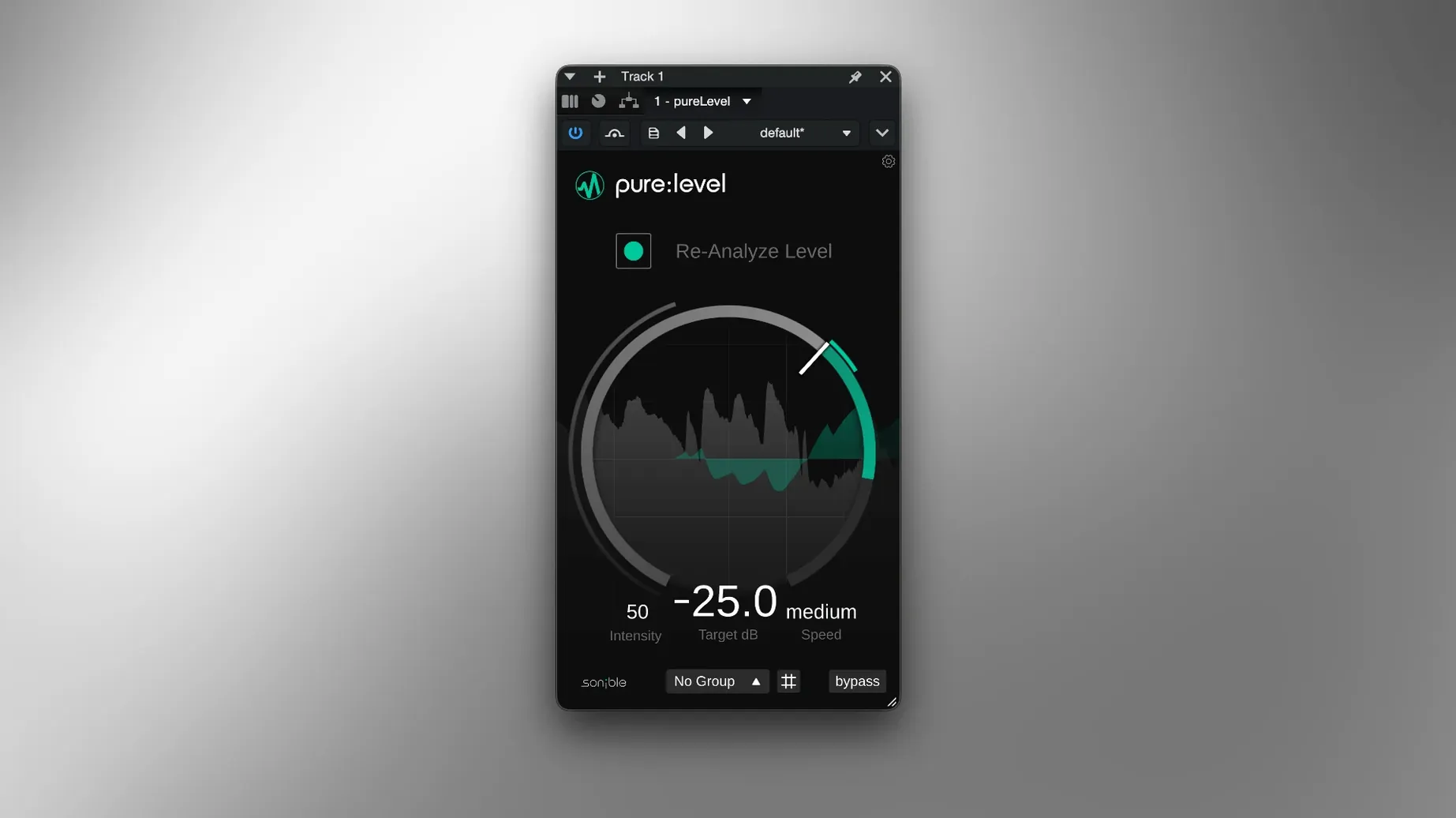
The catalogue note
You record a vocal take, and the verse sits at -18 dB, but the chorus hits -8 dB before you even think about compression. That is the job pure:level is built for. It rides the level over time, catching the drops and peaks so the track stays consistent without you drawing volume automation on every clip. The group feature lets you link several tracks — a voice and its room mic, for example — and adjust them from one window, which saves time on layered material. The plugin adapts automatically to whatever you feed it. It smooths large level changes in real time. It works on spoken dialogue, podcasts, vocals and instruments. It reduces the need to draw volume automation on each track. It is part of sonible’s pure series and runs on both Intel and Apple Silicon Macs.
For vocals and dialogue that need even volume without compression
Pure:level fits a specific gap that compressors and limiters often leave open. Compressors change the shape of a sound — they grab transients, colour the tone, alter the envelope. Pure:level does none of that. It only moves the volume over a longer timescale. That makes it most useful for anyone who works with sources where the level shifts are larger than a compressor's release time can handle gracefully.
Podcast editors and dialogue editors are the obvious candidates. A guest leans into the mic for one sentence, pulls back for the next, and the waveform looks like a mountain range. Pure:level flattens that ride without making the voice sound clamped. Musicians who record their own vocals at home benefit too — a singer who moves around the mic, or who naturally gets louder during a chorus, can hand that levelling to the plugin rather than editing clip gain on every phrase. Mix engineers who receive tracks from multiple sources also save time: one instance on each vocal track, grouped, and the relative balance stays put while the loudness target remains consistent.
For live-streamers and content creators who record spoken word or gameplay commentary, the plugin removes the need to ride a fader during recording. You record at a sensible level, then pure:level evens out the peaks and dips in post. The result is a track that hits a consistent output level without the listener hearing the gain move.
Start with a single vocal track showing clear level variation
Installation follows the included instructions. After activation, the plugin appears in your DAW's plugin list. A practical first step: load it on a single vocal track with a clear example of level variation — a verse-chorus recording or a podcast with one loud and one quiet speaker. Set the target loudness to a value that matches your mix bus or your delivery spec. Let the plugin play through once, then listen back. You will hear the level smoothing, but the performance's natural dynamics should remain intact.
Try the group feature early. Duplicate the track, add a second microphone or a DI signal, and place pure:level on both. Enable the group on one instance, and you can adjust all linked tracks from that single window. This is especially useful when dealing with a main vocal and a double, or a voice and a room mic. It keeps the relationship between them constant while the overall level moves together.
Spend a session testing the plugin on different material: a spoken-word clip, a bass guitar track with uneven fingerpicking, a vocal with wide dynamic swings. Because pure:level does not compress, you will notice that quiet breaths and soft consonants are not squashed — they are simply brought closer to the average level. If you want more control, you can still automate the plugin's bypass or adjust the target loudness per section.
Bug fixes and minor improvements in the maintenance update
The current version is 1.0.2. Based on the version number, this is a maintenance update addressing bugs or minor improvements from the initial release. Users who worked with earlier builds will find the same core functionality — level riding, group control, adaptive signal processing — but with the stability refinements that a point-two release typically brings. There are no new features or redesigned interfaces documented at this version level. For everyday use, the plugin behaves as it did on launch, just with fewer edge cases to watch for.
Leveling a voiceover with 6 dB microphone distance changes
I had a voiceover recording for a short documentary. The narrator delivered the script in one take, but the microphone distance varied between sentences. The waveform showed clear sections where the level dropped by 6 dB or more. I inserted pure:level on the track, set the target loudness to -16 dB LUFS — a common level for spoken word delivery — and played through the entire file. The plugin responded immediately, pulling up the quiet passages and taming the louder ones. The result sounded like a carefully ridden fader, but without any pumping or tonal shift.
Later in the same project, I had a stereo pair of room microphones placed in a small studio. The narrator moved between two positions, and the room mics captured that movement as a level change. I inserted pure:level on both tracks, enabled the group on the left channel, and adjusted the target loudness once. The two tracks moved together, keeping the stereo image stable. Without grouping, I would have matched settings manually on each channel, which takes time and risks slight mismatches.
For a music mix, I used pure:level on a vocal double that was recorded at a different level than the main vocal. I grouped the two instances, set the target to match the main vocal's average level, and the double sat naturally underneath without needing clip gain edits. The vocal still breathed — the singer's phrasing and expression were preserved — but the overall level discrepancy was gone.
The session ended with a podcast episode where three speakers had different mic techniques. One spoke close and consistently, another leaned back and forth, a third had a variable distance. I inserted pure:level on each track, grouped all three, and set the target to -14 dB LUFS. The final mix required almost no manual volume rides. The dialogue remained clear, the loudness was consistent across speakers, and the natural dynamics of each voice were intact. That is the kind of time-saving that makes the plugin a regular part of the session template.
Before it goes on the Mac
- macOS 10.14 or later
- Intel or Apple Silicon processor
- English interface language
Installing it on the Mac
- Run the installer included in the download package.
- Follow the on-screen activation instructions provided by sonible.
Notes from the control room
Sign in or open a catalogue account to leave a note.
No notes from the room yet. If you have used this build for a week, a short note helps the next person.
Also filed under Logic Pro Plugins
The whole Logic Pro Plugins rack Slate Digital Submerge1.0.5 Logic Pro Plugins 38 MB
 Slate Digital Storch Filter1.0.6 Logic Pro Plugins 69 MB
 Soundtheory Gullfoss1.11.7 Logic Pro Plugins 176 MB
 Slate Digital Murda Melodies1.1.1 Logic Pro Plugins 179 MB
 Slate Digital Fresh Air1.0.9 Logic Pro Plugins 40 MB
 Spire1.5.19 Logic Pro Plugins 158 MB
 Serato Sample2.2.0 Logic Pro Plugins 612 MB
 Serato Hex FX1.2.0 Logic Pro Plugins 105 MB