
Home › Logic Pro Plugins › Slate Digital Submerge

Slate Digital Submerge 1.0.5 (Mac)
Updated
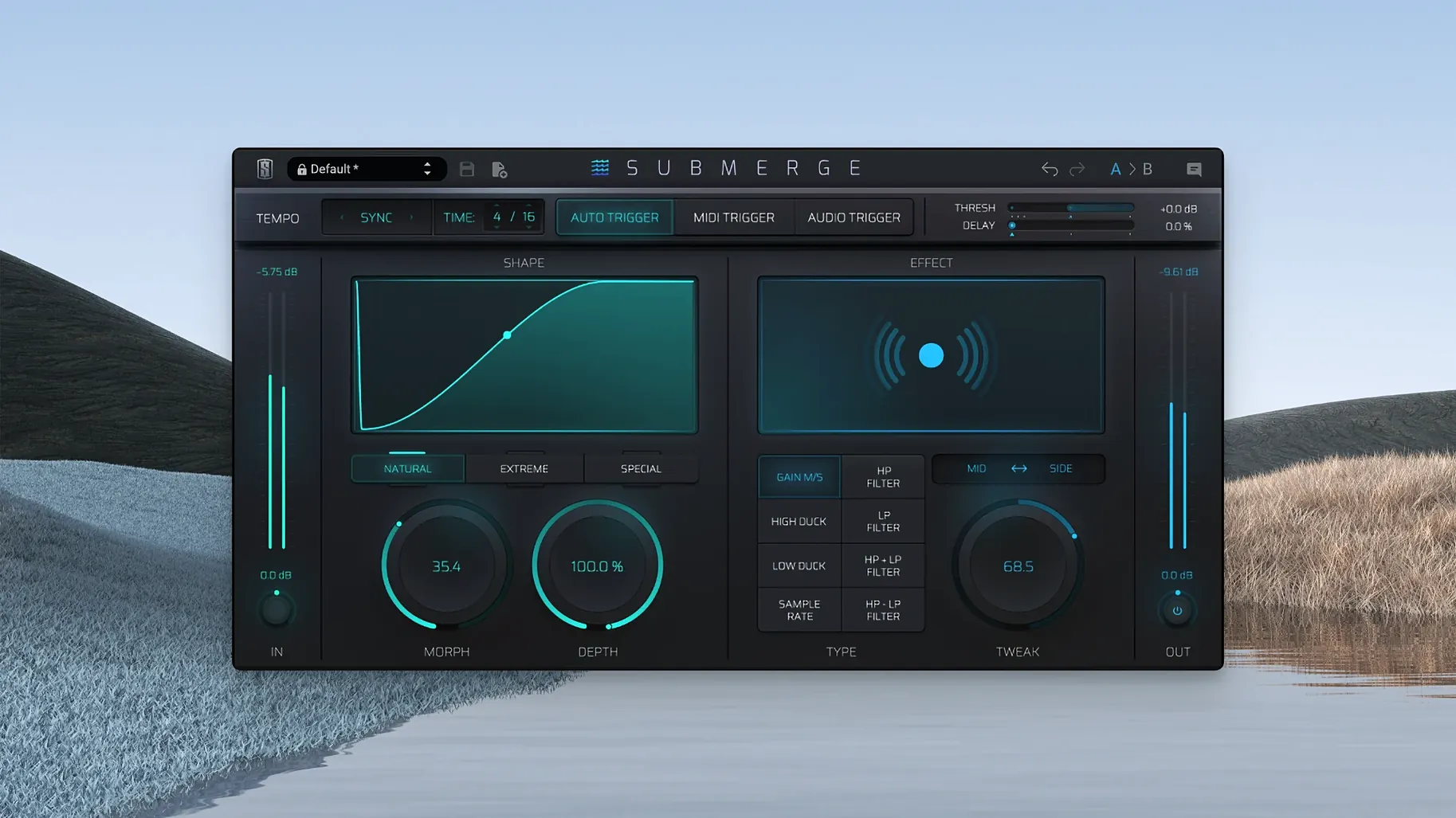
The catalogue note
Submerge runs on Apple Silicon Macs with macOS 11 or later, so if you're on an M1 or newer machine, you're set. The interface is in English, and it slots into your session as a standard plugin.
Three trigger modes and eight built-in effects
Submerge — a creative auto-ducking and pumping plug-in from Slate Digital.
Trigger modes — three ways to duck: auto syncs to project tempo, MIDI reacts to incoming notes, and audio uses a side-chain input.
Built-in effects — eight of them, including sample-rate reduction, all applied to the ducking curve.
Curve inversion — hold Shift to flip the duck into a push, which changes the whole feel of the groove.
Auto sync, MIDI patterns, and pumping character
In practice, Submerge is less about transparent sidechain compression and more about making the pumping obvious. The auto mode locks to your tempo, so it's easy to get rhythmic ducking without drawing automation. MIDI triggering opens up pattern-based pumping, and the effects give you colour beyond the standard volume dip. The sample-rate reduction alone can turn a clean sidechain into something gritty.
Start with a sustained track in auto mode
Start with a single track — a pad, a synth chord, or a sustained guitar part. Insert Submerge on it and set the trigger mode to auto. The tempo sync will give you instant rhythmic ducking without any routing. Play with the Speed control first; it changes how fast the volume recovers after each dip. Then move the Depth knob to hear how far the signal drops. These two controls alone cover most basic pumping needs.
Try the three curve types — natural, extreme, and custom — on the same loop. Natural is subtle enough for a pad that needs to breathe behind a kick. Extreme exaggerates the shape and works well for electronic genres. Custom lets you draw your own curve, which is useful when the built-in shapes don't fit the groove.
Load a second instance on a different track and trigger it with MIDI. Play a simple pattern on your controller and listen to how the ducking follows the notes rather than the tempo grid. This is where Submerge starts to feel less like a utility and more like an instrument.
Overdoing Depth and ignoring Morph control
The most common error is overdoing the Depth. Turning it down too far makes the track disappear completely, which sounds like a mute button rather than a rhythmic effect.
Another mistake is ignoring the Morph control. Morph blends between different curve shapes, and leaving it at zero means you never hear the intermediate stages. A small amount of Morph can soften the transition between ducking and recovery, making the effect feel more musical.
Some users forget to check the sidechain input when using audio trigger mode. If no signal is routed to the sidechain, the plugin has nothing to react to, and nothing happens. Verify your DAW's routing before assuming the plugin is broken.
Curve inversion via Shift is often missed entirely. Beginners set up a ducking pattern and don't realise they can hold Shift to turn it into a push — the opposite effect where the volume rises instead of dips. It changes the rhythmic emphasis completely.
Fixing a static pad with auto-synced quarter notes
I open a mix session that has a synth pad and a four-on-the-floor kick. The pad sits behind the kick but feels static, so I insert Submerge on the pad track. I set the trigger to auto, tempo-synced to quarter notes. The pad starts ducking in time with the kick, which immediately gives the rhythm section more space.
I toggle through the eight built-in effects and land on the low-pass filter. It adds a slight darkness during the dip, which contrasts nicely with the kick's attack.
Later in the session, I want a breakdown section where the pad pulses differently. I switch to MIDI trigger mode and play a dotted-eighth pattern on a keyboard. The ducking follows that rhythm instead of the grid, creating a syncopated feel that breaks away from the kick pattern.
Workflow for a specific task: creating a gated reverb effect
This is a common technique in electronic music and pop — a reverb that cuts off abruptly rather than tailing out naturally. Submerge can do this without sidechain compression or automation.
Insert a reverb plugin on a send or an aux track. Send your snare or vocal to that reverb. On the reverb return, insert Submerge. Set the trigger mode to auto and tempo-sync it to eighth notes. Adjust the Speed to be fast — the reverb should cut off sharply after each hit.
Switch the curve type to extreme for a more abrupt gate feel. If the reverb tail still lingers too long, increase the Speed further. The Tweak control adjusts the curve's attack and release characteristics, so experiment with it to fine-tune the gate's behaviour.
For a variation, switch to MIDI trigger mode and play a pattern that hits only on certain beats. The reverb will gate only when MIDI notes play, leaving the reverb tail intact between hits. This gives you a gated effect that follows your own rhythm, not the tempo grid.
If the sound needs more character, add the sample-rate reduction effect to the ducking curve. It will degrade the reverb's quality during the dip, creating a lo-fi texture that contrasts with the clean dry signal. The combination of gating and bit-crushing is a staple in many electronic productions and is straightforward to dial in with Submerge's controls.
Before it goes on the Mac
- macOS 11 or later
- Apple Silicon
Questions from the room
What are the trigger modes in Submerge?
Submerge has three trigger modes: auto syncs to the project tempo, MIDI reacts to MIDI notes, and audio uses a side-chain input.
Does Submerge work on Intel Macs?
No, Submerge requires Apple Silicon. It runs on macOS 11 or later.
What does holding shift do in Submerge?
Holding Shift inverts the ducking curve, turning it into a pushing effect instead.
Installing it on the Mac
- Run the standard installer.
Notes from the control room
Sign in or open a catalogue account to leave a note.
No notes from the room yet. If you have used this build for a week, a short note helps the next person.
Also filed under Logic Pro Plugins
The whole Logic Pro Plugins rack Slate Digital Storch Filter1.0.6 Logic Pro Plugins 69 MB
 Slate Digital Murda Melodies1.1.1 Logic Pro Plugins 179 MB
 Slate Digital Fresh Air1.0.9 Logic Pro Plugins 40 MB
 Sonible pure:level1.0.2 Logic Pro Plugins 59 MB
 Soundtheory Gullfoss1.11.7 Logic Pro Plugins 176 MB
 Spire1.5.19 Logic Pro Plugins 158 MB
 Serato Sample2.2.0 Logic Pro Plugins 612 MB
 Serato Hex FX1.2.0 Logic Pro Plugins 105 MB