
Home › Logic Pro Plugins › Slate Digital Fresh Air

Slate Digital Fresh Air 1.0.9 (Mac)
Updated
The catalogue note
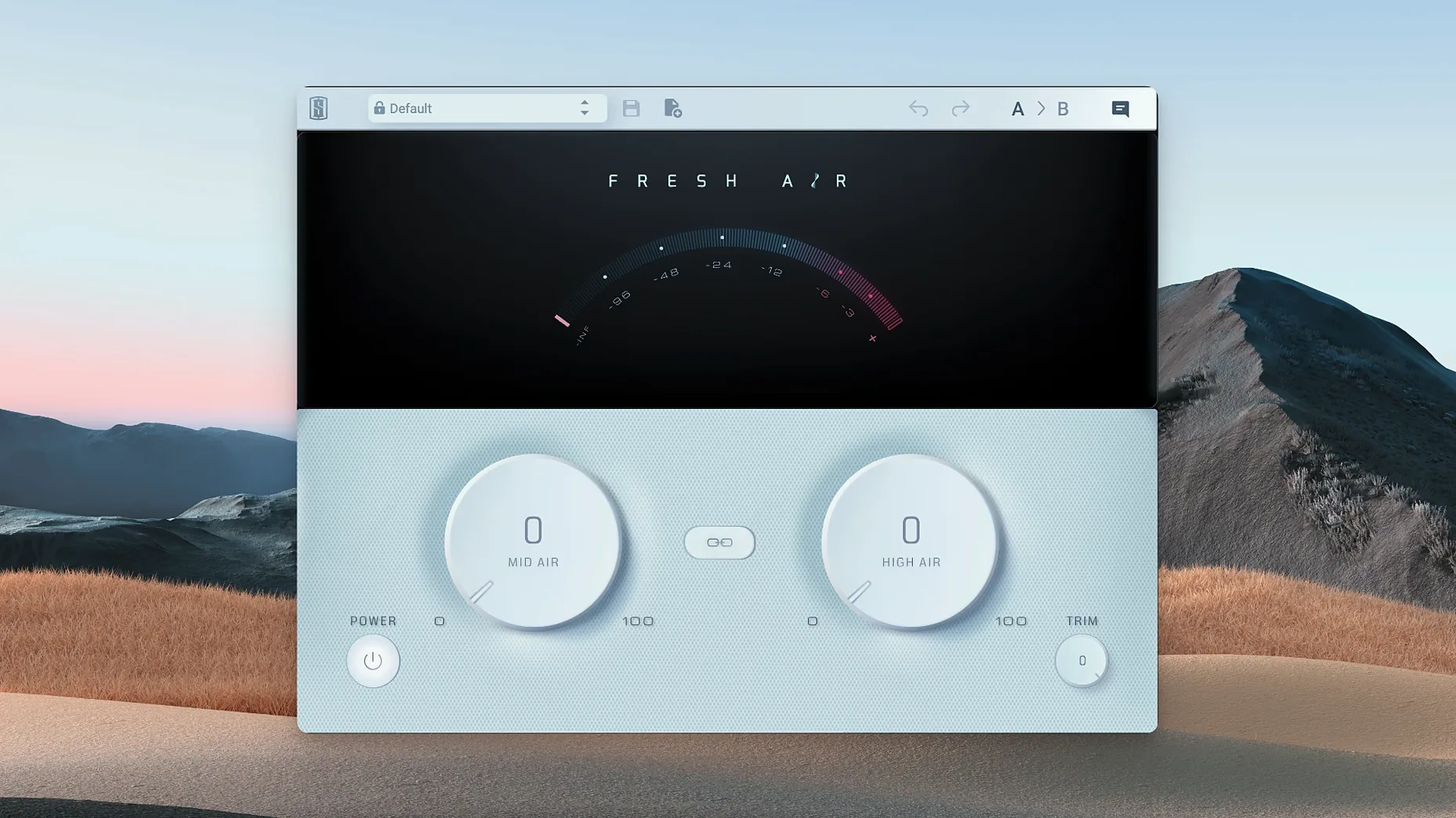
Fresh Air runs on any Mac with macOS 11 or later and an Apple Silicon chip. No Intel support, so if you are still on an older Mac, this one will not open. The plugin itself is a simple two-knob affair, and that is the point.
What do the two knobs do?
High Air works on the upper frequencies, adding shine and sparkle. Mid Air targets the upper-mid range, bringing presence forward. Together they let you shape the air band without touching a full EQ.
How does it behave on a mix?
Slate Digital calls it a dynamic high-frequency processor. It is based on vintage exciter circuits and modern dynamics algorithms, so the effect responds to the signal rather than just boosting everything equally. On individual tracks it can open up a dull vocal; on the mix bus it adds a subtle top-end sheen.
What else is on the interface?
A Link button ties the two knobs together for quick adjustment, and a Trim control sets the output level to match your bypass level. That is all – no hidden menus, no presets to wade through.
How Fresh Air fits with other apps and macOS features
The plugin works as a standard AU, VST3 or AAX file inside any DAW that supports those formats — Logic Pro, Ableton Live, Pro Tools, Reaper, Cubase, Studio One. No standalone application, no background service. It appears in the plugin list like any other processor. Because it is a single-instance effect, you can insert it on as many tracks as your session needs, though on a mix bus you will likely use one instance and leave it there.
On macOS, Fresh Air respects the system’s audio routing without extra configuration. If you use Audio Units or Aggregate devices in Logic, the plugin follows whatever sample rate and buffer the session is set to. No separate preference pane. It also plays well with Apple Silicon-native DAWs; Rosetta is not needed for the plugin itself, though some older DAW versions still run under translation and that is a DAW choice, not Fresh Air’s.
For those who use iLok for other Slate Digital or third-party plugins, the same activation system applies. You can activate Fresh Air to an iLok dongle, iLok Cloud, or machine authorisation. If you already manage several iLok licences, this one sits alongside them without conflict.
Turning both knobs to maximum is the most common error
The most common error is turning both knobs to maximum. Beginners also tend to forget the Link button: they adjust Mid Air and High Air separately, then wonder why the balance shifts when they go back to tweak one knob. Link keeps the relationship constant, which is useful when you want to dial in a character quickly.
Another mistake is leaving Trim at unity and never checking bypass level. The plugin adds gain at the top end, so the processed signal can be slightly louder than the bypass. Without adjusting Trim to match, the A/B comparison becomes unreliable — louder sounds better, and you end up over-processing. Set Trim so that bypass and engaged sit at the same perceived level, then judge the effect honestly.
Using Fresh Air on every track in a session is also common among newer users. It works well on individual sources, but stacking multiple instances across a mix can build up an unnatural sheen. A better approach is to identify two or three dull elements — a vocal, a keyboard, a room mic — and treat those, then leave the rest alone. The mix bus instance can handle the overall air.
Waves Vitamin uses harmonics; Fresh Air uses dynamic filtering
Several plugins attempt the same thing: adding high-frequency presence without harshness. The differences come down to control depth and character.
Waves Vitamin Sonic Enhancer is based on harmonic excitation rather than dynamic filtering. It adds even-order harmonics and has a separate drive control, so it can sound warmer and more coloured than Fresh Air. Vitamin does not have a dedicated dynamic response to the input level in the same way — it saturates the high end more consistently. For material that needs harmonic richness, Vitamin is a good alternative, but it requires more tweaking to avoid brittleness.
iZotope Ozone Exciter is a mult-band exciter with more parameters: frequency range, amount, character type (retro, tape, triode). It offers finer control over which bands get excited and how much, but that also means more time spent dialling in the right setting. Ozone Exciter is part of the Ozone suite, so it integrates with iZotope’s mastering tools; on its own it can feel heavy compared to Fresh Air’s two-knob simplicity.
Fresh Air occupies a middle ground — less flexible than Ozone Exciter, more dynamic than Vitamin. If you want a quick, predictable result without reading a manual, Fresh Air is faster. If you need surgical control over harmonics and frequency ranges, the other two give you more options.
Native Apple Silicon support removed Rosetta latency in 1.0.9
Version 1.0.9 updated the plugin to run natively on Apple Silicon. Earlier versions required Rosetta 2 emulation on M1 and M2 Macs, which introduced a small but noticeable latency in real-time monitoring. The 1.0.9 build removed that layer, so the plugin now loads and responds at the same speed as any other native AU or VST3. For users who work on large sessions with multiple instances, this change reduces cumulative processing overhead and makes the plugin feel more responsive during playback.
The update also addressed compatibility with macOS 11 (Big Sur) and later. No interface changes — the two knobs, Link and Trim remain exactly as before. The release notes from Slate Digital mention only the architecture switch and OS compatibility fixes; no new features, no preset system, no reverb or delay added. It is the same tool, now running properly on modern Mac hardware.
Fresh Air requires an iLok account for activation
Do I need an iLok account?
Yes, because Fresh Air uses iLok for activation. You can use a free iLok Cloud account, a physical iLok dongle (second generation or newer), or machine activation. No internet connection is required after activation if you choose machine authorisation, but iLok Cloud needs a persistent connection.
Can I use it on more than one computer?
With iLok Cloud or a dongle, you can move the licence between machines as long as you deactivate it on one before activating on another. Machine activation ties the licence to that specific Mac’s hardware ID, so it is not transferable without deauthorising first.
Will it work in Pro Tools on an M2 Mac?
Yes. Fresh Air is available as AAX, so it loads in Pro Tools on Apple Silicon. Make sure your Pro Tools version supports AAX-native plugins (Pro Tools 2022.7 or later, running natively).
Does it add latency?
As a dynamic high-frequency processor, Fresh Air processes in real time with minimal latency — certainly within the range of any standard EQ or dynamics plugin. The exact figure depends on your session sample rate and buffer size, but it is not a look-ahead processor, so it does not introduce the kind of latency you see with linear-phase EQs or limiters.
Can I use it on a master bus and on individual tracks at the same time?
Yes. Each instance operates independently. You can have one on the mix bus for overall air and another on a vocal track for extra presence. Just watch the cumulative gain — multiple instances can push the top end further than intended.
Before it goes on the Mac
- macOS 11 or later
- Apple Silicon
Questions from the room
Can Fresh Air be used on individual tracks and the mix bus?
Yes. Slate Digital says it works on both individual tracks and the mix bus, so you can apply it where the material needs it.
Installing it on the Mac
- Follow the standard installation procedure for the plugin.
Notes from the control room
Sign in or open a catalogue account to leave a note.
No notes from the room yet. If you have used this build for a week, a short note helps the next person.
Also filed under Logic Pro Plugins
The whole Logic Pro Plugins rack Slate Digital Murda Melodies1.1.1 Logic Pro Plugins 179 MB
 Slate Digital Storch Filter1.0.6 Logic Pro Plugins 69 MB
 Slate Digital Submerge1.0.5 Logic Pro Plugins 38 MB
 Sonible pure:level1.0.2 Logic Pro Plugins 59 MB
 Serato Sample2.2.0 Logic Pro Plugins 612 MB
 Serato Hex FX1.2.0 Logic Pro Plugins 105 MB
 Soundtheory Gullfoss1.11.7 Logic Pro Plugins 176 MB
 Spire1.5.19 Logic Pro Plugins 158 MB