
Home › Logic Pro Plugins › Slate Digital Murda Melodies

Slate Digital Murda Melodies 1.1.1 (Mac)
Updated
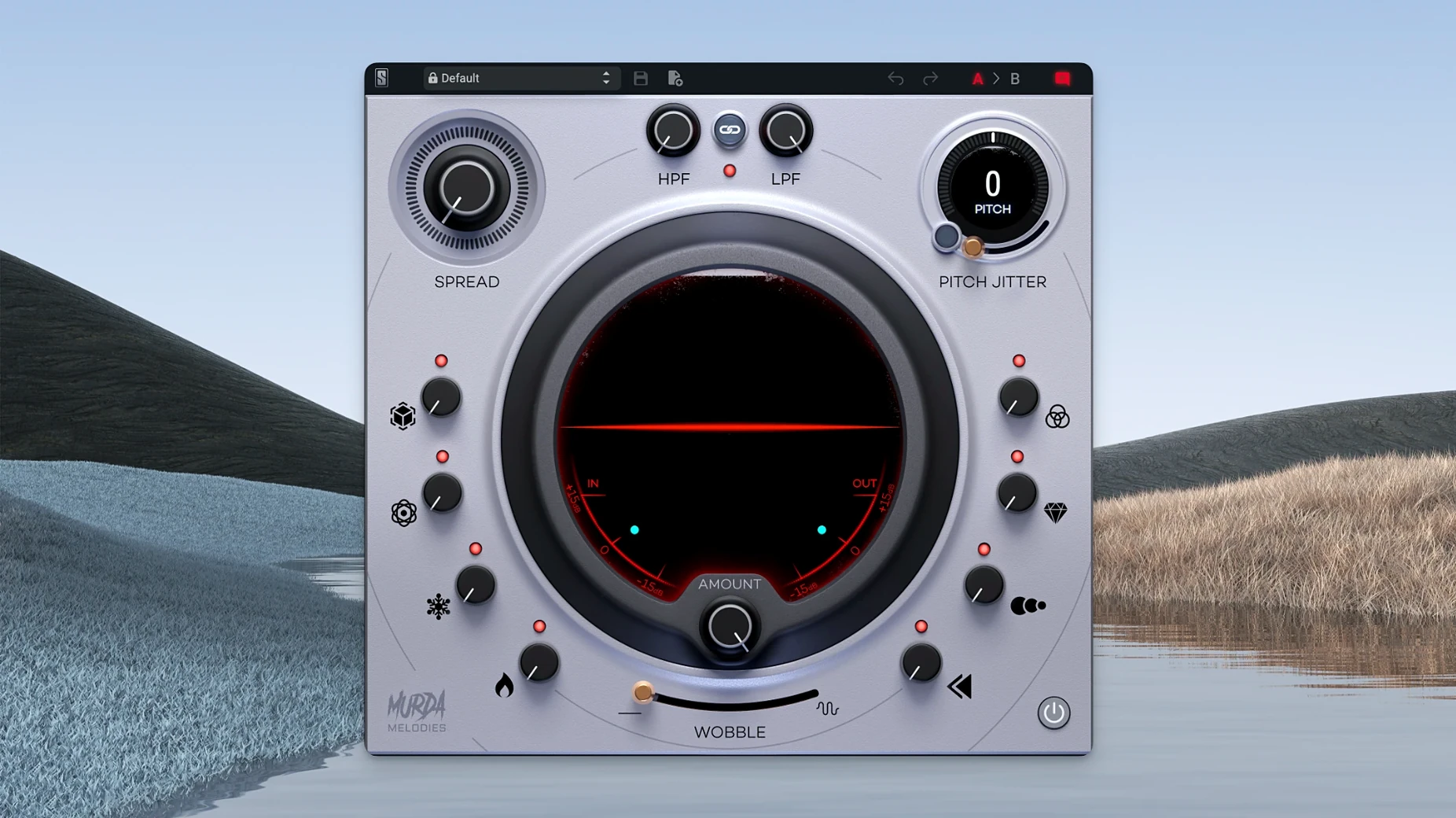
The catalogue note
If you already use Slate Digital’s bundle for drum processing or mixing, Murda Melodies fits alongside it as a dedicated multi-effects tool for melodic material. Developed with Murda Beatz, it targets hip-hop, trap, and R&B production, but the eight-effect control set works on any source you want to twist.
Typical workflow in four steps
- Load the plugin on a melody track — synth, sample, or vocal. The interface gives you eight knobs, each controlling a different effect (pitch shifter, filter, modulation, etc.).
- Start with the pitch shifter: it has a four-octave range, so you can move the part up or down dramatically or just nudge it for a subtle detune.
- Blend in the other controls one at a time. The layout encourages quick tweaks rather than deep menu-diving.
- Browse the 50+ presets if you want a starting point, then adjust from there.
The plugin runs as AU, AAX, and VST3. The current 1.1.1 update maintains that compatibility on macOS 11 and beyond, while version 1.0.8 added support for native Apple Silicon. It handles mono-to-stereo in AU and AAX formats, which matters if you are processing a mono sample into a wider texture.
Combines effects without replacing your reverb or pitch plugin
Most producers want to know whether Murda Melodies overlaps with effects they already own. The short answer is that it does not replace a dedicated reverb or a standalone pitch plugin — it combines several processors in one signal chain, designed to work together quickly. The vinyl wobble and Pitch Jitter controls are not something you find in a standard DAW utility, so even if you have a full effects rack, this plugin adds textures that are hard to replicate with stock tools.
Another common question is whether the plugin works in mono. Yes, the stereo widener is mono-compatible, and the mono-to-stereo handling in AU and AAX means you can feed it a single-channel source and get a wider result without extra routing. If you work in Logic Pro, Pro Tools, or any DAW that supports AU or AAX, you are covered.
People also ask about the preset workflow. The 50+ presets are organised as starting points, not final mixes. The eight controls' range is demonstrated by Murda Beatz and Slate Digital, so browsing them provides a rapid understanding of the plugin's capabilities. From there, you dial in your own values.
Best for hip-hop, trap, and R&B producers and mixing engineers
Music producers working in hip-hop, trap, and R&B are the obvious fit, but the plugin also suits mixing engineers who need a fast way to add character to a dull synth or a dry vocal sample. Beatmakers who work with loop libraries will find it useful for turning a generic melody into something that sounds less like a stock pack. The pitch shifter with a four-octave range is especially handy if you often transpose samples to match a new key.
If you produce other genres, the effects are still usable. The reverb and synced delays work on any tempo-locked material, and the analog-modelled filters behave like hardware-style EQs. The vinyl wobble adds lo-fi warmth, which works for electronic music or ambient textures just as well as for trap.
Users on Apple Silicon Macs running macOS 11 or later get native performance. No Rosetta translation is needed, which keeps latency low when you stack multiple instances.
Start with the dry/wet mix to avoid overloading effects
When you open Murda Melodies for the first time, skip the presets and start with the dry/wet mix. This takes ten seconds and prevents the common mistake of adding too many effects at once.
The Pitch Jitter control is subtle at low values and becomes a noticeable warble past halfway. If you want a clean detune, leave Jitter at zero and use only the pitch shifter.
The stereo widener works best after the filters. If you widen a signal that still has heavy low end, the mono compatibility can feel unbalanced. Apply the low-pass and high-pass filters first, then widen the remaining frequency range.
Lastly, check the plugin’s output level. Some presets push the gain, so reduce the output knob before you route the signal to a mixer channel. A quick gain stage adjustment saves you from clipping later.
A workflow for reshaping a vocal sample
Say you have a dry vocal phrase — a single line from a sample pack — and you want to turn it into a melodic hook for a trap beat. Here is how you could work through Murda Melodies from start to finish.
- Load the plugin on the vocal track.
- Use the pitch shifter to move the vocal up a fifth or an octave. The four-octave range gives you room to experiment without leaving the plugin.
- This works well for trap melodies where a polished vocal feels out of place.
- Engage the low-pass filter to roll off the highs above 8–10 kHz. This tames any sibilance and makes the sample sit behind the beat.
- Dial in a synced delay at a quarter-note or eighth-note setting. Keep the feedback low so the repeats do not clutter the mix.
- Apply the stereo widener at around 40–50%. The mono-to-stereo handling in AU means the sample stays centred in mono playback while spreading in stereo.
- Reduce the output gain until the processed signal matches the level of your dry track. Bypass the plugin, then enable it to check the difference.
- Save your preset if you plan to use the same processing on other samples. The layout makes it easy to recall the exact knob positions later.
This approach gives you a vocal sample that sounds like a processed melodic element rather than a raw loop. The same steps work for synth stabs, guitar phrases, or any monophonic source you want to reshape.
Before it goes on the Mac
- macOS 11 or later
- Apple Silicon (native support)
- Interface language: English
Questions from the room
Is Slate Digital Murda Melodies compatible with Apple Silicon Macs?
Yes, version 1.0.8 and later added native Apple Silicon support, and the current 1.1.1 release runs natively on M-series Macs.
Installing it on the Mac
- Run the standard installer package provided by Slate Digital.
- Follow the on-screen instructions to place the plugin in your system’s audio plug-in folders.
- Restart your DAW or rescan plugins before loading Murda Melodies.
Notes from the control room
Sign in or open a catalogue account to leave a note.
No notes from the room yet. If you have used this build for a week, a short note helps the next person.
Also filed under Logic Pro Plugins
The whole Logic Pro Plugins rack Slate Digital Fresh Air1.0.9 Logic Pro Plugins 40 MB
 Slate Digital Storch Filter1.0.6 Logic Pro Plugins 69 MB
 Slate Digital Submerge1.0.5 Logic Pro Plugins 38 MB
 Sonible pure:level1.0.2 Logic Pro Plugins 59 MB
 Serato Sample2.2.0 Logic Pro Plugins 612 MB
 Soundtheory Gullfoss1.11.7 Logic Pro Plugins 176 MB
 Serato Hex FX1.2.0 Logic Pro Plugins 105 MB
 Spire1.5.19 Logic Pro Plugins 158 MB