
Home › Logic Pro Plugins › Output Portal

Output Portal 1.2.1 (Mac)
Updated
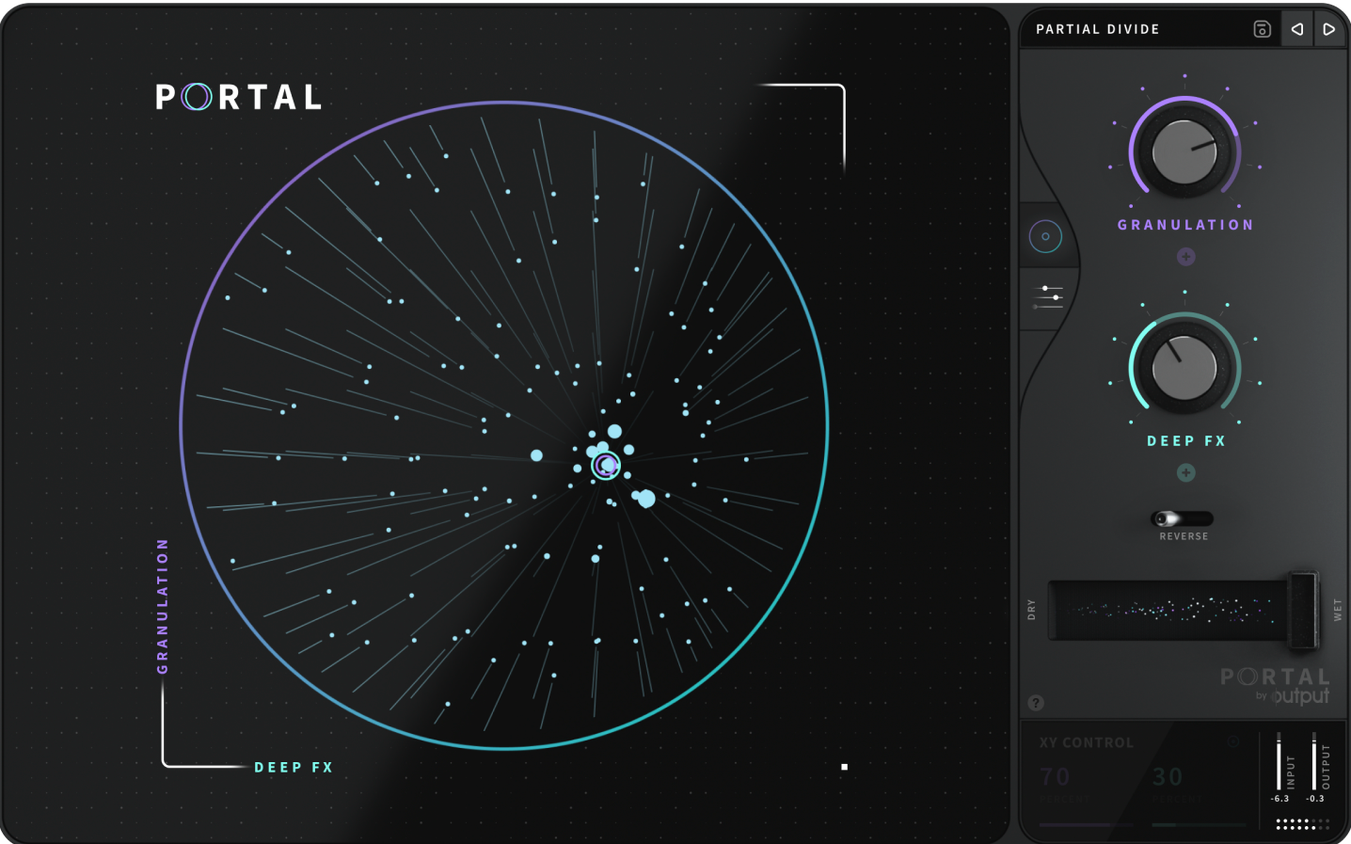
The catalogue note
Portal’s Scale Lock does something most granular processors avoid: it locks pitch to a scale without freezing duration or sync. That alone changes how you treat a vocal, a drum loop, or a guitar line.
Adds natural variation to envelopes without losing attack
- Adding natural variation to envelopes while keeping the original attack intact.
- Shifting pitch independently of time, useful for re-harmonising a sample without glitching.
- Processing live inputs, VST instruments or drum samples through the same grain engine.
English-only interface, runs on Intel and Apple Silicon
- Interface is English only.
- No dedicated macOS version listed; runs on both Intel and Apple Silicon.
Portal sits in an unusual spot. It is an effects plugin, not an instrument, yet it can completely replace the tonal character of whatever you feed it. That leads to a few common questions, and a few predictable snags, that are worth knowing about before you start routing audio through it.
Works on live vocals and pre-recorded audio in real time
The most frequent question is whether Portal works on a live vocal while you record, or only on audio you have already captured. It does both. Because Portal processes incoming audio in real time, you can insert it on an aux track or directly on a recording channel and hear the granular effect as you sing or play. The latency is low enough for monitoring, though the grain engine introduces a small delay by its nature. That delay is part of the sound — the overlapping grains are what create the texture.
Another common question is whether Portal can process a full mix bus. The answer is yes, but the result is rarely subtle. Portal is designed to transform, not to polish. On a drum bus you might use a slow grain size to turn a live kit into a sustained pad. On a vocal bus you might lock the pitch to a scale and let the envelope wander. It is not a corrective tool. It is a creative one, and it works best when you commit to the transformation rather than trying to blend it in quietly.
People also ask if Portal replaces a sampler or a synth. It does not. Portal has no oscillators, no sample playback engine of its own, and no built-in sound library. It is a granular effects processor that takes whatever audio it receives and re-synthesises it through grains. You still need a source — a VST instrument, a recorded track, a live microphone — to feed it.
Grain engine needs a healthy input signal to avoid thin sound
One snag that catches people is the grain engine responding differently to different input levels. Portal expects a healthy signal. If you feed it a quiet vocal or a low-output synth patch, the grains may sound thin or gated. The fix is to boost the input level before Portal, either with a gain plugin or by raising the track fader pre-fx. The plugin re-synthesises the sound, so a stronger signal gives the grain engine more material to work with.
Another snag involves tempo sync. When Portal is set to synchronise to the host tempo, the grain size and timing lock to the project tempo. That is useful for rhythmic effects, but it can make the sound feel rigid if the source material is not quantised. If a drum loop or vocal phrase sounds mechanical or loses its natural feel, try switching to unsynchronised mode. The grains then follow their own timing, which often restores the organic quality that granular processing is meant to add.
Pitch shift without sync is another area where people run into unexpected results. Portal can change pitch without changing duration, which is powerful, but if you shift a sound by a large interval the grains can start to sound thin or artificial. The workaround is to combine a moderate pitch shift with a slow grain size. The larger grains give the re-synthesised sound more body, and the pitch change feels less like a chipmunk effect and more like a natural transposition.
A workflow for turning a guitar line into a textured pad
This is a typical task for Portal, and it shows how the controls interact in practice. Start with a single guitar track, either a recorded performance or a live DI signal. Insert Portal on that track.
Set the grain size to a medium value — not so short that it sounds like a stutter, and not so long that it becomes a drone. Listen for the point where the guitar notes begin to smear into each other. That is the sweet spot for creating a pad-like texture.
Engage the scale lock and choose a scale that matches the key of your project. Now the pitch of the grains will stay within that scale even if you move the pitch control. Raise the pitch slightly, maybe two or three semitones, so the pad sits above the original guitar part.
Turn on the envelope variation control. This adds natural fluctuation to how each grain starts and ends. Without it, the pad can sound static. With a small amount of variation, the texture breathes the way a real string section or synth pad would.
If the guitar part has a steady rhythm, set Portal to unsynchronised mode. That way the grains do not lock to the tempo, and the pad floats independently. If the guitar part is slow and ambient, synchronised mode can work better because the grains reinforce the existing groove.
Finally, blend the dry signal back in. The dry guitar keeps the attack and clarity, while Portal provides the sustained texture.
Processes VST instruments directly for re-synthesised movement
Portal can process VST instruments directly, not just audio tracks. If you have a synth pad or a piano part that needs movement, insert Portal after the instrument in the chain. The granular engine will re-synthesise the synth sound in real time, adding grain texture on top of the original tone. This works particularly well with sustained sounds because the grains have more material to stretch and reshape.
The plugin also handles drum samples well. A single snare hit fed into Portal with a slow grain size and unsynchronised mode becomes a wash of noise that can sit under a verse. A hi-hat loop with short grains and pitch shift becomes a rhythmic texture that sounds nothing like the original pattern. These transformations are fast to set up because Portal does not require sample loading or waveform editing. It just processes whatever audio arrives at its input.
People searching for Portal often look for ways to get it without going through the official channels. If you come across a portal mac torrent, a portal torrent, or an output portal torrent, keep in mind that the activation method used in those releases may affect how the plugin behaves in your host. The version discussed here, 1.2.1, is the current build, and it runs on both Intel and Apple Silicon Macs. The installer is straightforward — mount the disk image, run the installer, choose a location, and you are done.
One final detail that is easy to overlook: Portal re-synthesises the sound to stay closer to the original input. That means even with extreme settings, the output retains a relationship to the source. It is not random noise. It is a manipulated version of whatever you put in, which is why it works as an effects plugin rather than a sound generator. That distinction matters when you are building a mix. Portal adds colour and motion, but it does not invent material out of nothing.
Before it goes on the Mac
- macOS version not specified by the developer.
- Architecture: Intel and Apple Silicon.
Questions from the room
Can Portal process live audio?
Yes, it can process live inputs such as vocals or guitars through its granular engine.
Does Portal change pitch and duration separately?
Yes, it can change pitch without changing duration or synchronisation.
Installing it on the Mac
- Mount the downloaded disk image.
- Run the standard installer.
- Choose the installation location to finish setup.
Notes from the control room
Sign in or open a catalogue account to leave a note.
No notes from the room yet. If you have used this build for a week, a short note helps the next person.
Also filed under Logic Pro Plugins
The whole Logic Pro Plugins rack Omnisphere3.0.2c Logic Pro Plugins 205 MB
 noteGRABBER2.0.0 Logic Pro Plugins 35 MB
 Plug and Mix VIP Bundle4.0.0 Logic Pro Plugins 3.7 GB
 Neural DSP Soldano SLO-100 X1.0.0 Logic Pro Plugins 340 MB
 Neural DSP Parallax X1.0.0 Logic Pro Plugins 179 MB
 Neural DSP Archetype Rabea X1.0.1 Logic Pro Plugins 742 MB
 Neural DSP Archetype Petrucci1.0.0 Logic Pro Plugins 745 MB
 Native Instruments Massive X2.0.0 Logic Pro Plugins 2.3 GB Updated