
Home › Logic Pro Plugins › Neural DSP Parallax X
Neural DSP Parallax X 1.0.0 (Mac)
Updated
The catalogue note
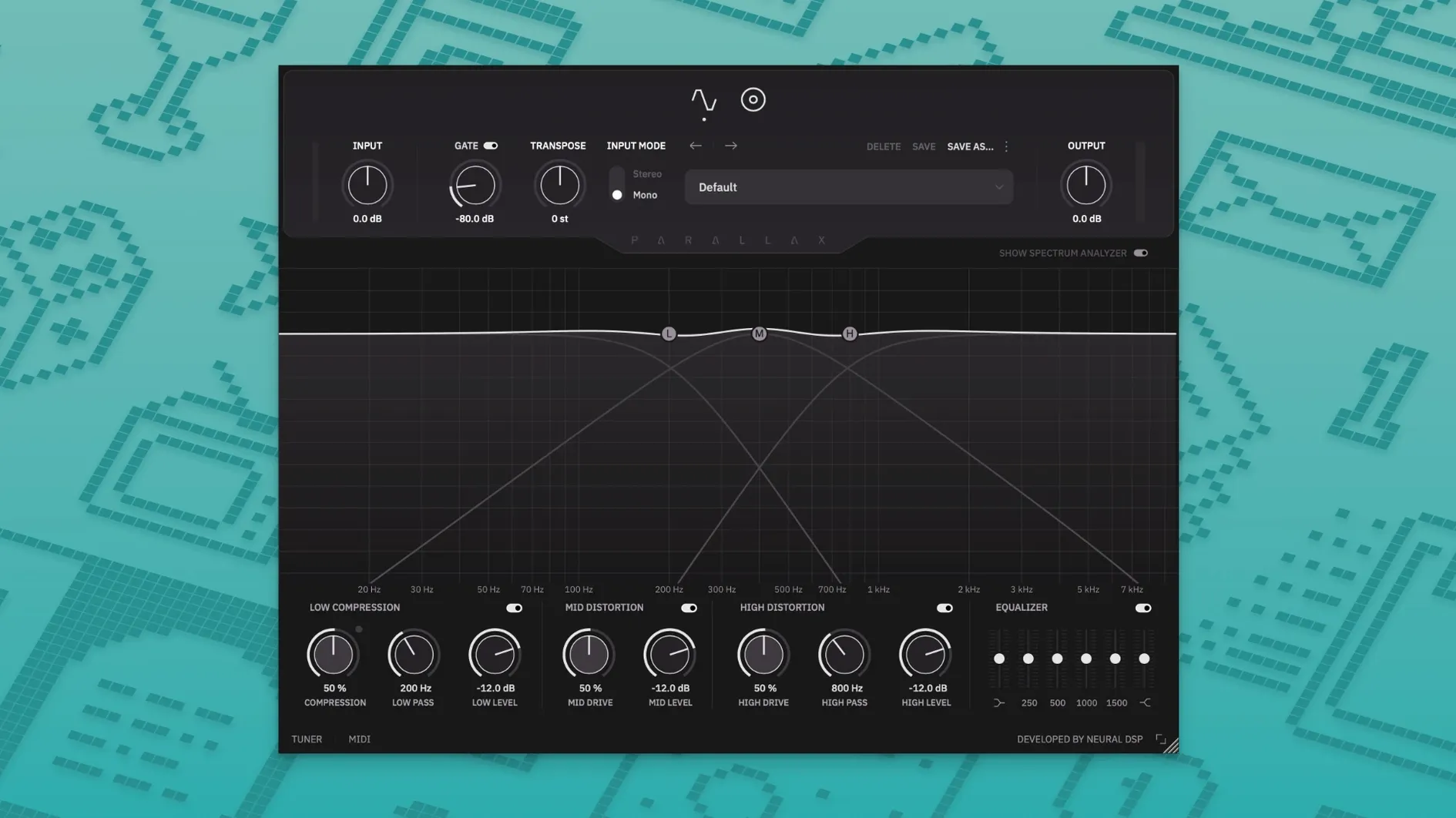
Most bass plugins treat the instrument as a single signal to be compressed or driven until it loses its character. Parallax X avoids that by splitting the bass into three frequency bands and processing each with its own distortion stage, then blending them back in parallel. The result is a sound that stays tight in the lows, articulate in the mids, and aggressive in the treble without turning into mud.
Three distortion stages, one purpose
The low band uses a tube-model circuit to add weight without boom. The mid band focuses on note attack and presence — useful when a bass needs to cut through a dense mix. The treble distortion pushes into fuzz territory, giving you the option to dial in edge or full-on grind. Each stage has its own blend control, so you can layer as much or as little as the track needs. A six-band graphic EQ sits after the distortion for final tonal shaping, and the built-in cabinet emulation offers six virtual microphones to place your sound in a room.
Standalone extras that matter
Outside the DAW, Parallax X runs standalone with a metronome that supports time signatures, accents and note lengths — handy for practice or sketching ideas. The new transpose feature shifts the input up or down within an octave, and the live tuner keeps your tuning visible at all times. The redesigned spectrum analyser and refreshed preset library round out what is less a revision and more a rethinking of the original Parallax.
Adjusting the low band drive on a DI Precision bass
I opened the plugin on a DI bass track that had been recorded with a passive Precision — clean, but lacking the weight the mix needed. The first thing I did was adjust the low band drive until the compressor in that section started reacting to the attack of my fingerstyle playing. That gave me a solid, consistent low end without pumping. I then pushed the mid band distortion just enough to bring out the fret noise and string attack, which made the part audible against distorted guitars.
From there I moved to the six-band graphic EQ. I cut a narrow notch around 250 Hz to reduce boxiness, and added a gentle shelf around 3 kHz to help the bass sit above the kick drum. The cabinet emulation came next: I cycled through a few of the six virtual microphones until I found one that gave the mids a woody, natural tone without thinning the lows. Because the cabinet only applies to the mid and high bands, the low end stayed clean and direct. The whole process took perhaps three minutes, and I had a usable bass tone that needed almost no additional processing in the mix.
Later that day I used the standalone mode to work out a new riff. I set the metronome to 4/4 with a quarter-note accent, activated the transpose function to shift the part down a fifth, and let the tuner confirm my intonation while I played. The metronome's note-length setting let me hear exactly where the downbeat fell, which made locking into the groove easier than tapping my foot.
The legacy Parallax stays installed alongside Parallax X
A common question is whether Parallax X replaces the original Parallax or sits alongside it. The installer keeps the legacy version in place, and Parallax X appears as a separate plugin in your DAW. Your old presets are copied into the new user folder during setup, so you do not lose work you have already dialled in. Both versions remain available if you prefer the older workflow for certain projects.
Another point of confusion is the architecture support. The plugin runs natively on Apple Silicon and Intel-based Macs running macOS 11 or later, with 64-bit hosts. No Rosetta translation is needed on Apple Silicon systems, which keeps latency low during tracking. The formats cover VST2, VST3, AU and AAX, so compatibility with Logic Pro, Pro Tools, Ableton Live, Cubase and most other modern DAWs is straightforward.
Some users wonder whether the standalone mode includes the full processing chain. It does: the three distortion stages, the compressor, the EQ, the cabinet emulation and the transpose function all work outside the DAW. The metronome is exclusive to standalone mode, so if you only ever open the plugin inside Logic, you will not see it — but the tuner and transpose are available in both modes.
A low-band compressor that catches thump without choking sustain
- The low-band compressor is dedicated to bass frequencies and responds differently than a general-purpose compressor. It catches the thump without choking the sustain.
- Each distortion stage has its own blend control, not just a wet/dry mix for the whole plugin. You can run the lows at full saturation, the mids at half blend, and the treble barely wet — independent control that a single mix knob cannot offer.
- Cabinet emulation only affects the mid and high bands. The low end stays direct and uncoloured, which keeps sub frequencies clean even with aggressive cabinet settings.
- The transposition range of one octave up or down works in real time, so you can play a bass part an octave higher than written and let the plugin shift it back to the original pitch.
- Legacy presets from the original Parallax are imported automatically during installation. No manual file copying or conversion step is needed.
Home bassists get a mix-ready tone without outboard gear
Bass players who record at home benefit most directly — the three-band parallel processing gives you a mix-ready tone without external hardware or expensive outboard compressors. Mix engineers who handle a variety of genres will appreciate the speed: a few adjustments to the mid distortion and EQ are often enough to make a DI bass sit in a dense rock or metal mix. Live performers who use a laptop on stage can rely on the standalone mode for practice and the tuner for quick checks between songs. Producers who work in electronic music may find the treble distortion useful for turning clean synth basses into aggressive, textured layers. The plugin does not assume one style of playing, and that flexibility is its real strength.
Changes in this build
Before it goes on the Mac
- macOS 11 or later
- 64-bit host
- Intel or Apple Silicon
- Interface language: English
Questions from the room
Does Parallax X replace the original Parallax?
No. The official installer keeps the legacy Parallax version installed alongside Parallax X, so both remain available.
Does it run on Apple Silicon Macs?
Yes. Parallax X supports Native Apple Silicon and Intel Macs running macOS 11 or later.
Installing it on the Mac
Notes from the control room
Sign in or open a catalogue account to leave a note.
No notes from the room yet. If you have used this build for a week, a short note helps the next person.
Also filed under Logic Pro Plugins
The whole Logic Pro Plugins rack Neural DSP Archetype Rabea X1.0.1 Logic Pro Plugins 742 MB
 Neural DSP Soldano SLO-100 X1.0.0 Logic Pro Plugins 340 MB
 Neural DSP Archetype Petrucci1.0.0 Logic Pro Plugins 745 MB
 Native Instruments Massive X2.0.0 Logic Pro Plugins 2.3 GB Updated
 noteGRABBER2.0.0 Logic Pro Plugins 35 MB
 Omnisphere3.0.2c Logic Pro Plugins 205 MB
 Output Portal1.2.1 Logic Pro Plugins 319 MB
 Minuit Solstice1.2.0 Logic Pro Plugins 117 MB