
Home › Logic Pro Plugins › Neural DSP Archetype Rabea X

Neural DSP Archetype Rabea X 1.0.1 (Mac)
Updated
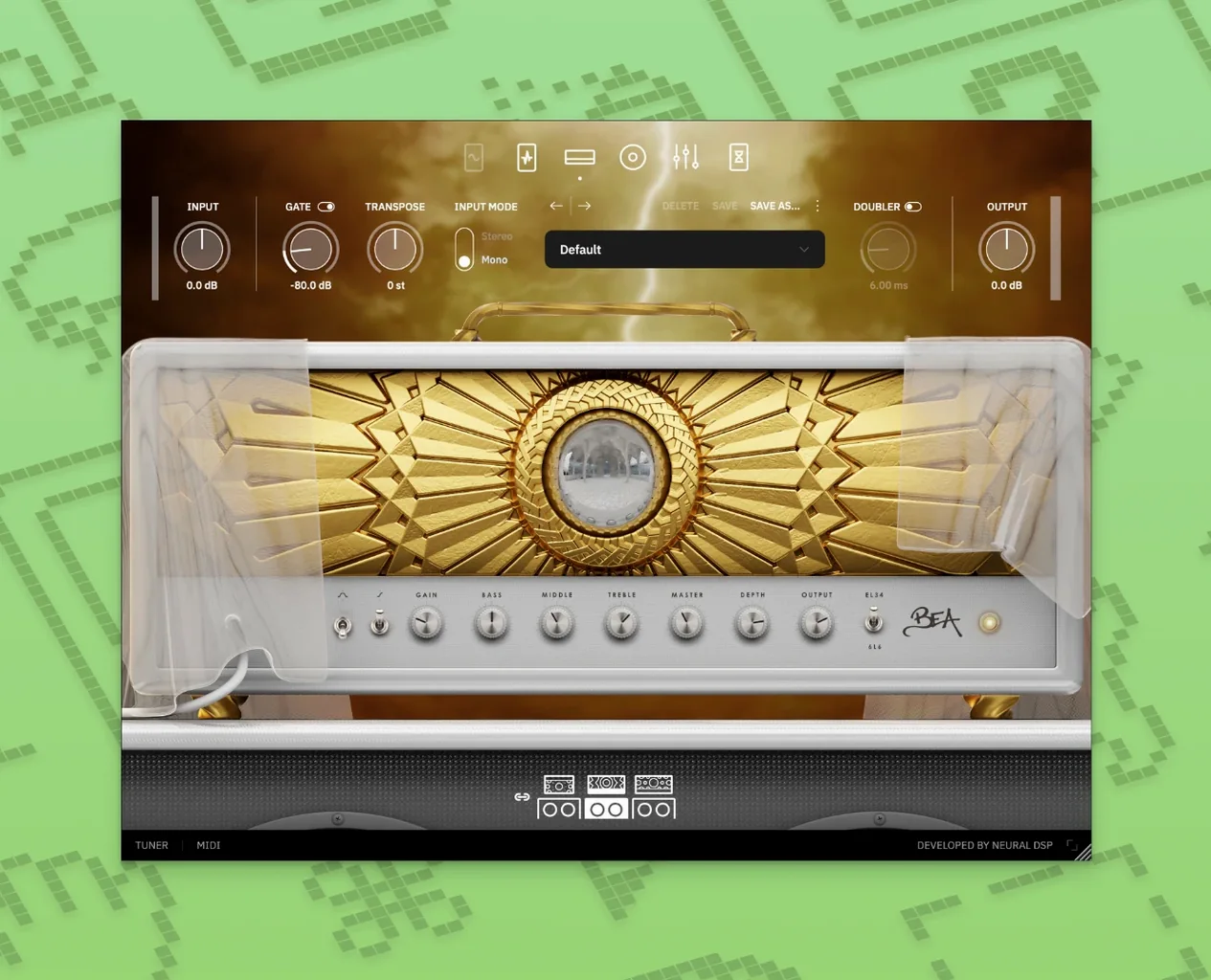
The catalogue note
Archetype Rabea X ships as a standalone plugin and in AU, VST3, and AAX formats, so it slots into Logic, Pro Tools, and most other Mac DAWs without fuss. It runs natively on Apple Silicon and Intel Macs, and works with macOS 10.15 and later. The plugin also talks to Quad Cortex and Quad Cortex mini, which matters if you move between studio and hardware.
First Steps in the Plugin
- Load Archetype Rabea X on a guitar track. The interface opens with two amp channels, a cab section, and a pedalboard.
- Dial in a clean or driven tone from the original amp designs — they cover modern high-gain and clearer textures.
- Add effects from the pedalboard: delay, reverb, modulation, and drive options are all there.
- Switch to the Overlord monosynth for synth-like leads or bass lines. It tracks your playing and responds to the same amp and effects chain.
- Save presets and tweak parameters until the sound sits in your mix.
The synth is the unusual part. Overlord is monophonic, so it behaves more like a lead instrument than a pad machine. Pair it with the drives and delays and you get tones that sit between guitar and synthesiser — useful for riff-based electronic music or soundtrack work. Version 1.0.1 adds quality-of-life fixes, so the current build is the stable one to keep.
Overlord triggers two oscillators simultaneously in 1.0.1
Version 1.0.1 arrived without fanfare, but the quality-of-life improvements and bug fixes are worth noting if you have been running the initial release. The manual mentions that Overlord can trigger up to two oscillators simultaneously — something that is easier to dial in now that the synth section responds more predictably to MIDI input and pitch-bend messages. Early adopters reported occasional glitches when switching presets mid-session; the 1.0.1 patch addresses those, so you can audition amp channels and synth patches without unexpected crackles or parameter jumps.
For daily use, the update tightens the integration between the pedalboard effects and the amp routing. Modulation effects like chorus and phaser now track tempo more reliably when synced to your DAW’s clock. The standalone version also benefits from a fix that prevented it from remembering audio interface selections between launches — a small annoyance that is gone.
Play Overlord as a monophonic lead guitar solo for best results
Most new users treat Overlord as a standard synth and expect polyphonic chords. It is monophonic, so the best results come from single-note lines, legato runs, and aggressive pitch-bend gestures. Try playing it like a lead guitar solo rather than a keyboard pad.
Another common misstep is ignoring the drive pedals before the amp. The monosynth’s oscillators sound clean on their own, but running them through an overdrive or distortion pedal in the chain gives them the grit that makes them sit alongside high-gain guitar tracks. Beginners often skip the pedalboard entirely, then wonder why the synth sounds thin.
Preset management trips people up too. The plugin saves global presets that include amp, cab, pedalboard, and synth settings all at once. If you tweak the synth but want to keep the amp sound, you need to save separate presets for each chain — the interface does not split them automatically. A little organisation early on saves time later.
Finally, the amp models are original designs, not emulations of famous hardware. New users sometimes expect a specific vintage sound and spend time hunting for a familiar knob layout. Treat them as new tools: the clean channel takes pedals well, and the high-gain channel has enough headroom for modern metal riffing without needing a boost in front.
Native 64-bit plugin for Apple Silicon and Intel on macOS 10.15+
Archetype Rabea X is a 64-bit plugin that runs on any Mac from macOS 10.15 Catalina upwards. It works on both Apple Silicon and Intel architecture, so it loads natively on M-series machines without Rosetta translation. The installer uses a standard disk-image mount and a package installer — no copy-paste or terminal steps required.
The plugin is available in VST2, VST3, AU, and AAX formats, plus a standalone executable. If your DAW prefers one format over another, you have options. The standalone version is useful for quick sketching without opening a full project, but it shares the same engine and presets as the plugin versions. When you find a tone you like in standalone mode, it transfers directly into your DAW session.
Neural DSP Archetype Rabea X offers synth-like sounds and aggressive amp tones for modern metal and progressive players. The amp models, effects, and Overlord synth are unique to this release.
Changes in this build
- Version 1.0.1
- Quality-of-life improvements and bug fixes
Before it goes on the Mac
- macOS 10.15 or later
- Apple Silicon or Intel processor
- English interface
Installing it on the Mac
- Mount the downloaded disk image.
- Run the standard installation procedure.
Notes from the control room
Sign in or open a catalogue account to leave a note.
No notes from the room yet. If you have used this build for a week, a short note helps the next person.
Also filed under Logic Pro Plugins
The whole Logic Pro Plugins rack Neural DSP Archetype Petrucci1.0.0 Logic Pro Plugins 745 MB
 Neural DSP Parallax X1.0.0 Logic Pro Plugins 179 MB
 Neural DSP Soldano SLO-100 X1.0.0 Logic Pro Plugins 340 MB
 Native Instruments Massive X2.0.0 Logic Pro Plugins 2.3 GB Updated
 noteGRABBER2.0.0 Logic Pro Plugins 35 MB
 Omnisphere3.0.2c Logic Pro Plugins 205 MB
 Output Portal1.2.1 Logic Pro Plugins 319 MB
 Minuit Solstice1.2.0 Logic Pro Plugins 117 MB