
Home › Logic Pro Plugins › Neural DSP Soldano SLO-100 X
Neural DSP Soldano SLO-100 X 1.0.0 (Mac)
Updated
The catalogue note
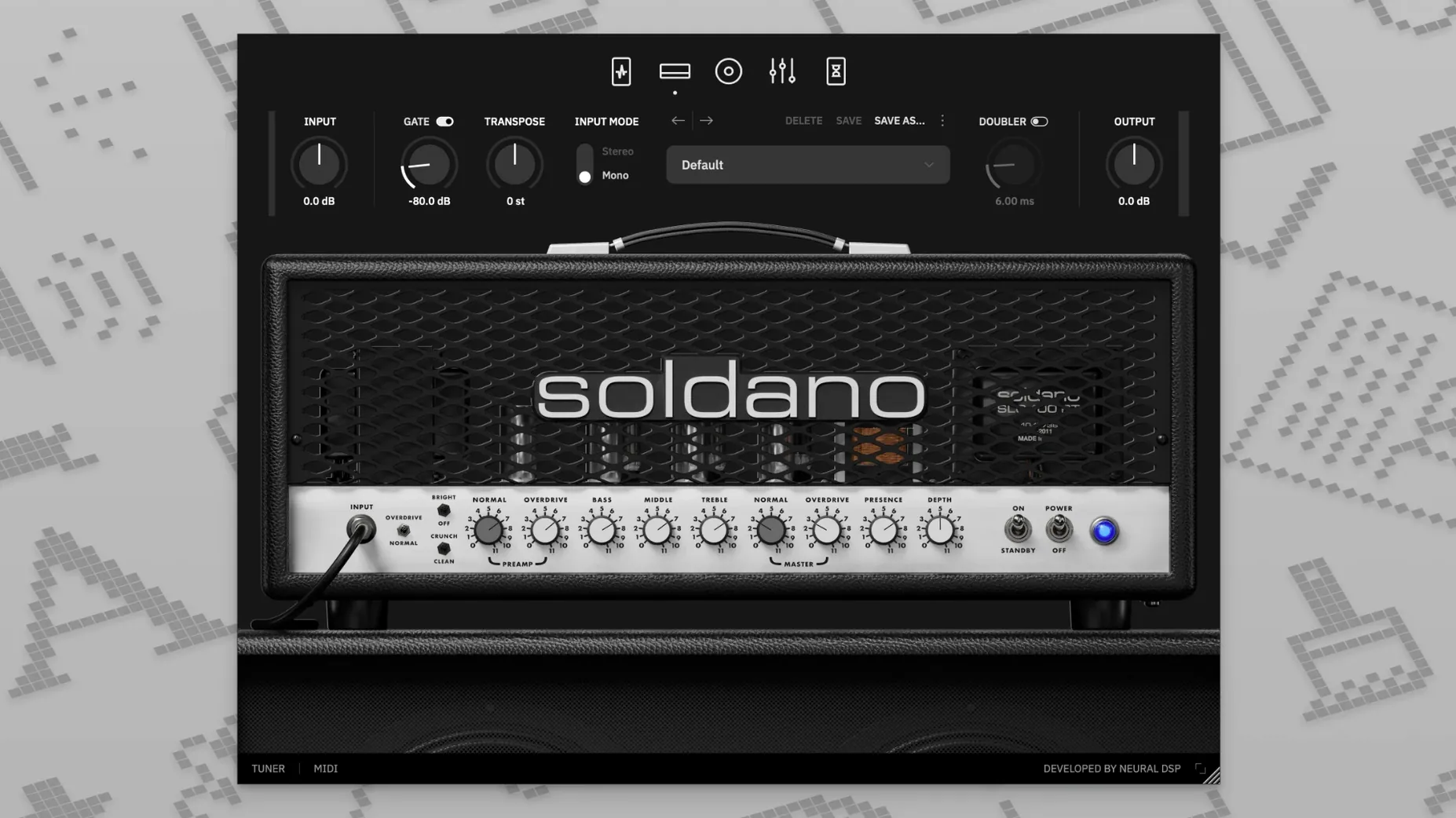
You drop a Soldano SLO-100 X on a guitar track that needs the tight, aggressive top end of a high-gain American amp. The session’s already got a DI signal recorded, so you load the plugin as an insert and set the mode to Overdrive. From there, the workflow follows a few predictable steps.
- Dial the amp section — choose Clean, Bright, Crunch, or Overdrive. For rhythm parts, Overdrive gives you that defined palm-mute attack. Clean works for brighter arpeggios.
- Adjust the transposition — drop the tuning a semitone or two without re-recording the DI. Useful when a riff sits better in E♭ than in standard.
- Load a cabinet file if the stock IRs don’t fit the mix. Drag your own .wav IRs straight into the plugin’s cab section.
- Route to a bus for parallel processing. Send the amp track to a reverb bus or a parallel compressor bus to keep the dry attack intact.
The X version updates the 2021 original with revised modelling. It runs as an Audio Unit in Logic Pro X 10.5 or higher, or as a standalone app for quick riffing. The selling point remains the same: a software version of the amplifier that defined American high-gain guitar tone, now tuned for modern session workflows.
Using the standalone app without an audio interface
Can you use it without an audio interface? Yes — the standalone app uses your Mac’s built-in input and output, though latency will be higher than with a dedicated interface. For tracking, an interface is still the better choice.
Does it replace a real SLO-100? It models the preamp, power amp and cabinet of the original, so for recording and practice it covers the same ground. If you need the physical amp for stage volume or tube feel, that’s a different use case. For a DAW session, the plugin gets you there faster.
Will it work in GarageBand? GarageBand supports Audio Units, so yes — the AU version should appear in the plugin list after installation. Logic Pro X 10.5 or higher is the recommended host, but GarageBand users have reported it working without issues.
Is the cabinet section mandatory? The plugin includes cabinet simulation by default, but you can bypass it and use your own IR loader if you prefer. The nine-band EQ with HPF and LPF also lets you shape the cab sound without swapping IRs.
Can you run two instances for stereo double-tracking? Yes — each instance is independent. Pan one left, one right, and the doubling effect in the plugin can add extra width if you want a thicker stereo image from a single performance.
The narrower amp focus compared to AmpliTube 5's amp collection
Against AmpliTube 5 from IK Multimedia, the SLO-100 X is narrower by design. AmpliTube offers dozens of amps, pedals and rack effects in one environment. The SLO-100 X gives you one amp architecture and a curated set of preamp pedals — compressor, boost, overdrive, vintage chorus. If you want a full rig builder, AmpliTube wins on variety. If you want the specific Soldano sound without menu scrolling, the Neural DSP plugin is faster to dial.
Compared to Guitar Rig 7 by Native Instruments, the difference is in the amp modelling approach. Guitar Rig leans on digital emulation that covers many classic circuits, but the Soldano X uses updated neural modelling from Neural DSP’s 2024 revision. The transposition and doubling features are not standard in Guitar Rig — you would need separate pitch-shifting or doubling plugins for those.
Next to Line 6 Helix Native, the SLO-100 X is less of a complete ecosystem. Helix Native models the full Helix hardware, including dozens of amps, cabs and effects, and supports deep routing. The Soldano X sticks to one amp, one cab section and a focused set of post-effects — delay and reverb. For guitarists who already own Helix hardware, Helix Native is the logical extension. For those who want a single high-gain amp that records fast, the SLO-100 X is a lighter install with less time spent on preset browsing.
Starting with Crunch mode to hear preamp pedal interaction
After installing, open the plugin on a DI guitar track and start with these adjustments:
- Set the amp mode to Crunch before switching to Overdrive. Crunch gives you a mid-gain sound that reveals how the preamp pedals interact. Overdrive is where most users end up, but starting from Crunch helps you hear what the boost or overdrive pedal actually adds.
- Turn off the cabinet simulation initially if you plan to use your own IR loader. The plugin loads a default cab IR that might not suit your mix. Listen to the amp section alone, then enable the cab section and browse the presets or load your own file.
- Adjust the transposition early in the session, not after you have already dialled the EQ and effects. Changing the pitch shifts the harmonic content, so EQ settings that sounded right at standard tuning may need tweaking after you drop the tuning.
- Check the doubling effect at a low mix level — 15–20%. Doubling adds width without the phase issues of a full stereo spread. Leave it off until you have the mono sound where you want it, then blend it in.
- Set the nine-band EQ with a gentle high-pass around 80–100 Hz before reaching for the low end. The SLO-100 has a naturally tight low end, but cutting the subsonic rumble keeps the track focused, especially for rhythm parts in a dense mix.
These adjustments take a minute and save you from backtracking later. The plugin’s signal flow — preamp pedals, amp, EQ, cab, delay/reverb — is linear, so changes at the start affect everything downstream.
Changes in this build
Before it goes on the Mac
- macOS 10.15 or later
- Intel or Apple Silicon processor
- 64-bit host software required for plugin use
- English interface language
Questions from the room
Can I use my own cabinet impulses with the SLO-100 X?
Yes, the plugin allows loading user cabinet files directly.
Does the plugin support Apple Silicon Macs?
It supports both ARM and x86 64-bit Macs, so it runs natively on Apple Silicon and Intel.
What host versions are supported on macOS?
For Audio Units, it requires Logic Pro X 10.5 or higher; for AAX, Pro Tools 12 through 2020 is supported.
Installing it on the Mac
- Open the downloaded disk image.
- Complete the standard installation procedure.
Notes from the control room
Sign in or open a catalogue account to leave a note.
No notes from the room yet. If you have used this build for a week, a short note helps the next person.
Also filed under Logic Pro Plugins
The whole Logic Pro Plugins rack Neural DSP Parallax X1.0.0 Logic Pro Plugins 179 MB
 Neural DSP Archetype Rabea X1.0.1 Logic Pro Plugins 742 MB
 Neural DSP Archetype Petrucci1.0.0 Logic Pro Plugins 745 MB
 Native Instruments Massive X2.0.0 Logic Pro Plugins 2.3 GB Updated
 noteGRABBER2.0.0 Logic Pro Plugins 35 MB
 Omnisphere3.0.2c Logic Pro Plugins 205 MB
 Output Portal1.2.1 Logic Pro Plugins 319 MB
 Minuit Solstice1.2.0 Logic Pro Plugins 117 MB