
Home › Logic Pro Plugins › Native Instruments Massive X

Native Instruments Massive X 2.0.0 (Mac)
Updated
The catalogue note
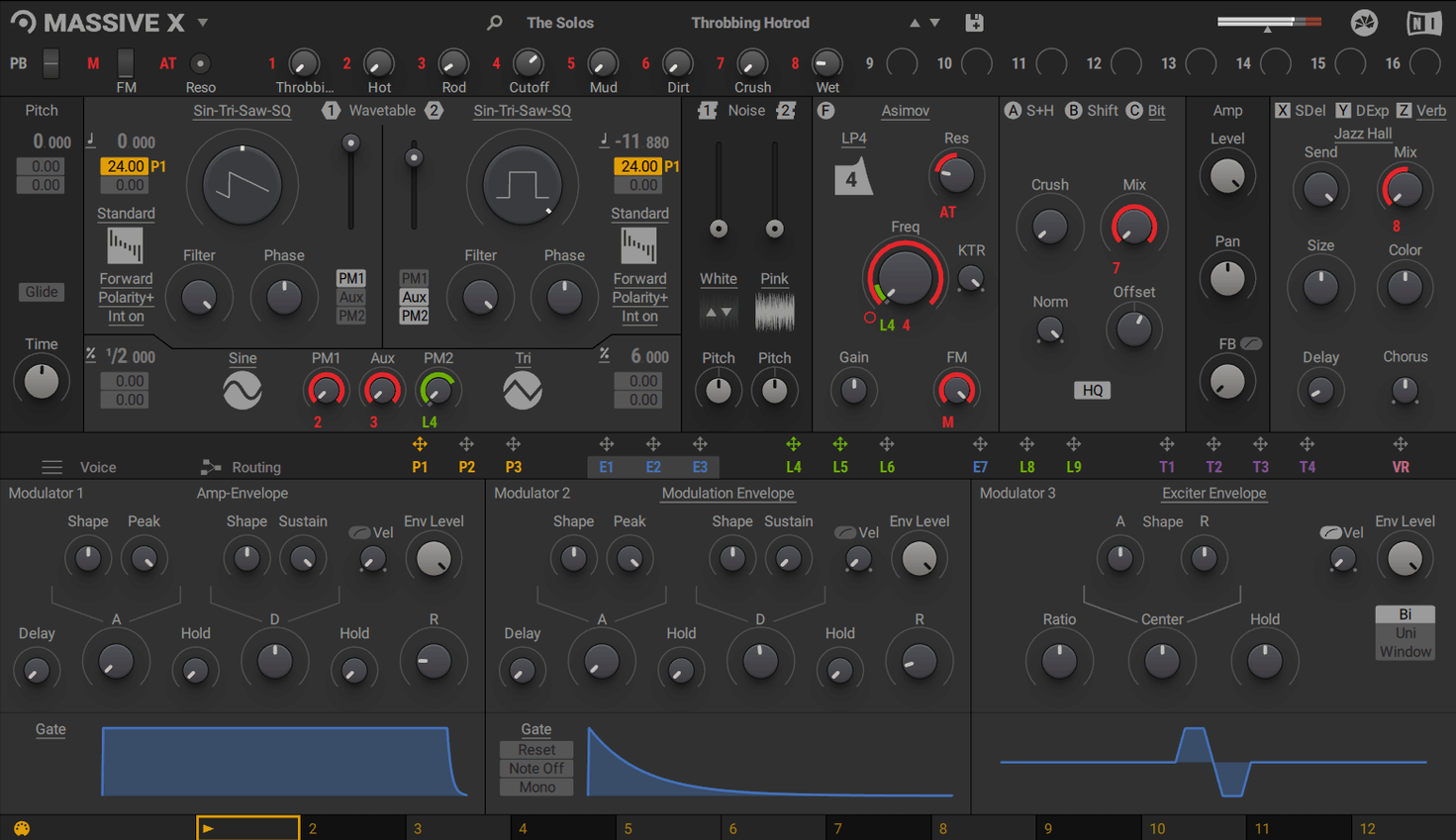
When you need a wavetable synth that doesn’t force your sound through a single signal path, Massive X gives you flexible routing and extensive modulation. It’s a VST, VST3, AU and AAX instrument on Mac — no standalone mode — so it lives inside your DAW of choice.
Sound design with 170+ wavetables and 10 playback modes
- Sound design with more than 170 wavetables and 10 playback modes
- Routing any output to any input for complex patches
- Using alongside the original Massive for existing projects and sounds
- Accessing 780 factory presets out of the box
Requires a compatible host and AVX on Intel Macs
- No standalone operation; requires a compatible host
- Intel Macs need a processor with AVX support
- macOS 13 or later; Apple Silicon native
- 4 GB RAM minimum, 6 GB recommended
- Internet connection needed for download and activation
- Graphics card with OpenGL 2.1 or DirectX 9/11 required
A day with Massive X in a scoring session
A composer working on a sci-fi short film has a brief: a drone that shifts from cold metallic resonance to a warm, breathing texture over twelve bars. The original Massive can handle the base tone, but the routing in Massive X makes the transition simpler. Two wavetable oscillators run through separate filters; one phase modulation generator nudges the pitch of oscillator A, while the Performer section draws a slow sine wave onto the filter cutoff. The Remote Octave control lets the composer trigger that Performer pattern from the keyboard without touching the mouse. The result is a single patch that evolves without automation lanes or extra MIDI tracks — the modulation does the work.
Runs as a plugin in Logic, Ableton, Cubase, and more
Massive X runs as a plugin inside Logic Pro, Ableton Live, Cubase, or any host that supports VST, VST3, AU, or AAX. On an Intel Mac, the processor must include AVX instructions; Apple Silicon machines run it natively. The installer handles both architectures from the same disk image. The minimum RAM is 4 GB, though 6 GB is recommended if you run multiple instances or large projects. An internet connection is required for the initial download and activation. The graphics card needs OpenGL 2.1 or higher, or DirectX 9 or 11 — most Macs from the last decade meet that without issue. Once installed, the plugin appears in your host's instrument list alongside other Native Instruments plugins.
Works alongside original Massive in the same project
Massive X works alongside the original Massive in the same project. If you have older sessions built with Massive, you can keep those tracks as they are and use Massive X for new layers. The plugin is part of the KOMPLETE instrument line, so it shares the same browser and preset structure as other Native Instruments products. On macOS, the standard installer places the plugin files where your DAW expects them — no manual moves. The disk image opens like any other macOS package, and the installer follows the usual steps. Because Massive X is not a standalone application, it doesn't compete for system audio resources outside the host; the DAW handles buffer size, sample rate, and core allocation.
Remote Octave control and two phase modulation generators
- Remote Octave control — you can trigger Performer patterns from the keyboard, which is faster than clicking pattern slots when you're playing live.
- Two phase modulation generators — they add movement without eating up modulation slots elsewhere in the routing matrix.
- 780 presets in the factory library — the collection covers a wide range, so you often find a starting point close to the sound you need, then route and modulate from there.
- The routing system lets any output connect to any input — this isn't a fixed signal flow synth, so you can patch effects, filters, and modulation sources in any order.
- 10 wavetable playback modes — beyond basic forward and backward, there are spectral and granular-style modes that change how the wavetable is scanned, giving different timbral results without swapping the table itself.
Massive X offers a massive torrent of wavetable possibilities for electronic music producers seeking deep sound design. The same applies if you search for a massive x torrent or a massive vst torrent — the 780 presets and flexible routing are what make this synth worth the space on your drive.
Changes in this build
Version 2.0.0 has landed. Full details are in the release notes on the Native Instruments forum, but the headline is native Apple Silicon support — the synth now runs as a universal binary on Intel and ARM Macs, and it requires macOS 13 or later.
Before it goes on the Mac
- macOS 13 or later
- Apple Silicon or Intel 64‑bit processor
Questions from the room
Can Massive X run standalone without a DAW?
No. It is a plug-in only — VST, VST3, AU and AAX — and requires a compatible host application.
Does Massive X work on Apple Silicon Macs?
Yes. It runs natively on Apple Silicon and also supports Intel Macs with AVX.
Installing it on the Mac
- Open the downloaded disk image.
- Run the standard installer.
Notes from the control room
Sign in or open a catalogue account to leave a note.
No notes from the room yet. If you have used this build for a week, a short note helps the next person.
Also filed under Logic Pro Plugins
The whole Logic Pro Plugins rack Neural DSP Archetype Petrucci1.0.0 Logic Pro Plugins 745 MB
 Neural DSP Archetype Rabea X1.0.1 Logic Pro Plugins 742 MB
 Neural DSP Parallax X1.0.0 Logic Pro Plugins 179 MB
 Neural DSP Soldano SLO-100 X1.0.0 Logic Pro Plugins 340 MB
 noteGRABBER2.0.0 Logic Pro Plugins 35 MB
 Minuit Solstice1.2.0 Logic Pro Plugins 117 MB
 MiniMeters1.0.30 Logic Pro Plugins 103 MB
 Omnisphere3.0.2c Logic Pro Plugins 205 MB