
Home › Logic Pro Plugins › Melatonin Sine Machine

Melatonin Sine Machine 27.4.9 (Mac)
Updated
The catalogue note
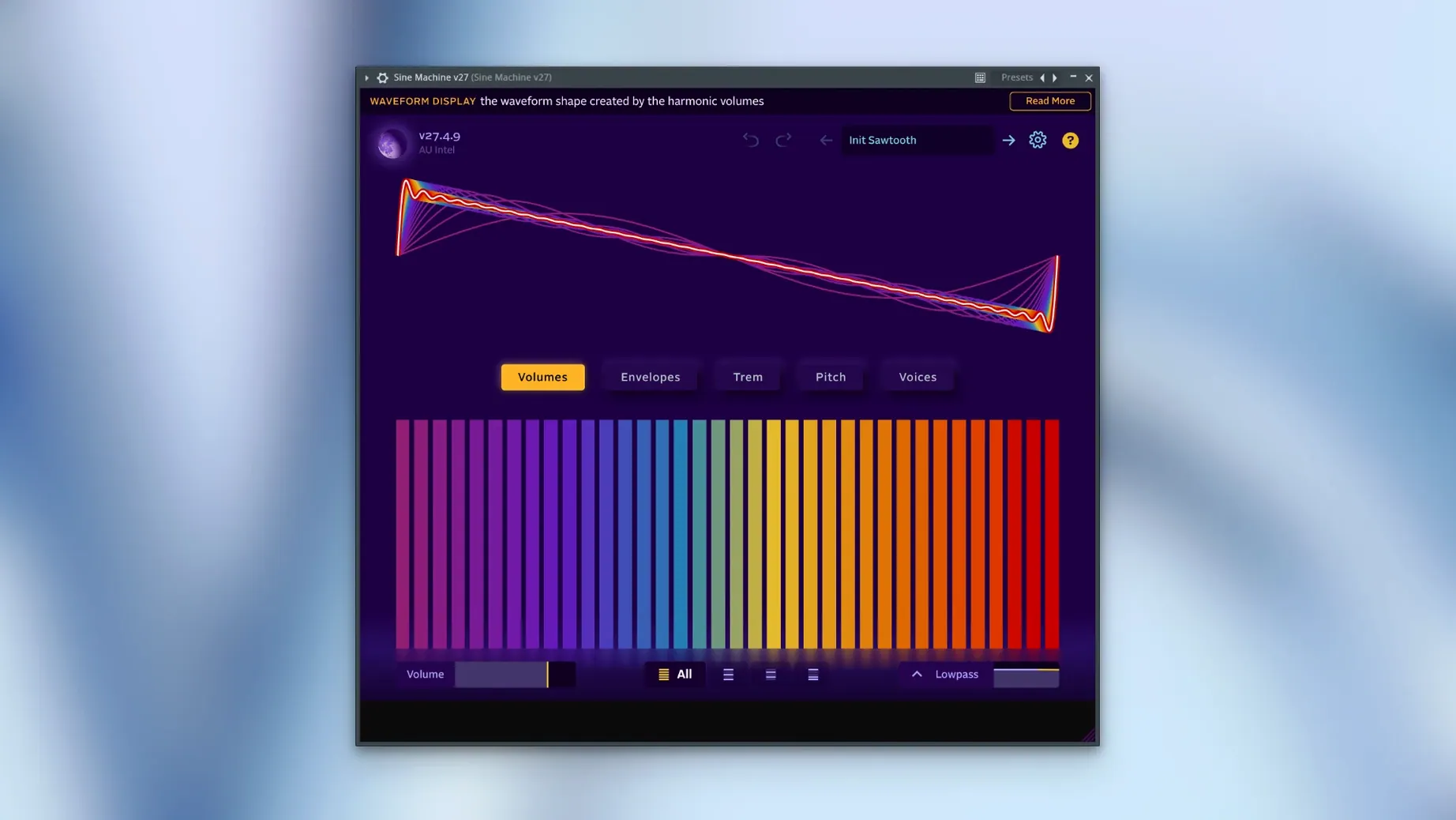
Version 27.4.9 of Melatonin Sine Machine adds live preset reloading. Open instances now notice edits to preset JSON files in the preset directory without restarting — useful when you are tweaking your own patches and want to hear the result immediately.
What it does with its 511 oscillators
Sine Machine is an additive virtual instrument with no conventional knobs. Each voice uses 511 time-domain oscillators, and the included additive reverb is built from 1,000 sine waves. The result is a sound that feels dense and organic in a way subtractive synthesis rarely manages. The interface is clean: you shape timbre by working with partials rather than twisting filters and envelopes. Over 140 factory presets give a sense of what is possible without building from scratch.
Plugin formats and system fit
The plugin ships as CLAP and VST3, supporting both Apple Silicon and Intel on macOS 11 and later. The same installer works for Windows and Linux (now compiled against glibc 2.35 for older distributions). If VST3 quirks appear, a few Terminal commands remove extended attributes and the macOS quarantine flag, then re-sign the bundle. It is a focused tool: no bloat, no knobs — just additive synthesis done properly.
Sound designers shaping atmospheric textures and evolving drones
Sound designers working on atmospheric textures, pads and evolving drones will find the additive engine immediately useful. The ability to edit per-harmonic ADSR, volume and pitch LFO parameters in bulk means you can shape a sound's spectral movement over time without drawing dozens of automation lanes. DAW users who prefer to stay inside the box benefit from the AU, VST3 and CLAP formats — no extra routing or external gear needed.
Synth programmers who enjoy building patches from first principles will appreciate the open JSON preset format. You can write or edit presets in any text editor, which also makes version control and sharing straightforward. For producers who rarely touch synthesis beyond loading presets, the 140+ factory patches offer enough variety to cover pads, leads and soundscapes without deep diving.
Musicians who work across multiple operating systems also gain: the same plugin runs on macOS, Windows and Linux, so a project started on a MacBook can move to a desktop PC or Linux DAW without format issues.
Evolving a pad from dark and narrow to bright and wide over eight bars
A composer scoring a short film needs an evolving pad that shifts from dark and narrow to bright and wide over eight bars. Rather than layering three subtractive synths and hoping the filter sweeps align, they open Sine Machine, load a factory pad preset, then open the JSON file in a text editor. They adjust the per-harmonic volume envelopes so the lower partials fade earlier and the higher partials swell later. The live preset reloading means each save to the JSON file updates the plugin instance instantly — no need to close and reopen the plugin window. After fine-tuning the Gaussian noise pitch modulation on a few harmonics, the pad moves exactly as the scene requires. The whole process takes minutes, not hours.
Hearing additive synthesis through factory presets
Start with the factory presets. Browse through them to hear how additive synthesis behaves across different timbres — some presets use the brickwall filter, others lean on the Gaussian band-pass or the additive reverb. Listen for the density that comes from hundreds of oscillators per voice.
Open a preset's JSON file in a text editor alongside the plugin. Change a single harmonic's volume value, save the file, and watch the plugin update live. This immediate feedback is the quickest way to understand how the JSON structure maps to what you hear.
Try building a simple patch from scratch. Set a few partials with different pitches and volumes, then add an ADSR envelope to one harmonic group. Use the bulk edit features to copy that envelope to several other harmonics. Add a touch of Gaussian noise pitch modulation to see how it affects the upper partials differently from the lower ones.
If you use a DAW that supports CLAP, test that format first — it tends to handle parameter changes more transparently than VST3 in some hosts. For standalone use, the app loads the same presets and runs independently of any DAW.
Melatonin Sine Machine macos download generates ambient sine tones for sleep, ideal for meditators and sound therapists.
Changes in this build
- Live preset reloading added — open instances see edits to preset JSON files without restarting.
- Build compiled against glibc 2.35 for broader Linux compatibility.
Before it goes on the Mac
- macOS 11 or later
- Apple Silicon or Intel processor
- CLAP or VST3 host
Questions from the room
Can I edit presets while Sine Machine is open?
Yes. Version 27.4.9 added live preset reloading, so existing instances notice changes to preset JSON files in the preset directory without restarting.
Installing it on the Mac
- Follow the included installation and activation instructions.
- If VST3 problems occur, remove extended attributes from the VST3 bundle using Terminal commands.
- If VST3 problems persist, remove the macOS quarantine attribute from the VST3 bundle with Terminal commands.
- If needed, re-sign the VST3 bundle using the provided Terminal command.
Notes from the control room
Sign in or open a catalogue account to leave a note.
No notes from the room yet. If you have used this build for a week, a short note helps the next person.
Also filed under Logic Pro Plugins
The whole Logic Pro Plugins rack Metric Halo Production Bundle2025.05 Logic Pro Plugins 318 MB
 Mastering The Mix Bundle2026.09.11 Logic Pro Plugins 681 MB
 MiniMeters1.0.30 Logic Pro Plugins 103 MB
 Minuit Solstice1.2.0 Logic Pro Plugins 117 MB
 Native Instruments Massive X2.0.0 Logic Pro Plugins 2.3 GB Updated
 Neural DSP Archetype Petrucci1.0.0 Logic Pro Plugins 745 MB
 LANDR Vocal Bundle2025.12 Logic Pro Plugins 447 MB
 Neural DSP Archetype Rabea X1.0.1 Logic Pro Plugins 742 MB