
Home › Logic Pro Plugins › elastiquePitch

elastiquePitch 2.5.0 (Mac)
Updated
The catalogue note
If you have worked with pitch correction in a DAW, you know the trade-off: shift the pitch and the timbre follows, often making vocals sound thin or unnatural. elastiquePitch v2.5 from zPlane.development tackles this by letting you change pitch and timbre independently, with real-time formant shifting built into the same interface. For an experienced user, that means a lead vocal can be tuned without losing its chest tone, or a backing part can be bent into a different character entirely.
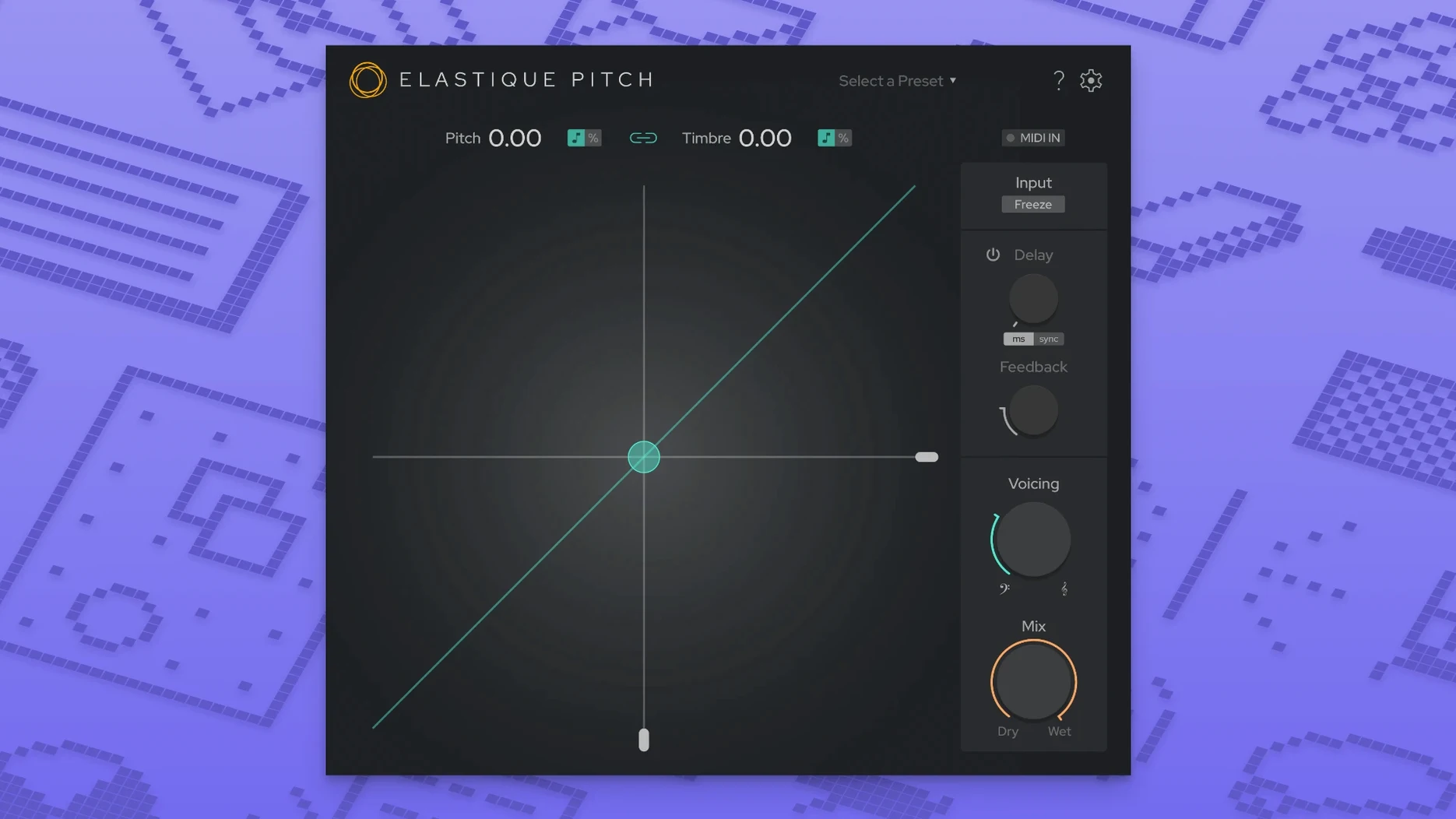
- Formant shift in real time. Adjust formants separately from pitch, so a male voice shifted up stays full, or a female voice dropped down doesn't turn into a cartoon character. Useful for sound design and corrective work alike.
- ÉLASTIQUEPRO algorithm. Version 2.5 uses the latest from zPlane, reducing artefacts on complex material. Works on stereo and up to 16-channel audio — useful for surround or stems.
- Redesigned UI. The new interface in 2.5 puts pitch, timbre and formant controls on a single screen, with clear metering. No digging through sub-menus mid-session.
- Multichannel support up to 16 channels. Handles 5.1, 7.1 or larger formats without daisy-chaining instances. A practical time-saver in post-production.
- Native plug-in formats. VST3, AU and AAX native — works in Logic, Pro Tools, Cubase and others. macOS 10.15 or later, Intel and Apple Silicon.
For anyone who already reaches for pitch tools regularly, elastiquePitch v2.5 offers the control that usually requires two or three separate plugins. The formant and timbre separation alone makes it worth a look for dialogue editing and vocal tuning.
A dialogue repair workflow, start to finish
Consider a location recording where the actor's voice sounds thin because the microphone was slightly off-axis. Instead of reaching for an EQ and hoping, I route the dialogue track through elastiquePitch and do this:
- Set the pitch to zero. I leave pitch at its centre position so the spoken note stays the same. The goal here is timbre, not transposition.
- Lower the formant by a small amount. A reduction of around 5-10% adds body to the voice without making it sound like a different person. The ÉLASTIQUEPRO algorithm handles this cleanly; the formant shift is audible but not wobbly.
- Check the grain freeze. If the actor's voice has a breathy section that needs a sustained tone for a transition, I enable the freeze function on that phrase and capture a grain. It works as a makeshift sustain without layering a separate sampler.
- Add a pitch-shifted echo send. For a subtle stereo width effect, I send the dry dialogue to an auxiliary track running elastiquePitch with a slight pitch offset — a few cents up or down — and mix it low. The echo tail inherits the offset, giving depth without clutter.
The whole adjustment takes less than a minute once the plugin is loaded. No additional formant tools needed.
Post-production editors benefit from 16-channel multichannel support
This plugin suits three kinds of Mac users particularly well:
- Post-production editors working on broadcast or film. The multichannel support up to 16 channels means a single instance handles a 5.1 dialogue stem or an ADR session with multiple mic feeds. No need to duplicate and sync instances across tracks.
- Music producers who tune vocals in a mix context. Being able to shift formants independently means you can nudge a background vocal up an octave for a doubling effect without it sounding like a chipmunk. The separate timbre control lets you match the altered part back to the original performance.
- Sound designers building unusual textures. The combination of pitch shift, formant shift, grain freeze and echo makes elastiquePitch a one-plugin source for alien voices, slowed-down atmospheres and metallic resonances. You can dial in something unnatural without stacking five plugins.
Lacks grain freeze and multichannel support that Waves SoundShifter has
There are a few other pitch-shifting plugins on macOS, but they approach the problem differently:
- Waves SoundShifter. A straightforward pitch shifter with basic formant control, but it lacks the grain freeze and multichannel support. For stereo stem work it is fine; for 5.1 or 7.1 you would need multiple instances and manual routing. elastiquePitch's 16-channel handling saves that hassle.
- Celemony Melodyne. The gold standard for note-by-note pitch correction, but it is not a real-time plugin. You process audio offline, which works for detailed tuning but not for live monitoring or quick echo sends. elastiquePitch is faster to insert on a track and hear results immediately.
- Apple's built-in Pitch Shifter (AU). Free and functional, but it offers no formant separation and only two channels. The algorithm is older and more prone to artefacts on extreme shifts. elastiquePitch v2.5 with ÉLASTIQUEPRO stays cleaner at wider intervals, and the redesigned UI makes the controls easier to read during a session.
Each tool has its place, but for real-time work where timbre independence and channel count matter, elastiquePitch fills a gap that the others leave open.
Changes in this build
- Redesigned user interface.
- Expanded multichannel support up to 16 channels.
- Uses the latest ÉLASTIQUEPRO algorithm.
Before it goes on the Mac
- macOS 10.15 or later
- Intel or Apple Silicon
- English interface
Questions from the room
Can elastiquePitch shift formants in real time?
Yes, version 2.5 shifts formants in real time alongside pitch and timbre, allowing independent control of vocal character.
What plug-in formats does it support on Mac?
It supports VST3, AU, and AAX native formats on macOS 10.15 or later, for both Intel and Apple Silicon.
Does version 2.5 handle multichannel audio?
Yes, it supports up to 16 audio channels, making it suitable for surround formats like 5.1 and 7.1.
Installing it on the Mac
- Open the downloaded disk image.
- Run the standard installation procedure.
Notes from the control room
Sign in or open a catalogue account to leave a note.
No notes from the room yet. If you have used this build for a week, a short note helps the next person.
Also filed under Logic Pro Plugins
The whole Logic Pro Plugins rack Excite Audio Lifeline Expanse1.3.0 Logic Pro Plugins 352 MB
 Expressive E Soliste1.0.3 Logic Pro Plugins 951 MB
 EZbass1.3.3 Logic Pro Plugins 81 MB
 FabFilter Total Bundle29.10.2026 Logic Pro Plugins 428 MB Updated
 Cymatics VOXITY1.0.0 Logic Pro Plugins 97 MB
 Cymatics QUAKE1.0.0 Logic Pro Plugins 1.6 GB
 Help Me Devvon HMD Uncompressor1.0.03 Logic Pro Plugins 38 MB
 Cableguys Snapback1.1 Logic Pro Plugins 37 MB