
Home › Logic Pro Plugins › Cableguys Snapback

Cableguys Snapback 1.1 (Mac)
Updated
The catalogue note
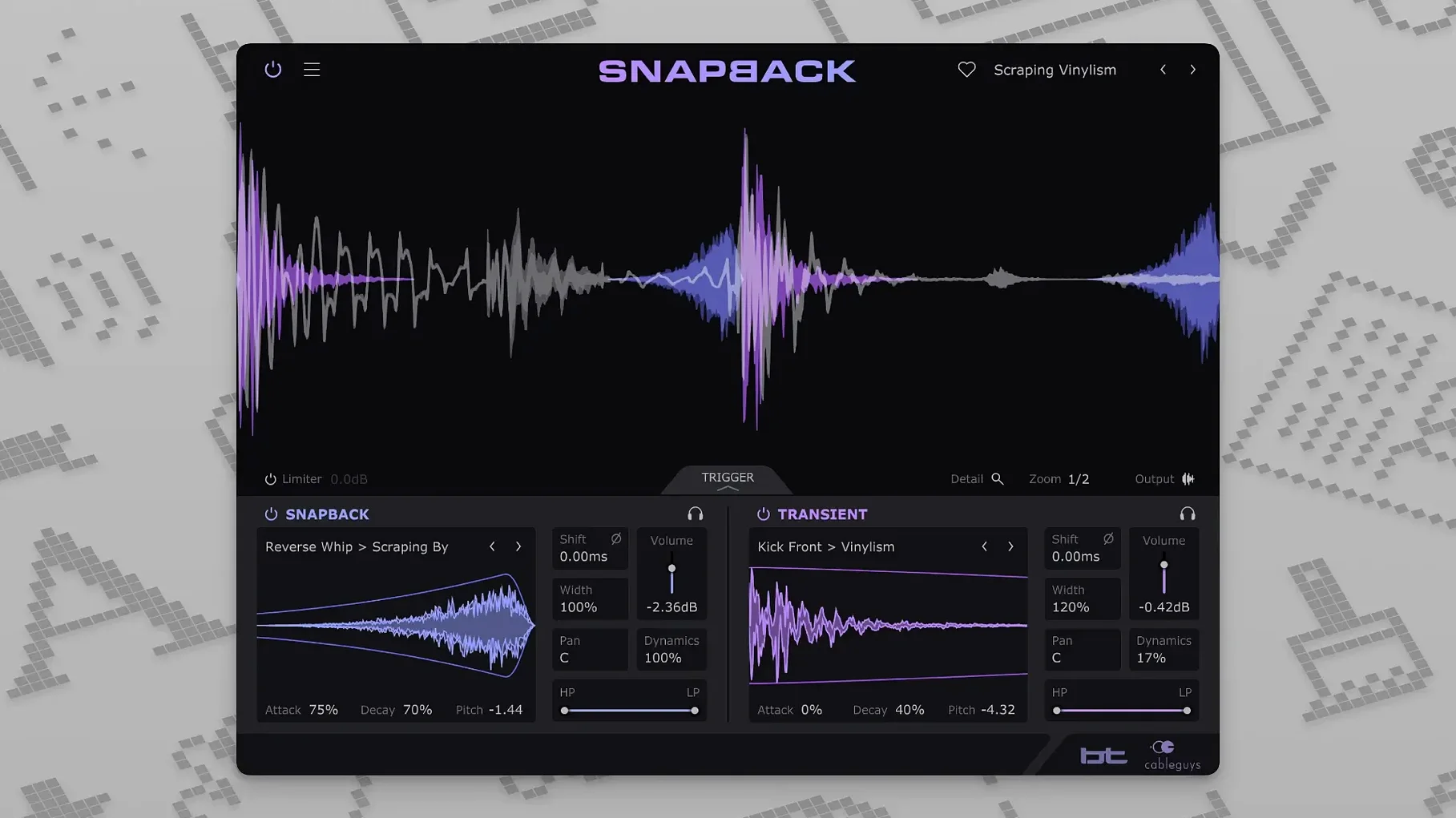
Drum hits often need more than a single sample. Layering adds weight, but aligning layers by hand is fiddly and eats time. Snapback solves that: it listens to a drum transient and snaps added samples to it, automatically.
Adds attack and texture without manual alignment
- Adding attack to kicks and snares, or texture to percussion, without manual alignment.
- Placing samples slightly before the transient to shape the initial hit.
- Using pitch and phase adjustment to blend layers that would otherwise clash.
- Envelopes let you trim each layer's length and contour, so layers sit naturally.
Works with VST 2, VST 3, AU, and AAX across major DAWs
- It works with VST 2, VST 3, AU, and AAX formats, so it fits most hosts: Ableton Live, Logic Pro, Pro Tools, Cubase, Bitwig Studio, FL Studio, and REAPER.
- The waveform visualizer shows exactly where each sample lands relative to the transient.
- Developed with BT, so the workflow is tuned for electronic and dance production.
- macOS 10.13 or later, Intel or Apple Silicon. Version 1.1 adds a Reverse button and raises MIDI port support from 16 to 256.
Requires a clear transient for reliable detection
Most people get Snapback working within minutes, but a few things can trip you up. The plugin needs a clear transient to lock onto. If your drum hit is heavily processed — lots of compression, reverb, or saturation — the detection can waver. Try feeding Snapback the unprocessed or lightly compressed hit first, then route that through your processing chain. The waveform visualiser helps here: if the marker isn't landing on the transient's peak, the source signal is probably too smeared.
Phase cancellation is the other frequent annoyance. When you layer two samples, their waveforms can cancel in certain frequency ranges, making the drum sound thinner. Snapback includes a phase adjustment control, so flip the phase of the added layer and listen. If the low end gets punchier, you've solved it. The envelope controls also let you shorten the layer's tail, which reduces phase overlap on longer samples.
If the plugin doesn't appear in your DAW after installing, check your plugin manager. Some hosts need a manual rescan or a restart. Snapback installs into the standard VST 2, VST 3, AU, and AAX folders, so point your DAW's scan path there if it isn't set already. On macOS 10.13 and later, the installer should handle permissions automatically, but if you're on a locked-down system, verify that the plugin files are in the correct directories.
Integrates with routing and processing already in your DAW
Snapback works as a standard plugin inside your DAW, so it integrates with whatever routing and processing you already have. You can use it on a dedicated drum group track, on individual hits, or even on loops. Since version 1.1 supports up to 256 MIDI ports, you can trigger Snapback from external hardware or MIDI controllers without hitting port limits — useful if you're running a large hybrid setup with drum machines and sequencers.
On macOS, Snapback plays well with Core Audio and the standard AU format, so Logic Pro users get native integration without bridging. If you use Ableton Live, the VST 3 version is the most modern option and handles parameter automation cleanly. The plugin doesn't rely on any external helper apps or background services, so there's no conflict with macOS's security features or Gatekeeper once the installer has run.
For those who use sample libraries or Kontakt, Snapback works alongside them: load your drum sample in Kontakt, route it through Snapback, and layer an additional sample on top. The alignment happens in real time, so you can audition different layers without bouncing or freezing tracks.
Start with 200-plus ready-made samples before importing your own
Start with the included samples before importing your own. The 200-plus ready-made sounds cover kicks, snares, claps, hi-hats, and percussion. Load a kick sample, feed a clean kick hit into Snapback, and cycle through the layers. You'll hear how the alignment behaves and how the pitch, envelope, and filter controls shape the result. Once you're comfortable, import your own samples — drag them in or use the file browser.
Experiment with the Reverse button added in version 1.1. It reverses the sample, which can produce interesting attack textures or ghostly tails. Try it on a snare layer for a reversed cymbal effect, or on a kick for a sub-heavy pull before the transient.
Use the waveform visualiser as a guide, not a ruler. The automatic detection is accurate, but sometimes moving the sample a few milliseconds earlier or later — using the sample offset — gives a better feel. Trust your ears, especially on acoustic or layered drums where transients aren't perfectly sharp.
Save your Snapback presets once you find a combination you like. The plugin stores the sample choice, pitch, envelope, filter, phase, and offset settings, so you can recall them on other tracks or in other projects. This is especially useful if you build a signature kick or snare layer that you reuse.
Needs clear transient hits like kicks, snares, and claps for best results
Does it work with any drum hit?
It works best with hits that have a clear transient — kicks, snares, claps, toms, percussion. Heavily layered loops or pads with no sharp attack may not trigger the detection reliably. In those cases, you can still use Snapback by feeding it a reference hit from the same loop, but it's designed for individual drum sounds.
Can I use it on a full drum bus?
Technically yes, but the plugin processes each hit independently. If your drum bus contains multiple hits close together, the detection may lock onto the wrong transient. It's more practical on individual drum tracks or on a group of similar hits.
Do I need an internet connection to use it?
No. Once installed, Snapback runs entirely offline. The sample library is stored locally.
Will it work in my DAW?
It supports VST 2, VST 3, AU, and AAX formats, so it covers the major hosts: Ableton Live, Logic Pro, Pro Tools, Cubase, Bitwig Studio, FL Studio, and REAPER. If you use a less common host, check whether it loads any of those plugin formats.
Does it add latency?
The plugin processes in real time with no lookahead. Any latency comes from your DAW's buffer setting, not from Snapback itself.
Can I use it with snapback plugin crack, cableguys snapback crack, cableguys snapback torrent, snapback torrent, or snapback vst torrent files?
Those are not relevant here. Snapback is a standard commercial plugin and this description covers its legitimate use within a DAW. The alignment and layering features work with any sample you import, regardless of how you obtained the plugin itself.
Changes in this build
- Reverse button added in version 1.1.
- MIDI ports expanded from 16 to 256.
Before it goes on the Mac
- macOS 10.13 or later
- Intel or Apple Silicon processor
- VST 2, VST 3, AU, or AAX host DAW
- Interface language: English
Questions from the room
Can Snapback place samples before the drum hit?
Yes. You can offset samples before the transient, which helps shape the attack of kicks and snares.
Which plugin formats does Snapback support?
It supports VST 2, VST 3, AU, and AAX, covering most major DAWs including Ableton Live, Logic Pro, Pro Tools, Cubase, Bitwig Studio, FL Studio, and REAPER.
Installing it on the Mac
- Run the standard installer and follow the prompts.
- Restart your DAW if needed, then load Snapback from the plugin menu.
Notes from the control room
Sign in or open a catalogue account to leave a note.
No notes from the room yet. If you have used this build for a week, a short note helps the next person.
Also filed under Logic Pro Plugins
The whole Logic Pro Plugins rack Bulldog Samples Bulldog Tuned1.1.2 Logic Pro Plugins 29 MB
 Bogren Digital Ampknob BH41.0.138 Logic Pro Plugins 280 MB
 Bogren Digital Ampknob BDH 66o6 Plus1.2.118 Logic Pro Plugins 253 MB
 Bogren Digital Ampknob BDE 1201.0.246 Logic Pro Plugins 325 MB
 BABY Audio Crystalline1.5 Logic Pro Plugins 107 MB
 Cymatics QUAKE1.0.0 Logic Pro Plugins 1.6 GB
 Cymatics VOXITY1.0.0 Logic Pro Plugins 97 MB
 Arturia V Collection 11 Pro2025.20.26 Logic Pro Plugins 53.8 GB