
Home › Logic Pro Plugins › Cymatics VOXITY
Cymatics VOXITY 1.0.0 (Mac)
Updated
The catalogue note
Version 1.0.0 is the initial release of VOXITY, so there are no prior changes to note. What you get is a straightforward vocal mixing plugin aimed at turning raw recordings into something you can place in a mix without much fuss.
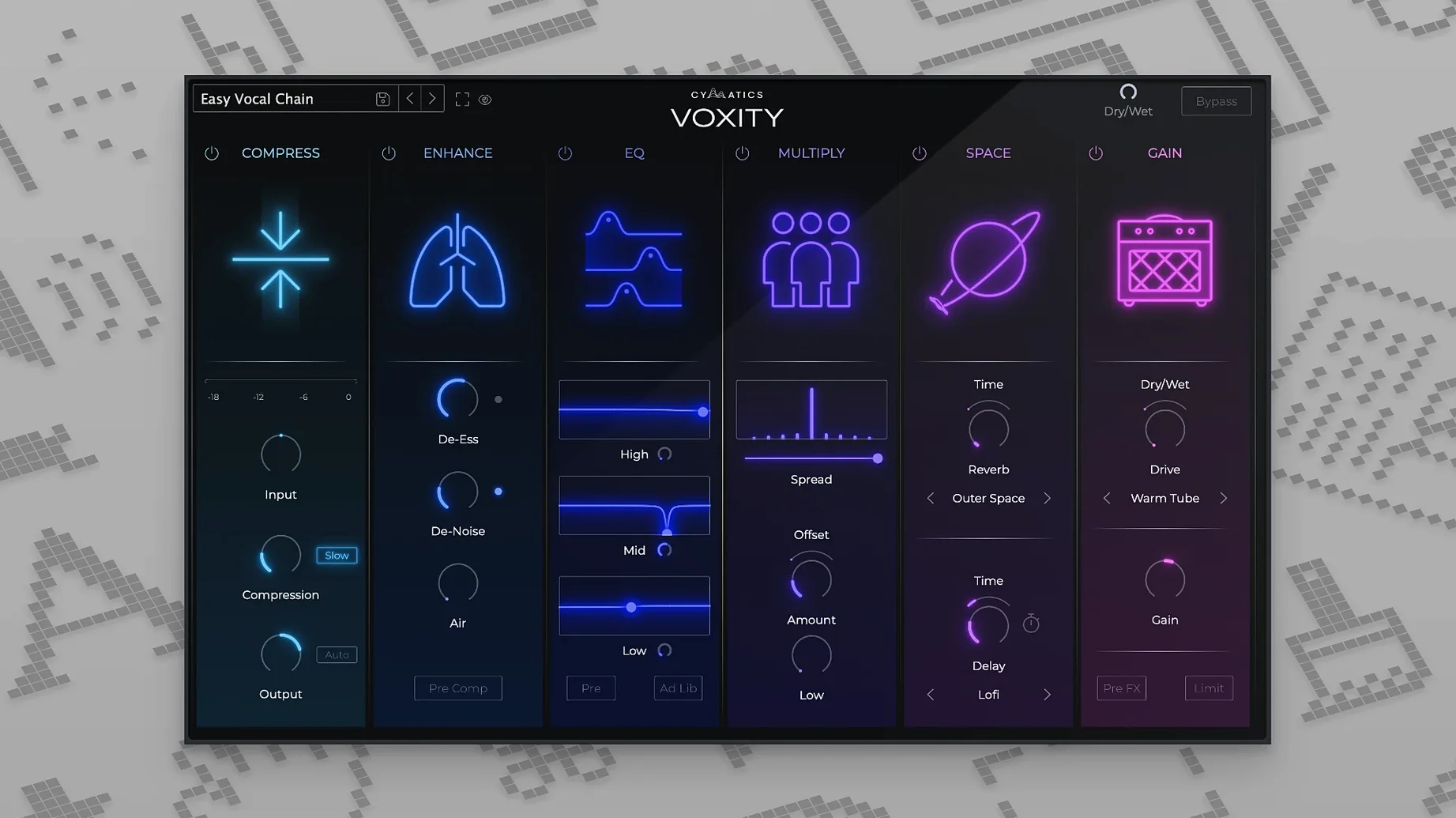
De-essing and breath control
The plugin includes parameters to reduce harsh sibilance and breathing noise. It does not replace a dedicated de-esser for heavy work, but it cleans up the common trouble spots in a vocal take quickly.
Adding echo and reverb
Echo and reverb are built in, which saves inserting separate sends for basic ambience. The controls are simple enough to dial in a room sound or a slap without diving into submenus.
Brightness and depth
There are also parameters to add brightness and depth, useful when a vocal sits too far back or sounds dull. The presets cover different styles and give a fast starting point before you tweak the individual knobs.
VOXITY runs as a plugin inside a DAW
One of the first things people want to know is whether VOXITY works as a standalone application or only inside a host. It is a plugin, so you load it in a DAW that supports the format you have installed. The disk image contains a standard installer, so no manual file placement is needed.
Another common question is about the activation method. The release notes mention K'ed by GTA, meaning the plugin does not require an online account or license file. You run the installer and it is ready to use. This matters if you work in a studio where you cannot always connect to the internet, or if you prefer to evaluate a tool without time pressure.
People also ask if the plugin works on older Macs. The minimum macOS is 10.14, which covers Mojave, Catalina, Big Sur, Monterey, Ventura, Sonoma, and Sequoia. Both Intel and Apple Silicon Macs are supported in 64-bit mode. If your DAW is 64-bit and runs on one of those systems, VOXITY will load.
Some users wonder whether the plugin is a one-knob solution or gives you granular control. The interface is laid out with several sections, each dedicated to a specific processing stage. You can adjust volume leveling, harshness reduction, breath suppression, brightness, depth, stereo width, echo, and reverb. It is not a simple vocal rider or a single-effect box. It combines multiple processors in one window, which is what Cymatics means by calling it an all-in-one vocal mixing plugin.
VOXITY works natively on Intel and Apple Silicon Macs from 2018 onward
Based on the system requirements, VOXITY should run on any Mac from 2018 onwards, including MacBook Air, MacBook Pro, iMac, Mac mini, Mac Studio, and Mac Pro models. The plugin supports both ARM and x86 architectures natively, so Rosetta 2 is not required on Apple Silicon machines, though it will still work if your DAW runs under Rosetta.
The interface language is English only, so there is no need to switch system language or install additional localisation files. The plugin is 64-bit, which means it will not load in older 32-bit-only DAWs or hosts. Most current DAWs are 64-bit, but if you still use an old version of Logic Pro 9 or Cubase 5, you are out of luck.
The installer comes as a disk image. You open it, run the installer package, and the plugin files are placed in the standard system locations. No component files to drag manually, no AU or VST folders to guess. The installer handles both Intel and Apple Silicon architectures automatically, so you do not need to pick a separate version.
VOXITY offers fewer modules than iZotope Nectar
There are several vocal processing plugins on the Mac that aim to do what VOXITY does. One is iZotope Nectar, which offers a much larger set of modules including pitch correction, harmony generation, and a more detailed de-esser. Nectar is deeper but also heavier on the CPU and takes longer to learn. VOXITY is narrower in scope and faster to set up. If you only need basic leveling, sibilance control, breath removal, and ambience, VOXITY does it without the extra layers.
Another comparable tool is Antares Auto-Tune Vocal Compressor, which focuses on dynamics and de-essing but does not include reverb, echo, or stereo widening. It is a good utility but leaves you reaching for other plugins for ambience and spatial processing. VOXITY includes those stages in one window, which saves track inserts and bus routing.
A third option is Waves Vocal Rider, which automates volume leveling but does not touch harshness, breath noise, or spatial effects. It is a single-purpose tool. VOXITY combines volume leveling with the other processing, so you can shape the vocal in one plugin rather than chaining three or four.
None of these comparisons are about quality. They are about scope and workflow. VOXITY sits in the middle: not as deep as Nectar, not as narrow as Vocal Rider. It is a sensible choice when you want to move fast and keep the track count low.
A podcast editor uses VOXITY to fix inconsistent mic placement and breath noise
Consider a podcast editor who records voiceover narration for corporate videos. The raw recordings come from a home studio with inconsistent mic placement. Some takes are quiet, some have plosives and breath noise, and the voice lacks presence when played back against background music.
The editor inserts VOXITY on the voiceover track. The volume leveling handles the quiet and loud sections without writing automation. The harshness reduction cleans up the sibilance that appears on S and T sounds. The breath suppression removes the audible inhales between sentences, which saves manual editing time. A touch of brightness brings the voice forward, and a short reverb adds a sense of space that matches the room tone of the video.
The presets give a quick starting point. The editor picks a podcast preset, adjusts the reverb decay slightly, and the voiceover sits in the mix without further processing. The whole adjustment takes under a minute per episode. That is the kind of scenario where an all-in-one plugin makes more sense than building a chain of individual processors.
Before it goes on the Mac
- macOS 10.14 or later
- 64-bit system
- Intel or Apple Silicon processor
Questions from the room
What macOS versions are supported?
VOXITY supports macOS 10.14 and later on both Intel and Apple Silicon Macs.
Does it include presets?
Yes, it includes ready-made presets for different vocal styles.
Installing it on the Mac
- Open the downloaded disk image.
- Run the standard installer.
Notes from the control room
Sign in or open a catalogue account to leave a note.
No notes from the room yet. If you have used this build for a week, a short note helps the next person.
Also filed under Logic Pro Plugins
The whole Logic Pro Plugins rack Cymatics QUAKE1.0.0 Logic Pro Plugins 1.6 GB
 elastiquePitch2.5.0 Logic Pro Plugins 17 MB
 Cableguys Snapback1.1 Logic Pro Plugins 37 MB
 Bulldog Samples Bulldog Tuned1.1.2 Logic Pro Plugins 29 MB
 Excite Audio Lifeline Expanse1.3.0 Logic Pro Plugins 352 MB
 Bogren Digital Ampknob BH41.0.138 Logic Pro Plugins 280 MB
 Bogren Digital Ampknob BDH 66o6 Plus1.2.118 Logic Pro Plugins 253 MB
 Expressive E Soliste1.0.3 Logic Pro Plugins 951 MB