
Home › Logic Pro Plugins › Bulldog Samples Bulldog Tuned

Bulldog Samples Bulldog Tuned 1.1.2 (Mac)
Updated
The catalogue note
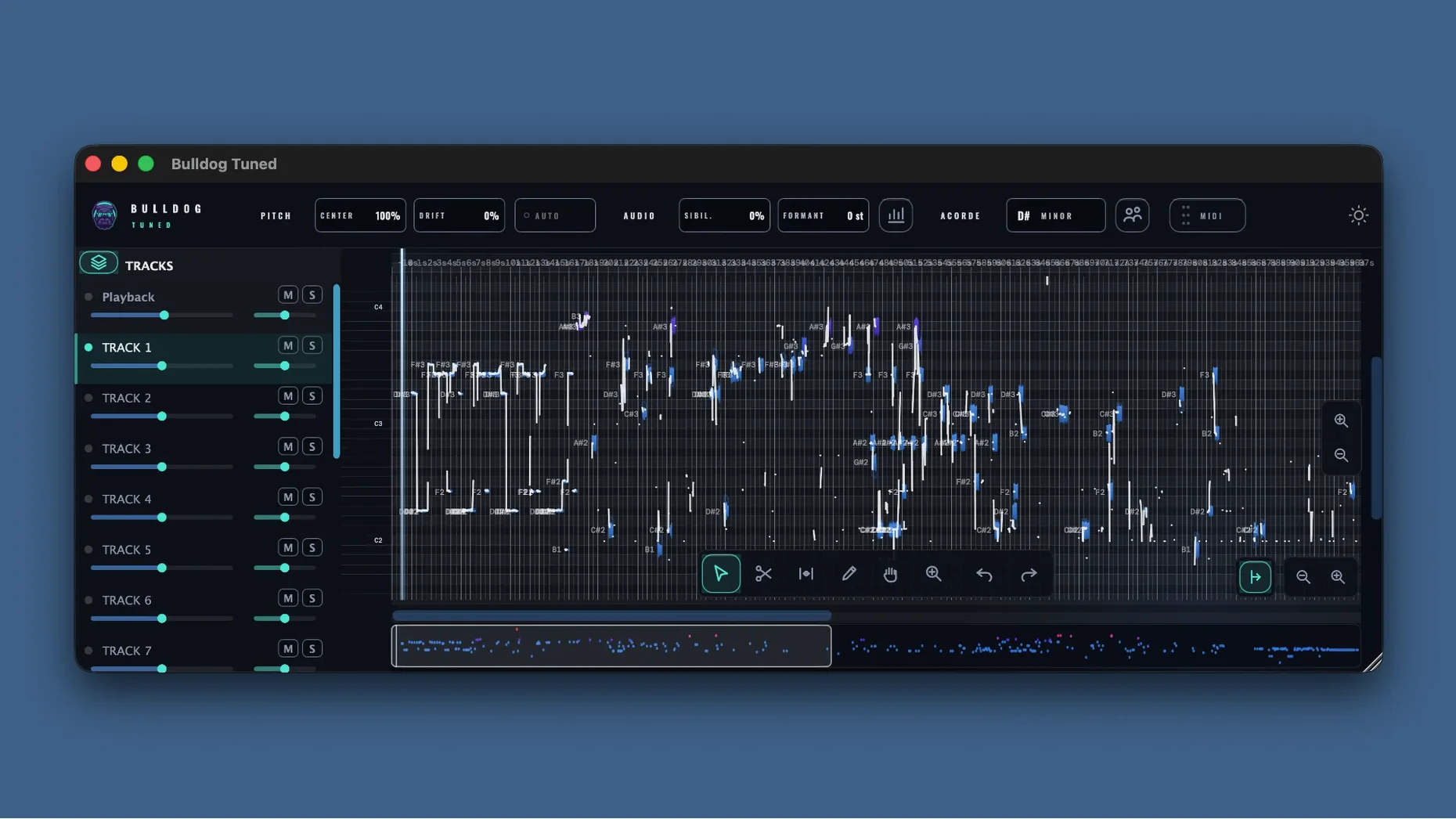
Vocal tuning that works across an entire mix, not just a single track, is a rare thing. Bulldog Samples Bulldog Tuned handles exactly that: it is a professional plug-in for vocal correction and tuning with a built-in harmonizer. It processes up to 16 vocal tracks simultaneously using multi-channel processing, and includes manual tools for adjusting individual parts when automatic correction isn't enough. If you are layering harmonies, doubling leads or working with group vocals, this plug-in saves routing headaches and keeps the tuning consistent across the bus.
| Key detail | Specification |
|---|---|
| Version | 1.1.2 |
| macOS | 11 and later (Intel and Apple Silicon) |
| Interface language | English |
Available as a standard Mac installer via disk image, Bulldog Tuned integrates into any DAW that supports plug-ins. For engineers tracking vocal groups or producers who want live pitch control across a whole section, it is a practical alternative to chaining multiple instances of a standard tuner.
Multi-channel design sets it apart from single-track tuners
In the Mac pitch-correction space, the usual suspects are single-track tuners and channel-strip pitch modules. Bulldog Tuned sits in a different category because of its multi-channel design. A typical workflow with, say, a well-known pitch-correction plug-in requires one instance per vocalist, then a separate aux for harmonies — that is three or four instances for a trio. Bulldog Tuned handles all of them inside one plug-in window, which matters when you are working on a session with limited CPU headroom or simply want fewer mixer lanes.
Another common approach is to use a harmony-generator plug-in that creates artificial doubles from a single source. Those are useful for background textures, but they do not correct pitch on the source material itself. Bulldog Tuned combines both jobs: it tunes the incoming vocals and builds harmonies from them. The manual part-adjustment tools also give you control over individual notes, which is something most automated harmonisers leave out. For engineers who prefer to keep pitch correction and harmony generation in one insert slot rather than two or three, this plug-in is the more direct route.
A third alternative is the built-in pitch correction found in some DAWs. These vary in quality and often lack multi-channel support entirely. Bulldog Tuned is a dedicated tool that does not depend on your DAW's stock processing, and its 16-track capacity is well beyond what any built-in system offers.
Ignoring multi-channel routing is the most common mistake
The most common mistake is treating it like a standard single-track tuner and ignoring the multi-channel routing. Users load it on a group bus, send all vocals there, and expect it to correct each voice individually. That works, but the plug-in can also accept separate inputs for each of the 16 channels. If your DAW supports multi-channel tracks or surround buses, you can route each vocalist to a dedicated channel inside the plug-in rather than summing them first. This gives you independent pitch control per singer, which is the point of the multi-channel design.
Another error is over-correcting the harmoniser. Because the plug-in builds harmonies automatically from the tuned input, it is tempting to let it generate four or five parts on every phrase. The result quickly becomes dense and unnatural. A better starting point is one or two harmony voices, then use the manual adjustment tools to shift notes that clash with the lead. The plug-in is designed for natural-sounding correction, not for turning every section into a choir.
Beginners also sometimes forget that the installer is a standard disk image — no serial numbers or online activation is needed for the version described here. The build is pre-activated, so you open the DMG, run the installer, and the plug-in appears in your DAW's insert list.
Runs natively on Apple Silicon and Intel Macs in any AU or VST DAW
Bulldog Tuned works inside any AU- or VST-compatible DAW on macOS 11 or later. It runs natively on both Apple Silicon and Intel Macs, so no Rosetta translation is needed on newer machines. If you use Logic Pro, the multi-channel routing aligns well with Logic's surround and multi-output instrument tracks. In Ableton Live, you can route multiple audio tracks to a group and insert Bulldog Tuned there, or use Live's external instrument routing for more control.
The plug-in also pairs well with other Bulldog Samples tools if you use them. For vocal production, you might run Bulldog Tuned on a bus, then follow it with a compressor or de-esser on the same channel. Because it handles up to 16 tracks, you can keep your mixer organised with a single insert rather than a row of identical tuners.
macOS features such as Audio Units validation and the built-in Audio MIDI Setup utility are not required for installation, but they confirm the plug-in is recognised correctly. If you check Audio Unit Manager in Logic or the plug-in manager in your DAW, Bulldog Tuned should appear listed as a valid unit. That is useful for troubleshooting if a new install does not show up immediately.
Before it goes on the Mac
- macOS 11 or later
- Intel or Apple Silicon
Installing it on the Mac
- Open the downloaded disk image.
- Run the standard installation process.
Notes from the control room
Sign in or open a catalogue account to leave a note.
No notes from the room yet. If you have used this build for a week, a short note helps the next person.
Also filed under Logic Pro Plugins
The whole Logic Pro Plugins rack Cableguys Snapback1.1 Logic Pro Plugins 37 MB
 Bogren Digital Ampknob BH41.0.138 Logic Pro Plugins 280 MB
 Bogren Digital Ampknob BDH 66o6 Plus1.2.118 Logic Pro Plugins 253 MB
 Bogren Digital Ampknob BDE 1201.0.246 Logic Pro Plugins 325 MB
 BABY Audio Crystalline1.5 Logic Pro Plugins 107 MB
 Cymatics QUAKE1.0.0 Logic Pro Plugins 1.6 GB
 Cymatics VOXITY1.0.0 Logic Pro Plugins 97 MB
 Arturia V Collection 11 Pro2025.20.26 Logic Pro Plugins 53.8 GB