
Home › Logic Pro Plugins › Help Me Devvon HMD Uncompressor

Help Me Devvon HMD Uncompressor 1.0.03 (Mac)
Updated
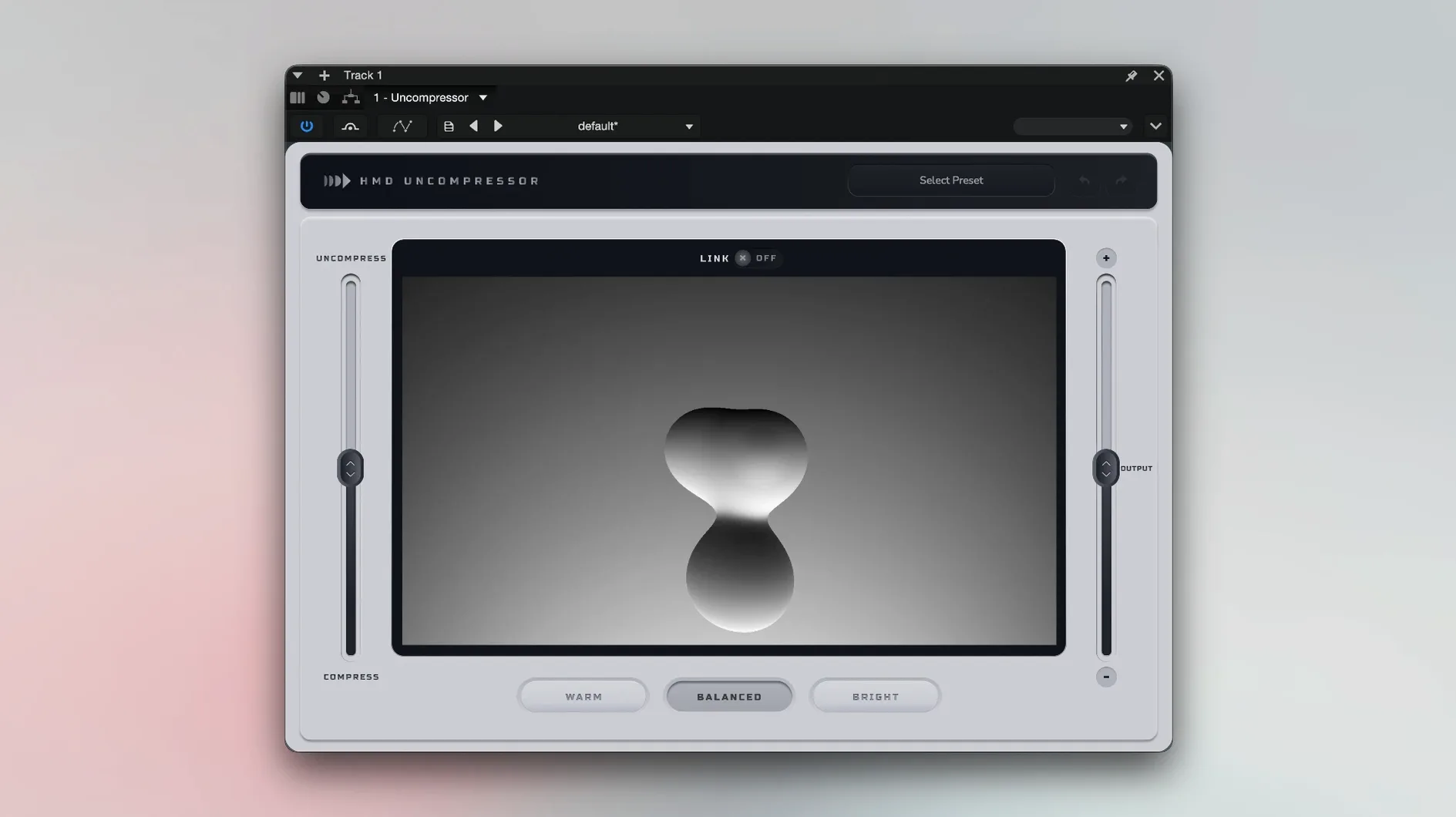
The catalogue note
The Uncompress link is where this plugin starts making sense. Flip it on and the Output slider follows the Uncompress control inversely, so you can push transients harder without slamming the ceiling. It's a small thing, but it keeps the gain staging honest.
Runs on macOS 10.13 or later as VST3, AU and AAX
HMD Uncompressor 1.0.03 runs on macOS 10.13 or later, Intel and Apple Silicon, and comes as VST3, AU and AAX. That covers Logic, Pro Tools, Cubase and most other hosts on both Mac and Windows. Memory demands are modest: 8 GB minimum, 16 GB recommended, with 500 MB of disk space for the install.
A workflow that uses the readout
- Insert HMD Uncompressor on a drum bus or a vocal track.
- Watch the live processor readout as the transients hit; it reacts in real time.
- Pick one of the three tonal modes to shape how the detector responds.
- Adjust Uncompress to open or tighten the attack.
- Enable the Uncompress-Output link to keep levels stable while you sweep.
The plugin is part of the HMD lineup, so it sits alongside the company's other dynamics tools with the same clean interface. For a transient processor, it behaves predictably; the readout tells you exactly when the detector fires, which is more than most compressors offer.
Uses a single Uncompress slider instead of attack and sustain knobs
If you have used a conventional transient designer, you will notice HMD Uncompressor approaches the problem differently. Most transient shapers work with attack and sustain knobs that alter the envelope after detection; the HMD plugin uses a single Uncompress slider that blends between compression and expansion of the detected transients. That makes it closer to a dynamics processor than an envelope shaper.
Compare it to a standard compressor with a fast attack setting. A compressor clamps down on the transient and then releases, which works but introduces timing artefacts if the release is not dialled in carefully. HMD Uncompressor's transient recognition happens in real time and adjusts gain before the transient finishes, so the result feels cleaner on percussive material. The three tonal modes give it another angle: where a typical transient shaper offers only frequency-independent gain changes, Warm, Balanced and Bright let you steer the detector's emphasis towards low-mid density or high-frequency detail without extra EQ.
Against a multiband transient processor, the HMD plugin is simpler and faster to set up. You do not need to split bands or adjust crossover points. For a vocal that needs a softer attack or a snare that needs more crack, one slider and one mode switch get you there.
A session with it on a mix bus
I started with a mix that had a drum bus already compressed, but the kick and snare felt buried behind the overheads. The mix bus had a gentle glue compressor, so adding another full-band compressor would have made everything flat. I inserted HMD Uncompressor on the drum bus instead.
The live processor readout showed that the detector was catching the kick and snare cleanly but missing some of the hi-hat transients, which was fine for what I needed. I set the tonal mode to Warm to keep the low-mid punch from the kick while letting the snare's body come through. Starting with Uncompress at zero, I watched the readout and pulled the slider up slowly until the kick started cutting through the overhead wash without making the snare sound aggressive. The readout flickered with every kick hit, confirming the detector was locked on.
When I linked Uncompress to Output, the level stayed consistent, so I did not need to adjust the fader afterwards. A quick A/B showed the drums had more attack without the sustain being pulled down. I left the plugin on the bus for the rest of the mix.
Start with Balanced mode on a drum loop for a neutral starting point
- Start with the Balanced mode on a drum loop. It gives a neutral starting point, and you can switch to Warm or Bright only when you know what the track needs.
- Use the live processor readout to check if the detector is catching the right transients. If the readout barely moves, the Uncompress slider has little to work with; lower the threshold in the source track or increase the input level before the plugin.
- Try the Uncompress-Output link from the beginning. It prevents you from chasing levels while you adjust transients, which saves time when you are still learning how the slider behaves on different material.
- On vocals, Bright mode can help sibilance and breath sounds cut through without de-essing. Set Uncompress low and increase until the vocal sits forward in the mix.
- If the plugin feels too subtle, check that the source track has enough dynamic range. Heavily limited material gives the detector little to work with.
Before it goes on the Mac
- macOS 10.13 or later
- Intel or Apple Silicon
- 8 GB RAM minimum (16 GB recommended)
- 500 MB free disk space
Questions from the room
What host formats does HMD Uncompressor support?
It is available as VST3, AU and AAX, so it works in Logic Pro, Pro Tools, Cubase and other major DAWs on macOS and Windows.
Installing it on the Mac
- Run the installer from the package and follow the on-screen instructions.
- Launch your DAW, then follow the activation steps included in the package to authorise the plugin.
Notes from the control room
Sign in or open a catalogue account to leave a note.
No notes from the room yet. If you have used this build for a week, a short note helps the next person.
Also filed under Logic Pro Plugins
The whole Logic Pro Plugins rack iZotope Neutron5.2.0 Logic Pro Plugins 928 MB
 iZotope RX12.1.0 Logic Pro Plugins 3.6 GB
 iZotope Tonal Balance Control3.0.0 Logic Pro Plugins 264 MB
 Kalifornia Dynamic KD Alkane1.0.17 Logic Pro Plugins 270 MB
 Komplete FX Bundle2026.1 Logic Pro Plugins 3.2 GB
 KORG Collection1.0.3 Logic Pro Plugins 175 MB
 KORG Software Multipoly Native1.1.3 Logic Pro Plugins 137 MB
 KORG TRITON1.4.7 Logic Pro Plugins 586 MB