
Home › Logic Pro Plugins › KORG TRITON

KORG TRITON 1.4.7 (Mac)
Updated
The catalogue note
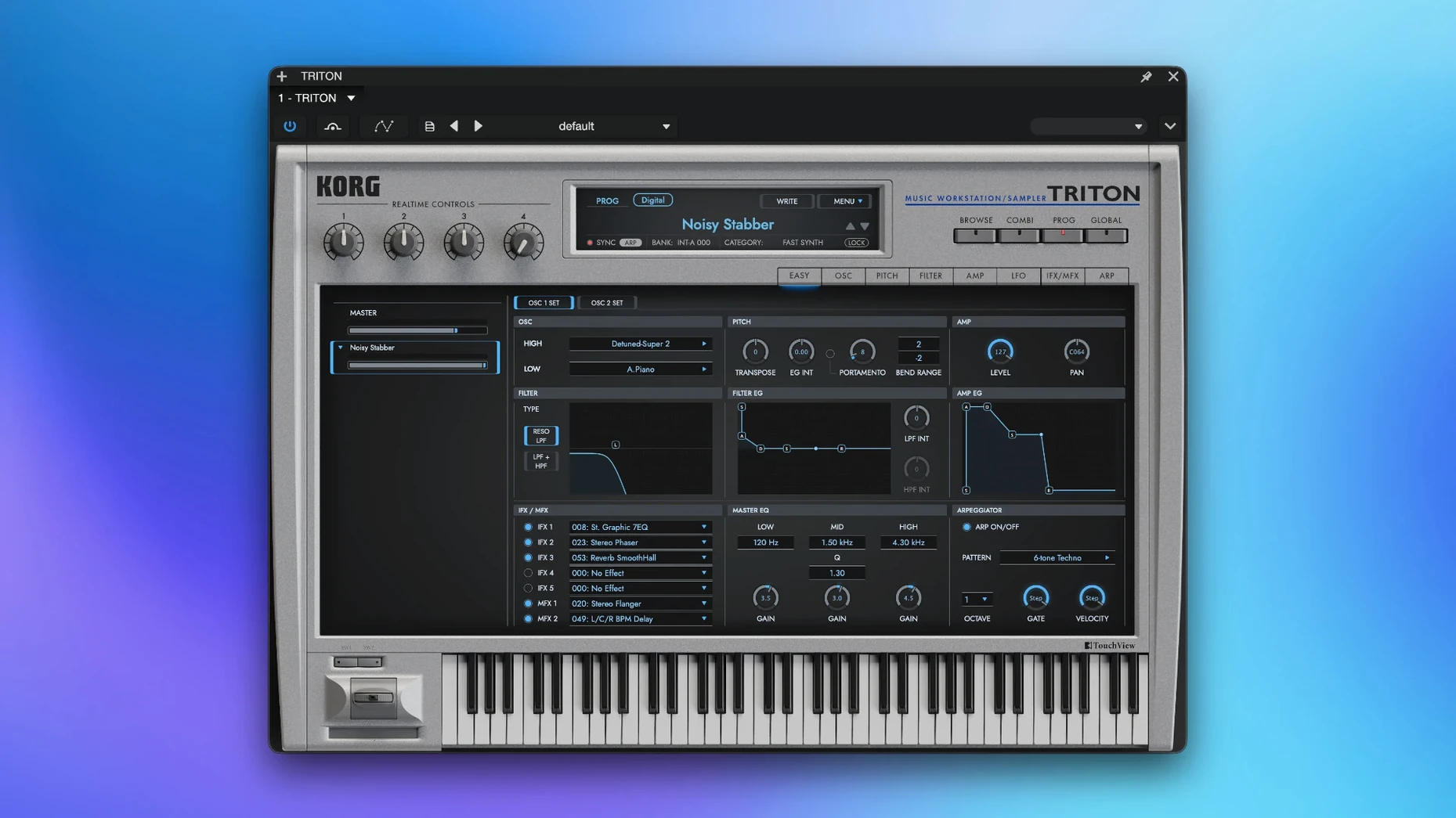
Version 1.4.7 of the KORG TRITON plugin packs over 4,000 sounds into a single window that mirrors the original 1999 workstation. Five insert effects and two master effects sit at your disposal, alongside two filter types that shape the tone before it hits the mix bus. The combination mode still layers up to eight sound parts, which makes layering pads, basses or stabs a matter of a few clicks rather than a multi-track setup.
Layering factory timbres without extra MIDI routing
- Layering multiple timbres from the factory library without extra MIDI routing.
- Dialling in quick ambience or compression on individual sounds via the insert effects.
- Running a second master effect across the whole layer stack for glue or space.
- Standalone use on a MacBook for writing or sound design on location.
Runs on macOS 11 and later, Intel and Apple Silicon natively
- It runs on macOS 11 and later, both Intel and Apple Silicon natively.
- Only VST is listed as a plugin format; check your DAW supports it if you plan to host it.
- Part of the KORG Collection suite, so updates come through that installer.
How a soundtrack composer might use it
Consider a composer working on a short film score who needs a tense, evolving drone and a punchy brass stab to land together. In a DAW, they load KORG TRITON on one track, set combination mode, and assign a slow string pad to part one and a staccato brass hit to part two. The insert effects let them add a short reverb to the pad while keeping the brass dry, and the master effects apply a gentle compression across the whole layer. No extra MIDI tracks, no routing — just one plugin instance doing the work of two or three.
Shares installer paths and authorisation with KORG M1 and WAVESTATION
Because TRITON sits inside the KORG Collection, it shares installer paths and authorisation with plugins like KORG M1 or KORG WAVESTATION. If you already have those, the setup feels familiar: the same launcher app handles updates and activation. On the macOS side, the standalone version runs as a regular application, so you can assign it to a separate desktop space or use the built-in Audio MIDI Setup to route its output into other apps like Logic Pro or Ableton Live via IAC driver. It also respects macOS screen reader settings if you need to navigate its interface with assistive technology.
How it compares to similar plugins
KORG TRITON’s main competition comes from other workstation recreations. The Roland Jupiter-8 emulation by Roland Cloud offers a different character — analogue synthesis rather than sample-based PCM — but lacks the multi-timbral combi mode and the sheer number of presets. Arturia’s Analog Lab bundles sounds from many hardware synths, but its browser is curated rather than exhaustive; you won’t get the full TRITON factory library or its specific effects chain. UVI Workstation is free and hosts soundbanks, but its interface doesn’t mimic any single hardware unit, so the tactile experience of dialling up a combi as on the original TRITON is missing. Each serves a different workflow, but TRITON is the only one that recreates the exact feel and sound set of that late-90s workstation.
Combi mode parts share the same MIDI channel unless you reassign them
- Assuming combination mode works like a DAW’s multi-track — each part in a combi shares the same MIDI channel unless you reassign it. Beginners often layer two sounds on the same channel and wonder why both trigger from one key. You need to set separate MIDI channels in the plugin’s mixer page if you want independent control.
- Overlooking the master effects for overall tone. With five insert effects on individual parts, it’s easy to forget the two master effects can add a global room or EQ across all layers, saving you from adding a separate reverb plugin on the DAW’s master bus.
- Not reading the included installation instructions. The plugin requires a specific activation process beyond a simple drag-and-drop; skipping that step leaves it in demo mode.
- Assuming the plugin runs on macOS 10.15 or earlier — it requires macOS 11 or later, so users on older systems find it simply won’t load.
Before it goes on the Mac
- macOS 11 or later
- Intel or Apple Silicon processor
- VST-compatible host or standalone operation
Questions from the room
Does the KORG TRITON plugin support Apple Silicon?
Yes, version 1.4.7 is compatible with both ARM and x86 64-bit architectures on macOS 11 and later.
Can I use it without a DAW?
The plugin supports standalone operation, so you can load and play sounds without a host application.
How many effects does it include?
It offers five insert effects per sound and two master effects that apply globally.
Installing it on the Mac
- Follow the installation and activation instructions included with the download.
Notes from the control room
Sign in or open a catalogue account to leave a note.
No notes from the room yet. If you have used this build for a week, a short note helps the next person.
Also filed under Logic Pro Plugins
The whole Logic Pro Plugins rack KORG Software Multipoly Native1.1.3 Logic Pro Plugins 137 MB
 LANDR Vocal Bundle2025.12 Logic Pro Plugins 447 MB
 KORG Collection1.0.3 Logic Pro Plugins 175 MB
 Komplete FX Bundle2026.1 Logic Pro Plugins 3.2 GB
 Kalifornia Dynamic KD Alkane1.0.17 Logic Pro Plugins 270 MB
 iZotope Tonal Balance Control3.0.0 Logic Pro Plugins 264 MB
 iZotope RX12.1.0 Logic Pro Plugins 3.6 GB
 iZotope Neutron5.2.0 Logic Pro Plugins 928 MB