
Home › Logic Pro Plugins › EZbass

EZbass 1.3.3 (Mac)
Updated
The catalogue note
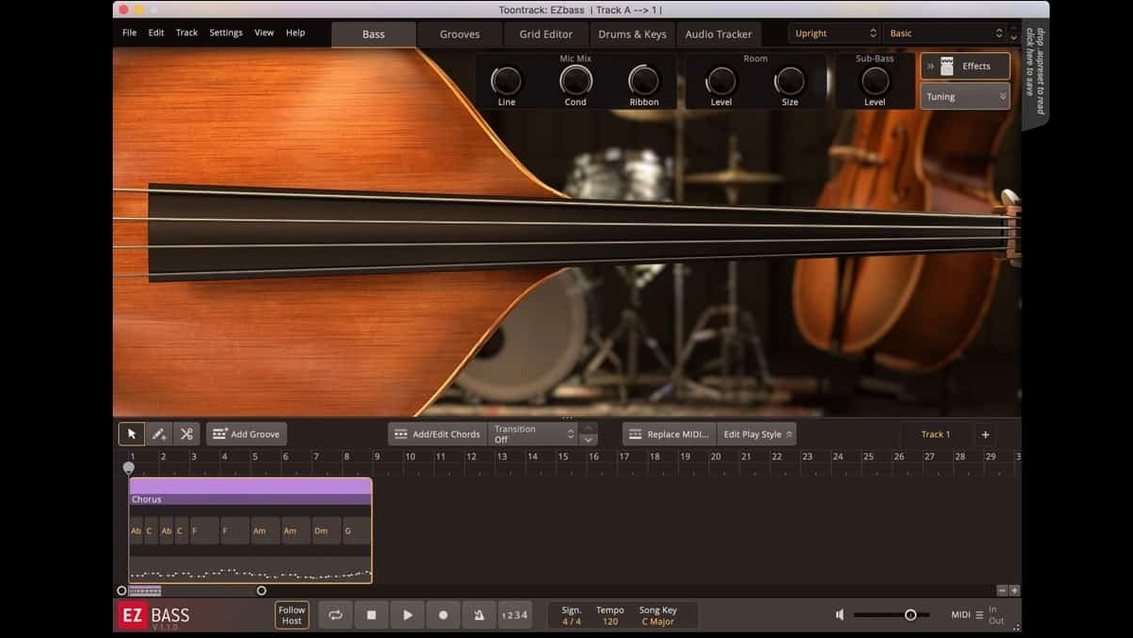
You drop a drum MIDI file onto a track, hit generate, and EZbass writes a bass part that follows the kick and snare. That is the core workflow, and version 1.3.3 keeps it tight, with a few refinements that matter when you are deep in a session.
- Right-hand mute articulation – The Rock Legend EBX now responds to the right-hand mute, giving you a choked, percussive sound that sits well under a busy mix without fighting the kick.
- Editable keyboard shortcuts – You can reassign some shortcuts in Settings, so muscle memory from your DAW carries over.
- Mac menu fix – Menu clicks respond properly in newer Apple hosts, which removes a nagging distraction during long edits.
- Audio-to-MIDI conversion – Feed it a bass guitar recording, and it turns the performance into MIDI you can edit or replace.
- Drum or keyboard MIDI input – Generate matching basslines from either source, which speeds up sketching arrangements.
- Intel and Apple Silicon support – Runs on both architectures, so it fits into mixed studios.
The controls are laid out for speed: a pattern browser, a note editor, and the amp section all stay visible without modal windows. That keeps the focus on the part, not the plugin.
Sits between UJAM Virtual Bassist and Scarbee libraries
EZbass sits in a specific corner of the bass-plugin market. The closest competitors are UJAM's Virtual Bassist and Native Instruments' Scarbee-based libraries in Kontakt Player. All three aim to get you a usable bass part quickly, but they approach the problem differently.
UJAM's Virtual Bassist leans heavily on preset phrases. You select a style, and it plays pre-recorded loops that you can tweak within limits. The interface is simpler, but you have less control over individual notes and articulation. EZbass gives you a full piano-roll editor, so you can draw or edit every note, change velocities, and switch articulations per note. That matters when the preset phrase doesn't quite fit your bridge or pre-chorus.
Native Instruments' Scarbee basses sound excellent — they are deeply sampled, detailed instruments. But they are just instruments. You get a Kontakt patch with keyswitches for articulations and that is it. No pattern generator, no audio-to-MIDI, no automatic bassline generation from drum MIDI. If you want to write a part, you play it in or program it note by note. EZbass includes the same quality of sampled basses — a vintage and a modern one — but adds the composition tools on top. For a songwriter who does not play bass well, that extra layer saves time.
The MIDI generation engine is EZbass's real differentiator. Feed it a kick-and-snare pattern, and it produces a bassline that locks rhythmically. The other apps either cannot do that or require you to drag in separate MIDI files. If you already work with drum MIDI — from EZdrummer, Superior Drummer, or any other source — this integration speeds up the sketch phase considerably.
Runs natively on Apple Silicon without Rosetta
EZbass 1.3.3 requires macOS 10.15 or later, and it runs on both Intel (x86 64-bit) and Apple Silicon Macs. The installer is a standard disk image: mount it, run the procedure, and you are done. No Rosetta workarounds needed on an M-series Mac, because the plugin ships as a universal binary.
During installation, you choose where the sound library goes. The two included basses plus the MIDI library take up several gigabytes, so factor that into your storage planning. You can move the library to an external drive later if your internal disk is tight.
The plugin loads as a standalone application or inside any compatible DAW. Formats are the usual suspects: VST3, AU, and AAX. If your DAW supports multiple formats, AU tends to be the most stable on macOS, though VST3 works equally well in most modern hosts. The interface language is English only.
Because EZbass generates MIDI internally, it does not hammer the CPU the way a polyphonic synth might. The heavy lifting happens during the pattern generation step, which is a one-time calculation. After that, the plugin plays back MIDI notes through the sampled instrument, which is efficient. If you run multiple instances across several tracks, you will notice the disk streaming more than the processor.
Only works with its own engine and EBX expansions
Can I use my own bass samples with EZbass?
No. EZbass works with its own internal engine and the EBX sound expansions. You cannot load third-party sample libraries or Kontakt patches. The two included basses cover a vintage tone and a modern one, and the EBX line extends that range with specific instruments like the Rock Legend.
Does the audio-to-MIDI work on full mixes?
It works best on a clean bass recording — a DI signal or a close-miked amp track. If you feed it a mix with drums and guitars, the conversion gets confused and produces erratic MIDI. The technology is the same as Superior Drummer 3's audio-to-MIDI, which means it handles monophonic material well. Polyphonic content or heavy distortion will give unpredictable results.
Can I export the MIDI to another instrument?
Yes. EZbass generates standard MIDI notes that you can drag or copy to any MIDI track. The articulations are mapped to specific note ranges, so if you move the MIDI to another bass library, you may need to remap keyswitches. But the note data itself is standard.
Do I need an iLok or online activation?
The version described here does not require an iLok dongle or an always-on internet connection. The installation process is straightforward: mount the disk image and run the installer.
Can I use it without a DAW?
Yes. The standalone application lets you load EZbass, browse patterns, edit MIDI, and export audio. You can sketch a bass part entirely outside your DAW and bring the audio or MIDI in later. This is useful if you want to work on bass parts while travelling or away from your main studio machine.
Drags drum MIDI from EZdrummer to generate a bassline
EZbass integrates well with Toontrack's own ecosystem. If you already use EZdrummer or Superior Drummer, the workflow is consistent: drag drum MIDI into EZbass, generate a bassline, and the two instruments sit together naturally. The pattern browser and editor share a similar visual language, so moving between them feels familiar.
Outside Toontrack, the plugin works with any DAW that supports AU, VST3, or AAX. Logic Pro users get the benefit of the Mac menu fix in 1.3.3, which resolves click-response issues in newer macOS versions. In Logic, you can also use the track stack feature to group EZbass with other instruments and route them through a single bus, which keeps your mixer tidy.
On macOS, the updated icons in 1.3.3 follow the Tahoe style, which matches the rounded-square look of recent Apple apps. It is a small detail, but it makes the standalone app and its project files look native rather than ported. The plugin also respects macOS window management — you can snap it to screen edges or use Spaces to keep it on a separate desktop.
If you use audio-to-MIDI conversion on a recorded bass track, you can route the resulting MIDI to any other virtual instrument. For example, you could convert a live bass performance into MIDI and then layer it with a synth sub-bass from Serum or Massive. The conversion preserves the timing and dynamics of the original performance, which gives you a natural feel even if you replace the sound entirely.
EZbass generates realistic bass tracks for songwriters and producers using Toontrack’s sound engine. The process is the same as any other Toontrack product: mount the image and run the installer. No additional tools or wrappers are needed.
Changes in this build
- Added support for right-hand mute articulation used in Rock Legend EBX.
- Added support for changing some keyboard shortcuts in Settings.
- Updated Mac icons to macOS Tahoe style.
Before it goes on the Mac
- macOS 10.15 or later
- Intel or Apple Silicon
Questions from the room
Can EZbass convert audio to MIDI?
Yes, EZbass can convert an audio recording of a bass guitar into MIDI, which you can then edit or use to trigger the sampled instruments.
Does EZbass run on Apple Silicon Macs?
Yes, EZbass supports both ARM and x86 64-bit Macs, and requires macOS 10.15 or later.
Installing it on the Mac
- Mount the downloaded disk image.
- Run the standard installation procedure.
Notes from the control room
Sign in or open a catalogue account to leave a note.
No notes from the room yet. If you have used this build for a week, a short note helps the next person.
Also filed under Logic Pro Plugins
The whole Logic Pro Plugins rack Expressive E Soliste1.0.3 Logic Pro Plugins 951 MB
 FabFilter Total Bundle29.10.2026 Logic Pro Plugins 428 MB Updated
 Excite Audio Lifeline Expanse1.3.0 Logic Pro Plugins 352 MB
 elastiquePitch2.5.0 Logic Pro Plugins 17 MB
 Cymatics VOXITY1.0.0 Logic Pro Plugins 97 MB
 Cymatics QUAKE1.0.0 Logic Pro Plugins 1.6 GB
 Help Me Devvon HMD Uncompressor1.0.03 Logic Pro Plugins 38 MB
 iZotope Neutron5.2.0 Logic Pro Plugins 928 MB