Studio One 7.0.0 (Mac)
Updated
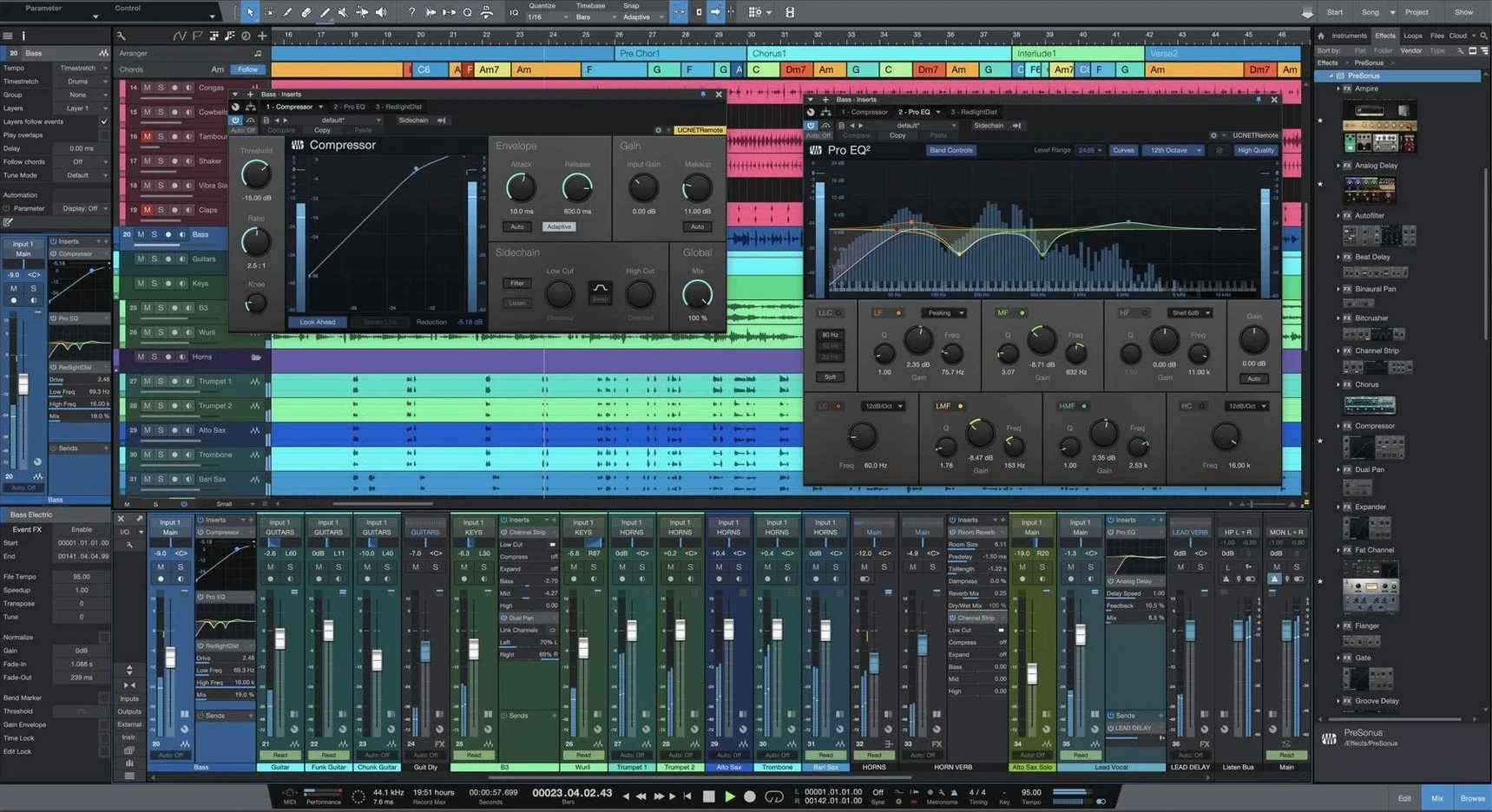
The catalogue note
Studio One 7 Pro handles up to unlimited audio and MIDI tracks, making it a practical choice for everything from a quick demo to a full post-production session. If you have just installed it, here are the first five things to try.
- Drag any audio file from Finder or the browser straight onto the timeline – Studio One builds a track and stretches it to tempo automatically.
- Open the Mix console (F3) and load a Native Effects plug-in on a channel – the stock compressor, reverb and limiter are genuinely usable and cover most mixing basics.
- Right-click a loop clip and select “Detect Tempo” – version 7’s advanced tempo detection analyses audio and writes a tempo map in seconds.
- Launch a Scene from the Launcher window – unlimited scenes let you arrange and recall different loop combinations for live performance or arrangement ideas.
- Try the Stem Separation feature on a mixed stereo file – it splits vocals, drums, bass and other instruments into separate tracks using AI processing.
These five steps cover the core drag-and-drop workflow, the built-in plug-ins, the new tempo tools, the performance-oriented launcher and the stem splitter. They give a solid feel for how the DAW operates without touching a manual.
Sits alongside Logic Pro with a smaller bundled library
On any Mac running macOS 12.4 or later, Studio One 7 Pro sits alongside a few well-established digital audio workstations. Logic Pro, Apple's own DAW, comes bundled with a large instrument and effect library and benefits from deep macOS integration. Its workflow is linear and region-based, with a different approach to comping and take management. Studio One's drag-and-drop paradigm and unlimited launcher scenes feel more open-ended for live arrangement, and the Project page gives you a dedicated mastering environment that Logic handles through a separate application called Logic Remote or the Bounce function.
Ableton Live, another common choice on Mac, is built around the Session View — a clip-launching grid that many producers find natural for electronic music and live performance. Studio One 7's launcher scenes work similarly, but the DAW also keeps a traditional timeline-focused Song page as its main workspace. Where Live relies on its own warping engine for time-stretching, Studio One 7 uses the same drag-and-drop approach across all views. Both support stem separation in recent versions, but Studio One's implementation is offline and processes the entire file at once, while Live's runs in real-time depending on your system.
The absence of ReWire support in version 7 means you cannot sync it with older applications that rely on that protocol, but the DAW does support standard audio unit and VST3 plug-ins, so most modern tools integrate without issue.
Unlimited scenes in the launcher after version 7
Version 7.0.0 brought three changes that affect daily work directly. First, the launcher now supports unlimited scenes and playlists. In earlier versions, you had a fixed number of scenes, which could become restrictive during longer performances or complex arrangement sketches. Now you can build as many as needed, name them, and switch between playlists for different sections of a set or composition.
Second, AI-powered offline stem separation replaces the previous spectral editing approach. Instead of manually isolating frequency ranges or using third-party tools, you select a stereo audio file and let the DAW split it into vocals, drums, bass, and other instruments. The processing happens offline, so you wait a few seconds rather than taxing the real-time engine. This is useful for remixing, extracting a cappella parts, or cleaning up live recordings.
Third, advanced tempo detection analyses audio and generates a tempo map automatically. Where earlier versions required manual tapping or beat markers, version 7 reads the file's transients and builds the map in one step. This saves time when working with recorded performances that drift in tempo, or when importing loops from unknown sources.
Because version 7 installs as a new application and does not overwrite an existing Studio One installation, you can keep version 6 for any projects that depend on ReWire or older plug-in configurations. Songs, projects, and shows created in earlier versions open in version 7 without conversion steps.
Installation questions answered before you start
Will my old plug-ins work with version 7
Studio One 7 supports audio unit and VST3 plug-in formats, which covers the vast majority of modern Mac audio software. If your plug-ins worked in version 6 and are updated for macOS 12.4 or later, they should load in version 7. The DAW does not support ReWire, so any application that relies solely on that protocol for sync or audio routing will not connect directly.
Can I keep version 6 installed
Yes. Version 7 installs as a separate application. The installer does not replace or modify an existing Studio One 6 installation. You can run both versions on the same Mac, though they share the same audio driver and may conflict if you try to use them simultaneously with the same interface. For everyday work, you can migrate projects gradually.
Offline after activation for recording and mixing
Activation requires an internet connection during installation, as described in the included guide. After activation, the DAW operates offline for recording, mixing, and most processing. Features like stem separation run locally on your Mac and do not send audio to external servers. Some online content browsers and update checks require a connection, but the core workflow does not depend on it.
What does "unlimited tracks and buses" actually mean
It means there is no artificial ceiling on the number of audio tracks, MIDI tracks, or bus channels in the Song page. The practical limit depends on your Mac's processing power, RAM, and storage speed. On a Mac with Apple Silicon and sufficient memory, you can work with hundreds of tracks and complex routing. The same applies to launcher scenes — you can add as many as you need without hitting a fixed maximum.
Runs on macOS 12.4 or later, no extra frameworks needed
Studio One 7 Pro runs on any Mac with macOS 12.4 or later, supporting both Apple Silicon (ARM) and Intel 64-bit processors. The interface language is English. No additional frameworks or runtimes are required beyond what the operating system provides.
Given the unlimited track count and the inclusion of stem separation and advanced tempo detection, you will benefit from a system with adequate RAM and a fast internal drive — particularly if you work with large sample libraries or multi-track recordings. The DAW itself is a single application installation that does not modify system files or require administrator privileges beyond the standard installer. During first launch, it scans your system for audio devices and plug-ins, which can take a few minutes depending on how many plug-ins you have installed.
The audio engine supports sample rates up to 192 kHz and bit depths up to 32-bit float. Latency performance depends on your audio interface and its driver. Core Audio interfaces work without additional configuration. The DAW does not include its own sound library or loop packs, but it does load the Native Effects plug-ins and virtual instruments that ship with the application.
Missing the Project page's mastering environment
One common mistake is ignoring the Project page entirely. Beginners often bounce their mix from the Song page and stop there, missing the dedicated mastering environment. The Project page lets you compile multiple songs, apply final limiting and dithering, and export consistent masters without reopening each session.
Another is overloading the Song page with unnecessary tracks and plug-ins before checking the mix console. The unlimited track count can encourage adding more than needed. A simpler approach — using subgroups, bus processing, and the built-in effects — often yields a cleaner mix and lower CPU load.
Some users also expect ReWire to work for syncing with older software like Propellerhead Reason or Ableton Live. Version 7 does not support ReWire, so attempting to use it will fail. The workaround is to export audio stems or use virtual MIDI and audio routing via third-party utilities.
Finally, beginners sometimes forget that version 7 installs separately and try to launch the old version from the same alias. Keep both applications in your Applications folder, but use the version 7 icon for new work. Old projects open in version 7, but if you have a project that depends on a plug-in not yet updated, you can still open it in version 6 without losing work.
Changes in this build
- Unlimited Launcher Scenes and Playlists
- AI-powered offline Stem Separation
- Advanced tempo detection
Before it goes on the Mac
- macOS 12.4 or later
- Intel or Apple Silicon processor
Questions from the room
Does Studio One 7 Pro open projects from older versions?
Yes, version 7 opens songs, projects, and shows created in earlier versions of Studio One.
What macOS version is required?
Studio One 7 Pro requires macOS 12.4 or later.
Is the interface available in languages other than English?
The interface language is English only.
Installing it on the Mac
- Open the included installation and activation instructions.
- Follow the instructions inside the package to install and activate the app.
Notes from the control room
Sign in or open a catalogue account to leave a note.
No notes from the room yet. If you have used this build for a week, a short note helps the next person.