Cockos REAPER 7.4.8 (Mac)
Updated
The catalogue note
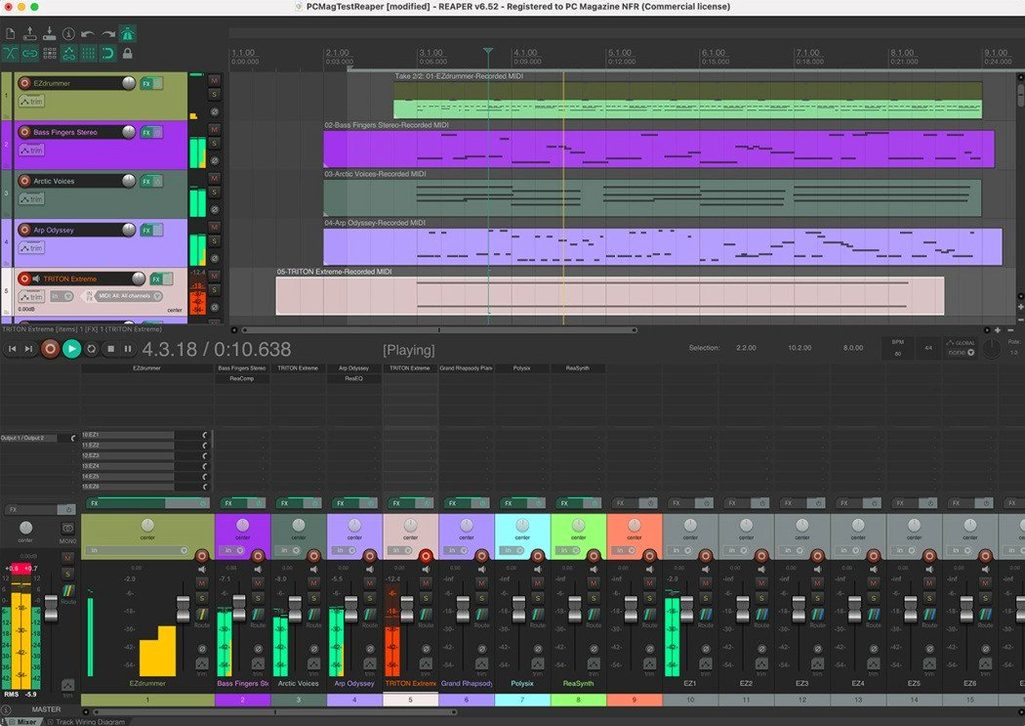
Cockos REAPER is a digital audio workstation that turns a computer into a recording studio when used with an audio interface and a microphone. Here is one realistic task from start to finish — recording a multitrack acoustic session — answered in a few questions.
Set up a recording session with your audio interface
Connect your interface, open REAPER, and create a new project. Add an audio track per microphone, arm them for recording, and set the monitor mix in the routing matrix. REAPER supports up to 128 MIDI output devices and loopback hardware, so complex setups are straightforward.
Comp multiple takes into one clean performance
Record several passes on the same track; REAPER stores each as a separate take. Use the comping toolbar to select the best sections across takes, then glue them into one clean performance. Audio from child tracks routes automatically into a folder track for group processing.
How do I mix and export the final stereo file?
Insert plugins per track or on the master bus, adjust levels and panning, and use the built-in tools for editing and mastering. Render the project to a stereo WAV or AIFF via File > Render — the multitrack session collapses into a single mix file ready for distribution.
Workflow for a live band demo, start to finish
Imagine a three-piece band — drums, bass, electric guitar — wants a rough demo in a rehearsal room. You have a USB audio interface with eight inputs, four microphones, and a laptop running REAPER.
- Create a project template — set up six tracks: kick, snare, overhead (stereo), bass DI, guitar amp mic. Name them, colour them, arm each one. Save as a template so next session takes thirty seconds.
- Route the folder — place the three drum tracks under a folder track by clicking the folder icon on the overhead track. Audio from the kick and snare routes into the overhead automatically, letting you compress the whole kit with one plugin later.
- Set input hardware — assign each track to the correct interface input: input 1 for kick, input 2 for snare, inputs 3-4 for the stereo overhead, input 5 for bass, input 6 for guitar. REAPER can address up to 512 remappable channels of audio hardware input, so an eight-input interface is barely stretching its legs.
- Record the backing — hit record and let the band play the song twice. Each pass becomes a separate take on every track. The drummer can fix a fill in take 2 without the bassist replaying his part.
- Comp the takes — in the comping mode, click the best section of each take across all tracks simultaneously. REAPER handles up to 128 MIDI input hardware devices, but here we are working with audio only — no different in principle.
- Freeze the drum folder — once the drum comp is final, render the folder track to a new take. This non-destructively freezes the drum processing: EQ, compression, and any folder-level effects become a single audio item, freeing CPU for the bass and guitar tracks.
- Mix and render — add a touch of reverb on the folder, balance the bass and guitar, then render the whole project to a stereo file. The session is ready for the band to review on their phones before they leave the room.
What a podcast editor does differently
A podcast editor I know records two hosts and a remote guest over Zoom. He uses REAPER because it handles the loopback routing without extra software. The guest audio arrives on one track, the hosts on two more, and a fourth track captures the mix-minus return from the interface. With up to 512 additional channels of loopback audio available, this setup is trivial. He edits the raw recording in the same project — trims silence, removes coughs, adds a jingle on a separate track — then renders the episode as a 128 kbps MP3. No session export, no format wrangling. REAPER is the only DAW he uses for this workflow; it covers the entire chain from capture to delivery.
Universal disk image works on Intel and Apple Silicon Macs
The system requirements are macOS 10.15 or later, with support for both Intel and Apple Silicon. A single universal disk image (reaper748_universal.dmg) works on either architecture. If you prefer, an Intel-only build (reaper748_x86_64.dmg) is also available. The application is a standard Cocoa app — no Rosetta quirks on ARM, no legacy installer. After the main app, the Reaper 7.x.x unipatch is applied. Language is English. No additional frameworks, no cloud components, no background services. It behaves like a native Mac application from the moment you mount the DMG.
Open a fourteen-track mix of audio, MIDI, and plugins
You open REAPER on a Tuesday afternoon. The project from yesterday loads: fourteen tracks, a mix of audio and MIDI, a few third-party plugins on the master bus. The arrangement view shows the song structure — verse, chorus, bridge — marked with regions you named last week.
First, you mute the vocal track and listen to the instrumental bed. The bass part has a note that sits wrong in the chorus. You split the MIDI item at the bar line, drag the offending note down a semitone in the inline editor, and glue the item back together. The change is instant.
Next, the drum folder. You recorded a new take of the verse last night, but the hi-hat bleed is too loud. Instead of re-recording, you insert a gate plugin on the overhead track inside the folder. The child tracks — kick, snare, toms — are unaffected. You tweak the threshold until the hi-hat sits behind the snare. The folder outputs the processed drum mix to the master bus.
You decide to print the drum folder to save CPU for the reverb send. Right-click the folder track, choose "Render tracks to stereo stem tracks", and a new stereo audio item appears. The original folder stays intact but muted — a safety net if you change your mind later.
Finally, the mix. You adjust the vocal fader, add a touch of compression on the bass bus, and ride the automation lane on the guitar track to bring the solo forward. The master meter hovers at -6 dB. You hit Render, choose a 48 kHz 24-bit WAV, and the file lands on the desktop in under a minute. The session is saved, the Mac goes to sleep, and tomorrow you will listen on headphones before sending it to the band. reaper mac torrent or cockos reaper torrent are phrases you might search for elsewhere, but here the workflow is already complete.
Before it goes on the Mac
- macOS 10.15 or later
- Intel or Apple Silicon (ARM64) processor
- English interface
Questions from the room
Can REAPER handle video alongside audio?
Yes, it is an advanced multi-track audio, MIDI and video production environment. You can import a video file, sync it to the timeline and edit audio in context.
Does the evaluation period limit features?
No, the full version can be evaluated for 60 days with all features enabled. One installer works across different user groups.
Installing it on the Mac
- Install the main app from reaper748_universal.dmg for Apple Silicon and Intel Macs.
- Alternatively, install from reaper748_x86_64.dmg for Intel Macs only.
- Apply the Reaper 7.x.x unipatch patch after the main app.
Notes from the control room
Sign in or open a catalogue account to leave a note.
No notes from the room yet. If you have used this build for a week, a short note helps the next person.