
Home › Mac Apps › Imagenomic Plugin Suite

Imagenomic Plugin Suite 2027 (Mac)
Updated
The catalogue note
When a portrait session comes back with uneven skin tones and a faint sensor-noise haze, I reach for the Imagenomic Plugin Suite. It is three plugins under one roof: Portraiture for skin retouching, Noiseware for noise reduction, and Realgrain for black-and-white, toning, film, and grain effects. They live inside Photoshop, Lightroom Classic, and Affinity, and they run on both Apple silicon and Intel Macs.
Retouch the skin
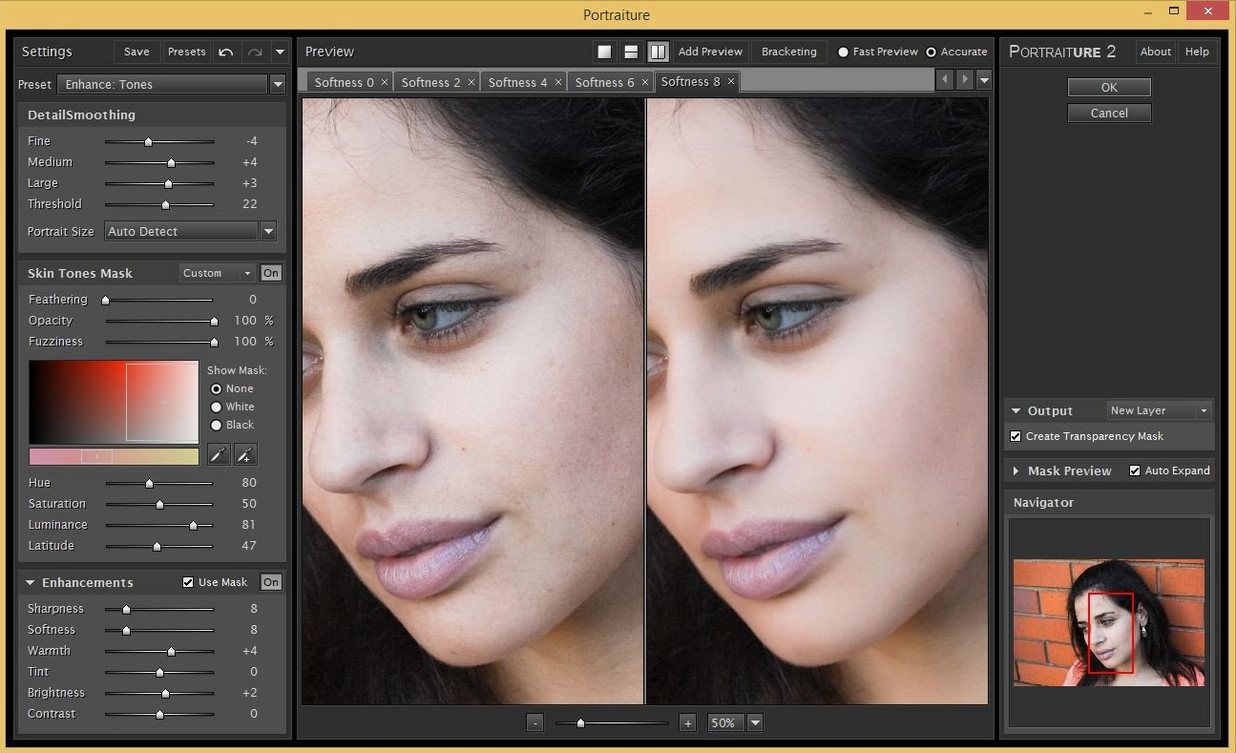
Portraiture handles the heavy lifting on faces. Its controls let you smooth without flattening the subject; you keep the texture that makes a portrait look like a photograph.
Clean the noise
Noiseware works as a plugin and a standalone module. It strips sensor grain from high-ISO shots while leaving edges intact, which matters when you crop tight.
Runs on macOS 13 or later with Intel or Apple silicon
The system requirements are straightforward. The Imagenomic Plugin Suite demands macOS 13 or later, and it supports both ARM (Apple silicon) and x86 64-bit (Intel) architectures. That means any modern Mac — from an M1 MacBook Air to an Intel Mac Pro — can host it, provided the operating system is current enough. There is no split installer or separate download for Apple silicon; the same disk image handles both architectures through a universal binary.
The suite integrates as plugins into Photoshop, Lightroom Classic, and Affinity. If you run one of those hosts, the installer places the plugin files into the expected directories automatically. The standalone Noiseware module also works on its own, outside any host application, which is useful for batch-processing folders of images before they reach your editing workflow.
Because the suite is English-only, the interface language is fixed. There are no localisation files to toggle or remove. For non-English speakers, the slider labels and tooltips remain in English throughout.
Better compatibility with macOS 15 and Sequoia
Version 2027 is the current build. The most notable change for everyday work is the improved compatibility with macOS 15 and later, which Imagenomic lists specifically for the Photo Suite. If you have upgraded to Sequoia or plan to, this version removes the compatibility friction that earlier builds could introduce with newer system frameworks.
The installation routine also reflects a practical change. Because macOS Gatekeeper has grown stricter, the installer requires a terminal command to bypass the block. The steps are: mount the disk image, run Open Gatekeeper friendly, press Enter in Terminal to bypass Gatekeeper, drag the app to the Applications folder, then launch the app when installation is complete. It is a one-time procedure; after that, the plugins load normally inside your host application.
For users who keep multiple editing machines, the same installer works on both Apple silicon and Intel Macs without needing to track separate downloads. The plugin formats and host integration paths remain identical across architectures.
No slowdown for older Intel Macs in Photoshop or Lightroom
Will the plugins slow down Photoshop or Lightroom on an older Intel Mac? The suite is designed to work within the host application's processing pipeline. Noiseware and Portraiture apply their effects as filter layers or adjustments; they do not run background processes or modify system resources outside the host. On an Intel Mac, the processing time for a high-megapixel file will be longer than on Apple silicon, but the plugins themselves do not add overhead when idle.
Can I use Portraiture without installing the other two plugins? The suite installs all three plugins together. If you only need skin retouching, you can still run Portraiture and leave Noiseware and Realgrain unused — they will not interfere with your workflow. There is no separate lightweight installer for individual plugins.
Does the suite work with Affinity Photo 2? Yes. Imagenomic lists Affinity as a supported host alongside Photoshop and Lightroom Classic. The plugin files appear in the Affinity filters menu after installation.
What happens if I upgrade macOS mid-project? The version 2027 build supports macOS 13 through current releases. If you upgrade the operating system while a project is open, the plugins should reload correctly after a host restart. The suite does not depend on deprecated system libraries.
Best for portrait and wedding photographers needing faster retouching
Portrait and wedding photographers are the obvious fit. Portraiture cuts down the time spent on skin retouching per frame, and Noiseware handles the high-ISO grain that indoor reception shots often carry. Realgrain then lets you unify the set with a consistent film look, so the whole gallery reads as one body of work rather than a mix of digital and film.
Commercial retouchers who work with product shots or fashion will find Noiseware useful for cleaning up low-light backgrounds and studio shadows. Portraiture is less relevant for non-human subjects, but the noise module alone justifies the suite for editorial work where clean backgrounds are critical.
Photographers who maintain a film aesthetic alongside digital capture — the kind who shoot RAW and then emulate Kodak or Fuji emulsions — will use Realgrain more than the other two. The toning and grain controls give a tactile finish that is difficult to replicate with generic noise filters.
For anyone running a mixed-architecture studio with both Intel and Apple silicon machines, the universal installer means one download serves both workstations. That simplifies deployment across a small team where not everyone has upgraded hardware yet.
Realgrain gives you grain, film emulation, and toning. It is the last step for a frame that needs to feel less digital.
Before it goes on the Mac
- macOS 13 or later
- Apple silicon or Intel (x86 64-bit)
- Interface language: English
Questions from the room
Which applications does the Imagenomic Video Suite support?
The Photo Suite works with Photoshop, Lightroom Classic, and Affinity on Mac, and it requires macOS 15 or later.
Installing it on the Mac
- Mount the disk image and run Open Gatekeeper friendly.
- Press Enter in Terminal to bypass Gatekeeper.
- Drag the app to the Applications folder.
- Launch the app when installation is complete.
Notes from the control room
Sign in or open a catalogue account to leave a note.
No notes from the room yet. If you have used this build for a week, a short note helps the next person.
Also filed under Mac Apps
The whole Mac Apps rack Imagenomic Portraiture4.5 Mac Apps 65 MB
 Iconize1.8.8 Mac Apps 5 MB
 iA Writer8.1.3 Mac Apps 23 MB Updated
 HitPaw Watermark Remover2.4.7 Mac Apps 290 MB
 HitPaw Video Converter4.5.0 Mac Apps 577 MB
 HitPaw Univd4.7.0 Mac Apps 525 MB
 HitPaw Edimakor2.6.0 Mac Apps 487 MB
 Jump Desktop10.15.46 Mac Apps 62 MB