Home › Mac Apps › Flicker Free

Flicker Free 2.1.6 (Mac)
Updated
The catalogue note
Editors wrestling with flicker in time-lapse sequences, slow-motion clips from high-speed cameras, or any footage where light or electricity creates an unwanted pulse reach for Digital Anarchy’s Flicker Free. It analyses frames on the fly and applies a deflickering pass that handles the problem without you having to keyframe or guess. The plugin runs on both Intel and Apple Silicon Macs, 64-bit only.
Hosts and formats it works with
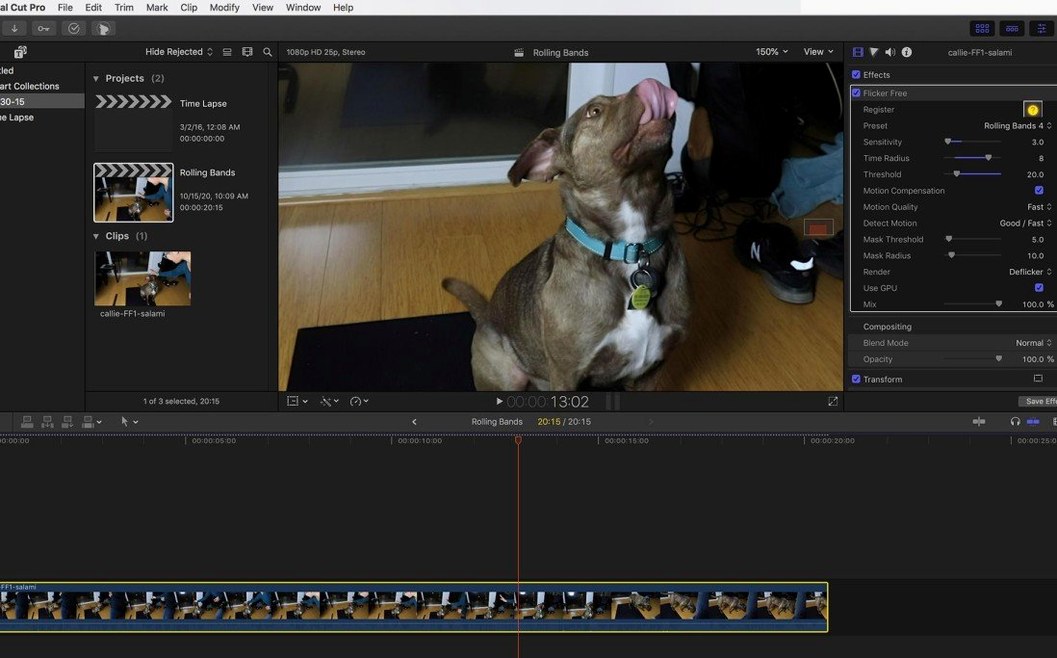
Flicker Free ships as a plugin for Final Cut Pro, After Effects, Premiere Pro, Avid Media Composer, DaVinci Resolve, and any other host that supports OpenFX. That covers most of the professional timeline. The architecture is native on both ARM and x86, so there is no Rosetta penalty on newer Macs. Footage from cameras such as the Phantom Flex, Sony FS700U, and GoPro HERO3 Black is listed as compatible; in practice, any clip with a persistent flicker pattern should respond to the analysis.
How it works and what you adjust
Rather than a manual threshold, the plugin examines the frame content while processing and applies a preset-based correction. You pick a preset that matches your source – time-lapse, slow-motion, or generic – and let the algorithm do the rest. The interface is in English, and the included install and activation instructions are straightforward. For a single tool that fixes a very specific, very annoying problem, it does its job without fuss.
A day in post: the time-lapse editor
A motion graphics editor I know spends half her week assembling city-scape time-lapses for a documentary series. The raw clips from her Sony A7S III look fine on the back of the camera, but once she drops them into After Effects the sodium-vapour streetlights pulse at a steady beat. The editor’s built-in deflicker tools either blur the clouds or leave a residual wave. She installed Flicker Free, picked the time-lapse preset, rendered a ten-second test section, and the pulse vanished. The rest of the five-minute sequence processed without her touching any sliders. That kind of scenario is why the plugin exists: one preset, one test render, then walk away.
Questions to answer before installing
Will it work inside my current host without extra setup?
Flicker Free registers itself like any other plugin. After you run the installer, it appears in the effects list of Final Cut Pro, Premiere Pro, DaVinci Resolve, Avid, or any OpenFX application. There is no standalone application to launch; the plugin lives inside the host’s effect panel. The activation step is handled once, and then it is available on every clip you apply it to.
Render a few seconds to test the fix
No. The workflow is to drop the plugin onto a short section of your sequence – a few seconds of the flickering area – and render just that region. If the preset removes the flicker, you apply it to the rest of the footage. If the result is not quite right, you try a different preset or adjust the source clip’s exposure beforehand. This quick feedback loop saves time on long projects.
Can it handle flicker from computer monitors recorded on set?
Yes. When a camera films a monitor, the refresh rate mismatch creates rolling bars or a constant flicker. Flicker Free’s analysis detects the periodic pattern even when it is not caused by mains electricity. The same applies to LED and fluorescent lighting in a scene – the plugin does not care whether the source is a bulb or a screen, only that there is a repeatable fluctuation in brightness across frames.
Native Apple Silicon support in version 2.1.6
DaVinci Resolve’s built-in deflicker
Resolve ships with a Deflicker effect in the colour page. It works adequately on simple flicker from 50/60 Hz lighting, but it struggles with the irregular patterns you get from LED arrays or slow-motion footage. If you work primarily in Resolve, the built-in tool is free, but when it fails, Flicker Free is the logical next step.
Re:Vision Effects’ RE:Fill
RE:Fill is primarily a dirt and scratch removal plugin, but it includes a temporal smoothing pass that can reduce mild flicker. It is not designed for rolling flicker from LEDs or for time-lapse sequences, so the results are hit-or-miss on anything beyond uniform lighting. Flicker Free is a dedicated tool; it analyses the flicker frequency and applies correction only where needed, which preserves more detail in the image.
Adobe After Effects’ built-in deflicker
After Effects has a Remove Flicker effect in the Animation Presets folder. It is a simple temporal blur that averages neighbouring frames. It blunts flicker but also softens motion and can introduce ghosting on fast-moving objects. Flicker Free’s per-frame analysis avoids that averaging approach, so motion stays sharp while the flicker is removed. For time-lapse work in After Effects, the difference is noticeable on the first test render.
How Flicker Free compares to other Mac tools
The update to 2.1.6 brought support for Apple Silicon natively. Earlier versions ran under Rosetta, which was fine for short clips but added overhead on longer timelines. Now the plugin loads as an arm64 binary in Final Cut Pro and DaVinci Resolve on M-series Macs, which means no translation step. The interface and presets are unchanged – the work is the same – but the responsiveness when scrubbing through a clip that has the plugin applied is better because the CPU is not emulating x86 instructions.
The installer was also updated to simplify the activation flow on macOS 14 and later. Users who had trouble with permissions on earlier versions should find the process more straightforward. For anyone who already owned a licence, the upgrade path was a straightforward download and reinstall.
If you are still running an older version on an Intel Mac, there is no pressing reason to update unless you are moving to Apple Silicon. The plugin behaviour is identical. The main benefit of 2.1.6 is the native arm64 support, which makes it a clean fit on current hardware.
Before it goes on the Mac
- macOS (version not specified by developer)
- 64-bit Intel or Apple Silicon processor
- English interface language
Questions from the room
Does Flicker Free work on Apple Silicon Macs?
Yes. The plugin is 64-bit and supports both ARM and x86 architectures, so it runs natively on M-series Macs.
Which video hosts are supported?
Final Cut Pro, After Effects, Premiere Pro, Avid Media Composer, DaVinci Resolve, and any OpenFX-compatible application.
Installing it on the Mac
- Use the installation and activation instructions included in the package.
Notes from the control room
Sign in or open a catalogue account to leave a note.
No notes from the room yet. If you have used this build for a week, a short note helps the next person.