BRAW Studio 3.3.3 (Mac)
Updated
The catalogue note
Blackmagic RAW files can be a hurdle in Adobe video applications without the right import pipeline. BRAW Studio is a plugin suite and companion desktop app that handles BRAW from the moment you add a clip to the timeline.
Setting source settings on a clip track
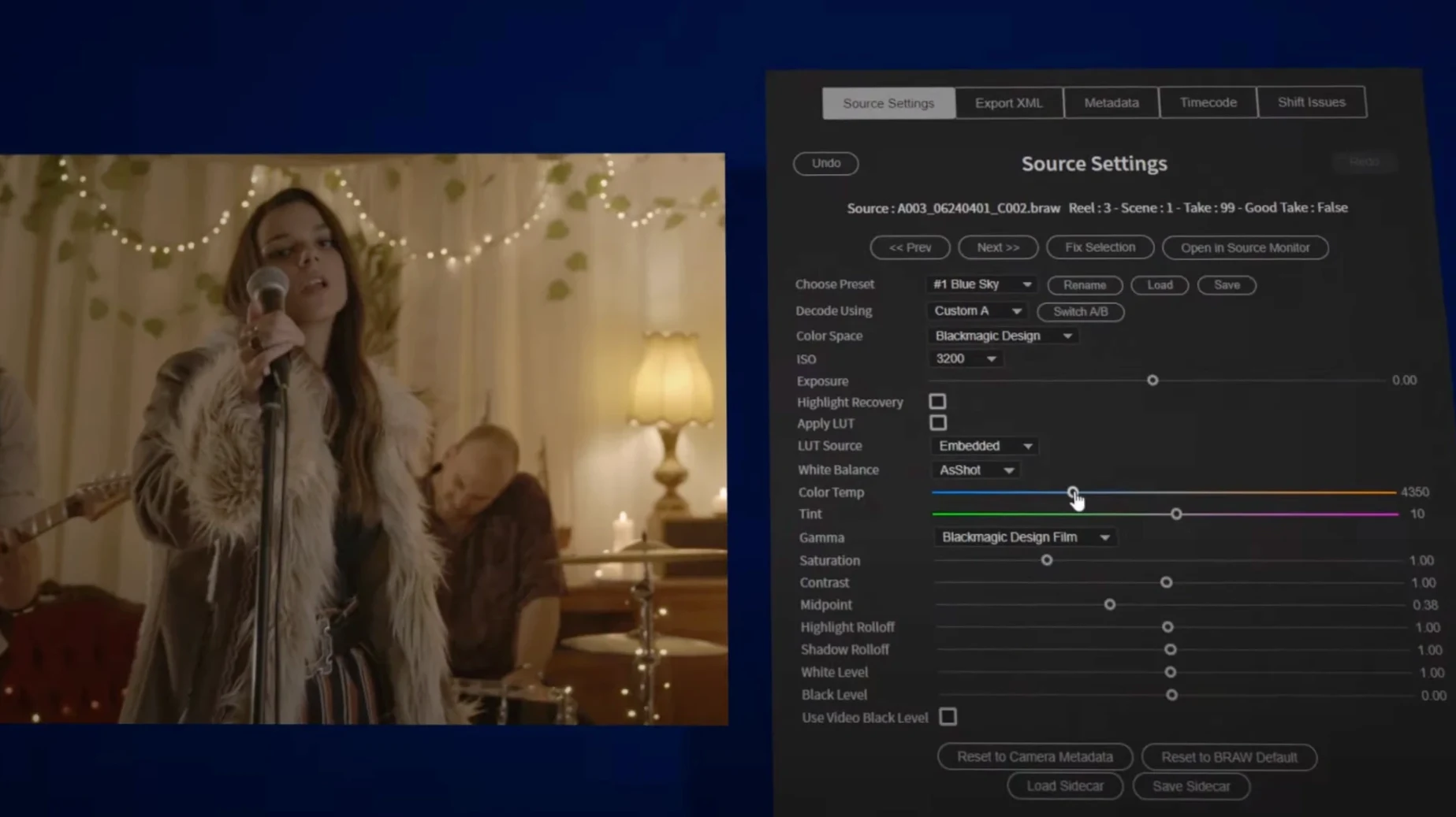
When you drop a BRAW file onto a video track, the plugin exposes the camera’s source metadata — ISO, white balance, colour space — directly in the effect controls panel. You adjust those per clip without leaving the timeline.
Grading in the bus
The stand-alone desktop application lets you apply a custom LUT and grade the raw stream before it reaches the host. That graded signal then passes through the usual Adobe bus chain, so you can layer additional effects on top.
Exporting an XML sequence
For handoffs between sessions, the plugin can export an .XML sequence referencing the original BRAW files, keeping the source settings and LUT assignments intact. No re-interpretation needed on the receiving end.
Check for the BRAW source settings in Premiere Pro
Once BRAW Studio is installed and activated, a quick check of the plugin's presence in each host application saves time later. In Premiere Pro, open the effects panel and search for "BRAW" — the source settings control should appear. In After Effects, the import dialog gains a .braw format option alongside the usual codecs. Media Encoder picks up the format automatically if Premiere Pro is installed on the same machine.
The desktop application works independently of any host. Open a BRAW file there first to verify the raw metadata is readable and that your system can play the clip at full resolution. If the file stutters, the desktop app offers a lower decode quality setting in the preferences — useful for proxy-style workflows on older hardware.
Start with one or two test clips rather than a full project. Adjust ISO and white balance in the effect controls panel, then switch to the desktop app and apply a LUT. Export a short .XML sequence from the plugin and re-import it to confirm the settings survive the round trip. This baseline check catches any quirks before real deadlines.
What version 3.3.3 fix changes in daily work
The 3.3.3 fix release addresses specific playback and metadata handling issues that surfaced in earlier builds. The fix also improves how the desktop application handles LUTs loaded from network volumes — a detail for shared studio storage environments.
For Premiere Pro panels, the update resolves a case where the source settings window could remain blank after switching between clips of different Blackmagic camera models. The panel now refreshes the metadata fields on each clip selection. No change to the export workflow: .XML sequences from 3.3.3 fix are backwards compatible with sessions started in earlier versions.
The installer itself is unchanged in layout. Unpack the archive, run the included installer, and follow the activation instructions as before. Both ARM and x86 64-bit macOS builds are updated in this release, so no architecture-specific download is needed.
BRAW Studio loads inside Adobe on Intel and Apple Silicon Macs
BRAW Studio runs on macOS with both Intel and Apple Silicon architectures. The plugin suite loads inside the Adobe host process, so memory and GPU usage depend primarily on the host application and the resolution of the BRAW files you open. The desktop application is a separate process that reads raw data directly; it does not require Adobe software to be running.
Because BRAW files are decoded on the GPU when possible, systems with a discrete graphics card or Apple Silicon's unified memory handle playback more efficiently. The plugin does not install background services or launch agents — it is present only when the host application or the desktop app is open. Disk space required is modest; the plugin files and desktop app together occupy a few hundred megabytes.
The same installer works for both architectures, and the activation process is the same regardless of which Adobe applications you have installed.
Before it goes on the Mac
- macOS (version not specified by the developer)
- Intel or Apple Silicon processor
- Interface language: English
Questions from the room
Does BRAW Studio work on both Intel and Apple Silicon Macs?
Yes, the plugin provides both ARM and x86 64-bit macOS builds, so it runs natively on Apple Silicon and Intel machines.
Can I apply a LUT to the raw footage before editing?
Yes, the stand-alone desktop application includes a LUT loader that lets you grade the BRAW stream before the clip enters the Adobe host.
Installing it on the Mac
- Unpack the downloaded archive.
- Run the included installer.
- Follow the printed installation and activation instructions provided inside the package.
Notes from the control room
Sign in or open a catalogue account to leave a note.
No notes from the room yet. If you have used this build for a week, a short note helps the next person.