
Home › VST Plugins › Sonic Academy KICK

Sonic Academy KICK 1.1.8 (Mac)
Updated
The catalogue note
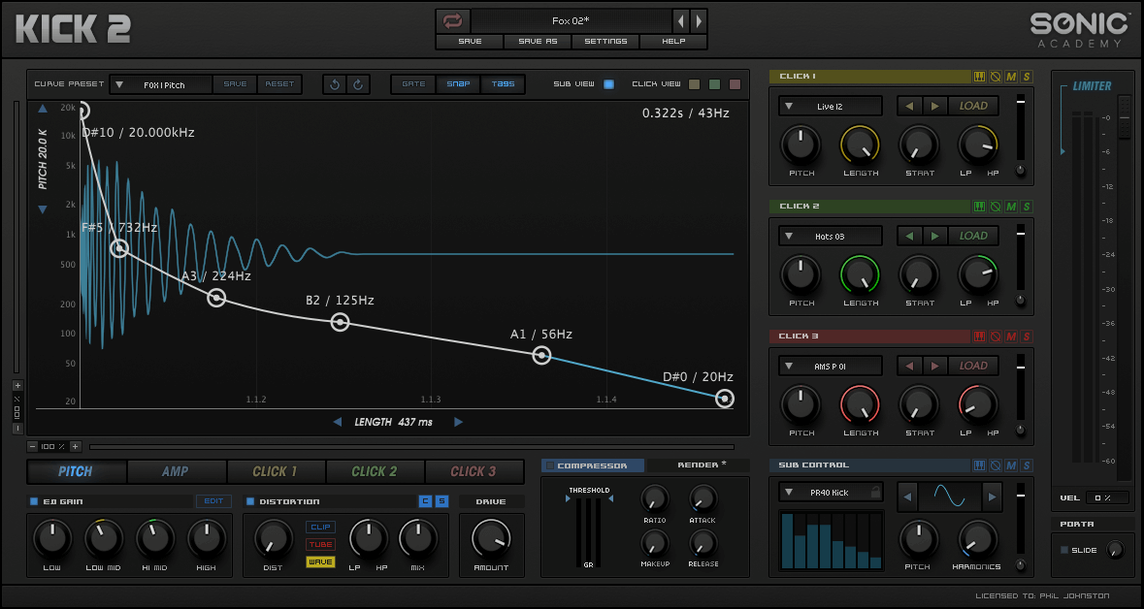
Kick 2, version 1.1.1, is a 64-bit Intel build that pairs a synthesized sub oscillator with sampled clicks for the beater attack.
The sub oscillator, sampled clicks, and three distortion algorithms
Sub oscillator — the low-frequency sine source that gives the kick its weight and pitch envelope.
Sampled clicks — transient material layered on top, so the drum cuts through without needing much high-end processing later.
Three distortion algorithms — different saturation flavours for thickening the tone or adding bite to the click.
Equalizer — tonal shaping after the sound sources, useful for carving space against a bassline.
Compressor — controls the envelope's dynamics, letting you tighten or lengthen the body.
Limiter — catches peaks at the output stage, so the kick sits consistently in a mix bus.
Ignoring the click layer makes the kick sound like a low rumble
The most common error is ignoring the click layer entirely. New users often dial in a sub sine and expect the result to punch through a busy mix. Without a click, the kick sounds like a low rumble — audible on headphones but lost in a club or car system. The sampled clicks are there for a reason; even a quiet click gives the transient something to grab.
Another mistake is over-processing the sub oscillator. Beginners add distortion and EQ boost to the low end, then wonder why the kick sounds muddy. The sub is already a sine wave (or one of the other waveforms). Adding harmonics there only blurs the signal. Keep the sub clean and treat the click and distortion stages separately. The three distortion algorithms work better on the attack than on the fundamental.
A third issue is not using the pitch envelope. A kick drum’s character comes from its pitch drop — the initial thump sliding down into the sustained note. Some users leave the envelope flat and then try to fix the lack of weight with the compressor or limiter. The compressor can’t add pitch movement. Set the sub oscillator’s pitch envelope first, then adjust the body length with the compressor.
Finally, beginners often load a factory preset and leave it untouched. The 230 factory presets are starting points, not finished sounds. A preset tuned for a house track will sit wrong in a hardstyle or hip-hop context. Adjust the click sample, the distortion type and the EQ curve to fit the rest of the arrangement.
Version 1.1.1 improves stability on Intel-based Macs
Version 1.1.1 is a point release, so the changes are refinements rather than new features. The update addressed stability on Intel-based Macs running recent macOS builds. Earlier versions of Kick 2 (the direct successor to Kick by Nicky Romero) occasionally failed to recall compressor or EQ settings when reopening a project. That recall issue is resolved in 1.1.1 — the plugin now restores its full state from the DAW session without needing a manual refresh.
The installation package in 1.1.1 also includes updated activation instructions. The previous documentation was unclear for users who had never registered a Sonic Academy product. The new instructions walk through the licensing step by step, which reduces support requests on the download page.
For users who work with both the sub oscillator and the additional waveforms, 1.1.1 improves how the plugin handles waveform switching. Switching from a pure sine to a saw or square wave no longer introduces a small glitch in the note tail. That glitch was barely audible in a full mix but noticeable during soloed kick editing. It is gone now.
None of these changes alter the sound character or the workflow dramatically. They make the plugin behave predictably inside a project, which is what a studio engineer needs from a point release.
Picking one of 230 factory presets to start a track
I open my DAW and create a new MIDI track. I load Kick 2 as an instrument plugin. The first thing I do is pick a factory preset from the list — one of the 230 presets that comes with version 1.1.1. For this session I am writing an electronic pop track, so I choose a preset called “Pop Thud”. It has a clean sub and a short, bright click.
I play the MIDI note. The kick sounds round but too polite. I go to the sub oscillator section and adjust the pitch envelope: I make the start pitch a little higher and the decay a little longer. The kick now has a noticeable thump before it settles into the bass note.
Next, I look at the sampled clicks. The preset uses a sampled click from the default slot. I swap it for a different sample from the click-shaping area — one with a bit more beater snap. The kick now cuts through the mix without needing high EQ.
I add distortion using one of the three algorithms. I select the algorithm labelled “saturation” and turn the drive up slightly. The kick gains a subtle grit that helps it sit alongside a distorted bass synth. I do not touch the sub oscillator again; the distortion is only on the click path.
Then I open the equaliser. I cut a small notch around 200 Hz to make space for the bassline. I add a gentle shelf above 2 kHz to bring out the click’s attack. The compressor is set to a fast attack and medium release, tightening the body without killing the sub tail. The limiter at the output catches any peaks from the distortion stage.
I save the preset with a new name. The kick is done. I move on to arranging the rest of the track, knowing that the kick drum will not need rework later.
64-bit Intel-only build requires Rosetta 2 on Apple Silicon Macs
Kick 2 version 1.1.1 is a 64-bit Intel-only build. If you are on an Apple Silicon Mac (M1, M2 or M3), you need to run your DAW in Rosetta 2 compatibility mode. The plugin itself does not have a native Apple Silicon binary. The developer has not stated whether future versions will include one.
The minimum macOS version is not specified on the download page. The 64-bit x86 architecture suggests it runs on macOS 10.15 (Catalina) and later, but you should confirm compatibility with your specific OS version before installing. The installation package includes activation instructions; follow them exactly, because the licensing process is not automatic.
The plugin loads as a single instrument instance. It does not use any external sample libraries or additional software. It does not require an internet connection after activation. The interface remains in English only, with no language options. For a studio engineer running a stable Intel-based Mac, the plugin should install and function without surprises. For those on newer hardware, Rosetta is a manageable extra step.
The interface language is English.
Before it goes on the Mac
- macOS version not specified
- Intel architecture (64-bit x86)
Questions from the room
Does KICK work on Apple Silicon Macs?
The build is 64-bit x86, so it runs natively on Intel Macs. Apple Silicon users would need to run it through Rosetta 2.
What audio sources does KICK combine?
It uses a synthesized sub oscillator for the low-end body and sampled clicks for the beater attack.
What effects are included inside KICK?
The plugin includes an equalizer, compressor, limiter, and three distortion algorithms for shaping the drum.
Installing it on the Mac
- Use the included installation and activation instructions.
- Follow the instructions inside the package.
Notes from the control room
Sign in or open a catalogue account to leave a note.
No notes from the room yet. If you have used this build for a week, a short note helps the next person.
Also filed under VST Plugins
The whole VST Plugins rack Sonible smart:EQ 41.1.0 VST Plugins 432 MB
 Steinberg SpectraLayers Pro13.0.40 VST Plugins 3.8 GB Updated
 ShaperBox3.6.1 VST Plugins 111 MB
 Serum2.1.5 VST Plugins 1.2 GB
 T-RackS6.3.2 VST Plugins 2.3 GB
 RipX DAW Pro8.0.3 VST Plugins 1.6 GB
 reFX Nexus5.5.21 VST Plugins 72 MB
 Tone Empire Goliath V31.0.0 VST Plugins 82 MB