
Home › VST Plugins › Sonible smart:EQ 4

Sonible smart:EQ 4 1.1.0 (Mac)
Updated
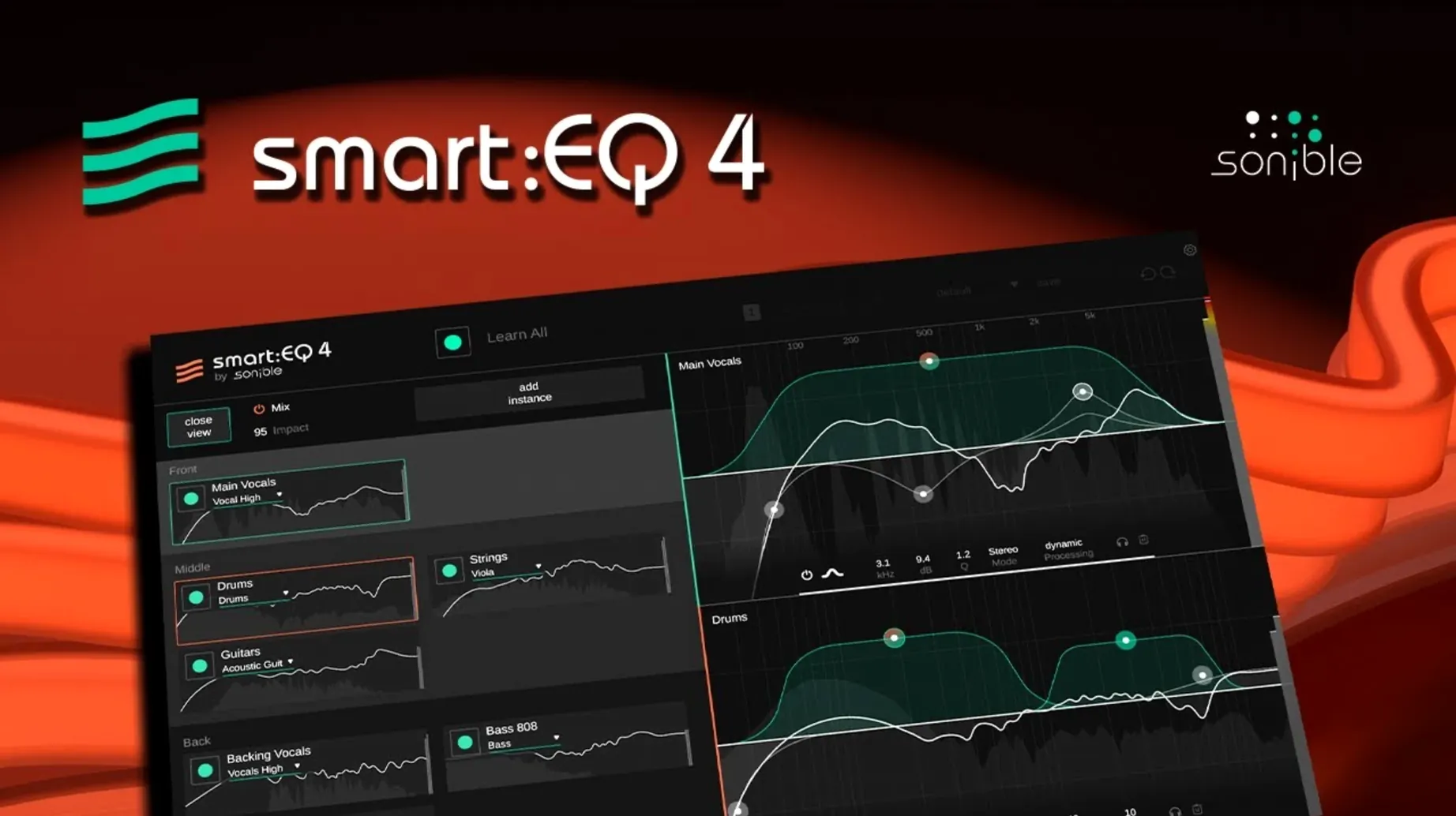
The catalogue note
Most engineers know the drill: you push a band up to fix a resonance, and the next instrument disappears. smart:EQ 4 approaches that differently — it learns the spectral shape of your material and applies corrective filtering that adapts as the music moves.
Dynamic correction curve with a custom learning time
- smart:filter — computes a dynamic correction curve based on the audio you feed it. A custom learning time sets how long the plugin analyses before committing. The new Smooth parameter tames overly aggressive moves.
- Standard EQ bands — now behave like a dynamic EQ. You get compressor-style threshold, ratio, and attack controls, so a band only acts when the signal exceeds a set level.
- M/S processing — full mid/side treatment, useful for widening or tightening a stereo image without touching the centre.
- Reference profiles — import a reference track and smart:EQ 4 builds a target curve from it. Genre-based AI profiles offer a quicker starting point.
Multi-track unmasking
When several instances are grouped, any one of them can act as the remote controller. You see where tracks clash in the frequency spectrum and adjust the group's filters from a single window. Version 1.1.0 adds hierarchical control, so the unmasking decisions propagate consistently through the session. Auto Gain compensates for level shifts, keeping your gain staging intact while you work.
Unmasking hierarchy for dense pop, rock, and electronic arrangements
Mix engineers working on dense pop, rock, or electronic arrangements will find the multi-track unmasking hierarchy the most practical feature. If you regularly have six or seven instruments occupying the same 200–500 Hz area, the group view saves the back-and-forth of soloing each track. Music producers who prefer to stay in the flow rather than surgically carving EQs will appreciate the genre-based AI profiles — a starting point that is closer to a finished bus than a blank shelf filter.
Audio editors handling speech or podcast content can use the speech profile and reference-track import to match a consistent tonal balance across clips recorded in different rooms. Mastering engineers get the comprehensive M/S processing and the dynamic EQ bands, useful for corrective moves that only activate when a problem appears.
Runs on macOS 10.14 or later, Intel and Apple Silicon
smart:EQ 4 requires macOS 10.14 Mojave or later and runs on both Intel and Apple Silicon machines. The installer is a standard macOS package, no unusual permissions or kernel extensions needed. The plugin scans for compatible hosts during the initial launch; if you use Logic Pro, Cubase, Ableton Live, or a similar DAW, it should appear in your plugin list after a standard installation.
Version 1.1.0 is listed at 64-bit only, which covers every modern Mac shipping in the last decade. The interface language is English throughout — no localisation options are included, so everything from tooltips to profile names stays in English.
Similar apps worth knowing
FabFilter Pro‑Q 4 offers a spectral analysis overlay and dynamic EQ bands, but it does not learn a target curve from your material or provide automated multi-track unmasking. You dial in each band manually, which gives you full control but no AI guidance.
iZotope Neutron 4 includes a similar unmasking module called Track Assistant plus a target curve feature. Its approach is guided by adaptive EQ suggestions rather than a continuous smart:filter. Neutron also leans on iZotope's Relay and Visual Mixer, so if you already use those, it may integrate more tightly than an all‑in‑one EQ like smart:EQ 4.
Sonible smart:EQ 4 targets a middle ground: you get the AI‑driven filter and the unmasking hierarchy, but you are not forced into a full channel‑strip plugin. It remains an equaliser first, and the added automatic features do not replace your existing workflow — they complement it.
Changes in this build
- Hierarchical control for multi-track unmasking from any instance in a group.
- Genre-based AI profiles and reference-track import for target spectral shaping.
- Smooth parameter added to the smart:filter in each EQ instance.
- Standard EQ bands now work as a dynamic EQ with compressor-style controls.
- Auto Gain compensates level adjustments.
Before it goes on the Mac
- macOS 10.14 Mojave or later
- Apple Silicon or Intel 64-bit
- Interface language: English
Installing it on the Mac
- Follow the standard installation procedure for the plugin format you need.
Notes from the control room
Sign in or open a catalogue account to leave a note.
No notes from the room yet. If you have used this build for a week, a short note helps the next person.
Also filed under VST Plugins
The whole VST Plugins rack Sonic Academy KICK1.1.8 VST Plugins 358 MB
 ShaperBox3.6.1 VST Plugins 111 MB
 Steinberg SpectraLayers Pro13.0.40 VST Plugins 3.8 GB Updated
 Serum2.1.5 VST Plugins 1.2 GB
 T-RackS6.3.2 VST Plugins 2.3 GB
 RipX DAW Pro8.0.3 VST Plugins 1.6 GB
 reFX Nexus5.5.21 VST Plugins 72 MB
 Tone Empire Goliath V31.0.0 VST Plugins 82 MB