
Home › VST Plugins › Steinberg SpectraLayers Pro
Steinberg SpectraLayers Pro 13.0.40 (Mac)
Updated
The catalogue note
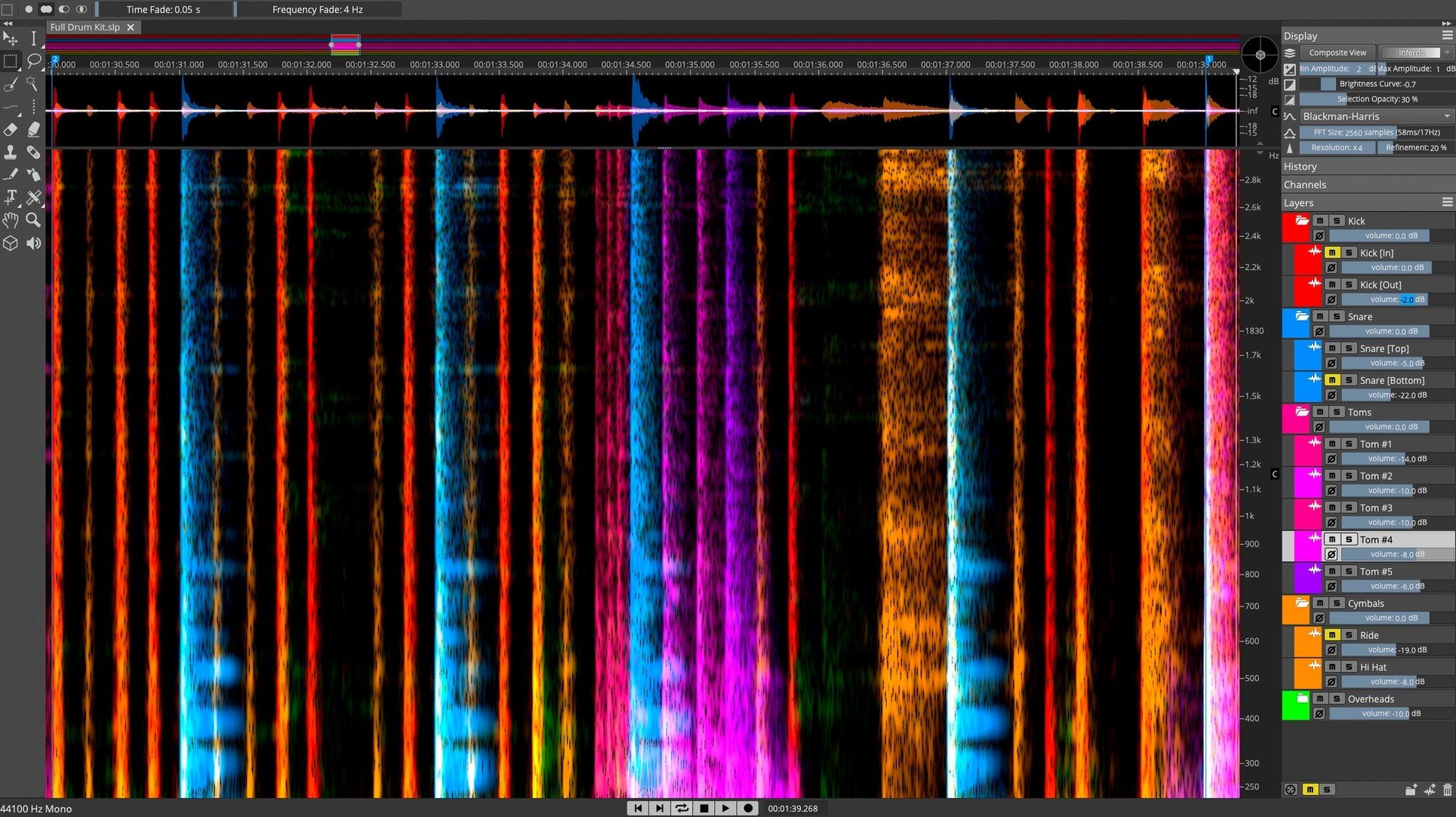
The Voice Denoiser in SpectraLayers Pro treats a mix like a set of tracks, letting you isolate the human voice directly from the spectral display. This is not a conventional EQ or gate — you are editing the audio itself, pixel by pixel, in a 3D visualisation of frequency over time.
Opens inside Cubase and Nuendo via ARA 2 without bouncing
SpectraLayers Pro supports ARA 2 integration with Steinberg Nuendo and Cubase, which means the spectral editor opens inside the host timeline without bouncing or exporting. The plugin runs natively on both Intel and Apple Silicon Macs (macOS 12 and later). The interface is English only. Pro and Elements editions are available, with Pro offering the full set of AI-driven separation and manual editing tools.
What the spectral approach sounds like
Rather than processing a signal through filters, you reshape the sound at the spectral data level. Background hum, reverb tails, or a single off-key note become visual objects you can select and remove. The AI separation handles voice, drums, bass and other stems; the manual tools let you refine what the algorithm missed. The result is transparent — no phase artefacts or comb filtering, because you are not mixing processed and unprocessed paths. You are simply editing what is there.
Visual spectral editing differs from iZotope RX's module-based approach
Izotope RX is the closest equivalent: it also offers spectral editing, voice isolation and stem separation. Where SpectraLayers Pro differs is in the visual editing philosophy. RX relies heavily on module-based processing — you run a dialogue de-noise, then a de-click, then a de-hum, each as a separate step. SpectraLayers Pro lets you see the whole spectrogram and paint, erase or lift sound objects directly. For users who think visually, this is more intuitive. RX is stronger for batch processing and repair workflows; SpectraLayers Pro is stronger for surgical, one-off edits where you want to see exactly what you are removing.
Adobe Audition includes a spectral frequency display and basic repair tools, but its separation capabilities are limited. The built-in Sound Remover tool works well for tonal noise, but it cannot isolate a full vocal stem from a mixed track with the same depth. Audition is a multitrack editor first; SpectraLayers Pro is a spectral editor first. If your work is predominantly spectral repair and unmixing, the dedicated tool wins.
You get separated stems, but you cannot then open the spectrogram and manually erase a breath or a mouth click inside the vocal track. SpectraLayers Pro combines the two — AI separation plus full spectral access — which is rare at this level.
Handles dialogue cleanup for post-production film and video engineers
Post-production engineers handling dialogue cleanup for film and video benefit directly. A single location recording with air conditioner rumble, traffic noise and overlapping speech becomes manageable: separate the voice, remove the background in the spectral layer, then recombine. The voice denoiser alone saves hours of manual gating and EQ notch filtering.
Music producers working with samples or archive recordings can isolate individual instruments or remove a cough from a vocal take without affecting the rest of the mix. The pattern finder is useful here: find all instances of a specific hi-hat hit or snare bleed and adjust them together, rather than hunting through the waveform.
Sound designers and foley artists use the 3D visualisation to identify and extract unusual textures — a creak, a rustle, a distant siren — that would be nearly impossible to separate with conventional EQ. The spectral view makes these events visible as distinct shapes, so you can lift them out cleanly.
Over-processing strips natural ambience from recordings
The most common error is over-processing. Because you can see every pixel of sound, the temptation is to remove everything that looks like noise. This often strips the natural ambience from a recording, leaving it dry and unnatural. A little room tone or breath noise is usually desirable. Learn to leave some of the spectral texture in place.
Another mistake is relying solely on the AI separation and never touching the manual tools. The AI is good, but it is not perfect — crosstalk between stems, especially in the low frequencies, is common. Beginners who export the separated stems without checking the spectral view may find drum bleed in the vocal track or vocal artefacts in the bass. The manual selection and erase tools exist for this reason.
A third issue is not understanding the difference between spectral selection and waveform selection. In a normal DAW, you select time and that is it. In SpectraLayers Pro, you select a region of frequency and time — a rectangle, a lasso shape, or a brush stroke. Beginners sometimes try to select a vocal phrase by drawing a box around the whole frequency range, which grabs everything. Instead, use the voice denoiser or the unmix tool first, then fine-tune the selection by frequency.
ARA 2 creates the tightest workflow with Cubase and Nuendo
ARA 2 integration with Cubase and Nuendo is the tightest workflow: open SpectraLayers Pro as an ARA editor on a clip, edit spectrally, and the changes appear directly in the Cubase project without rendering. For other DAWs — Logic Pro, Ableton Live, Pro Tools — you can export the separated stems as audio files and import them back. The export quality is high enough that reimporting does not introduce noticeable degradation.
SpectraLayers Pro works well alongside macOS Quick Actions if you set up a folder action to run batch separation. While the app itself does not include a built-in batch processor, you can use Automator or Shortcuts to trigger the command-line tools if Steinberg provides them. For most users, the workflow is simpler: drag the audio file into SpectraLayers Pro, process, and export.
The app respects macOS core audio routing, so you can use system audio sources or aggregate devices for playback. This is useful if you are monitoring through an interface while editing on built-in speakers — the signal path stays clean. The installer follows the standard macOS package format, and the disk image mounts without extra steps.
SpectraLayers Pro isolates audio elements like vocals or noise, ideal for sound editors, but "spectralayers pro torrent" is not its official name. The same applies for spectralayers 12 torrent or spectralayers pro 12 torrent — version 12 is older, and version 13.0.20 includes the current AI models and interface improvements. A spectralayers 12 download from unofficial sources may miss updates and lack ARA 2 compatibility with newer Cubase versions.
Before it goes on the Mac
- macOS 12 or later
- Apple Silicon or Intel 64-bit
Installing it on the Mac
The installer lands at about 3.8 GB and covers both Intel 64-bit and Apple Silicon Macs running macOS 12 or later — three steps from disk image to ready.
- Mount the disk image and run the installer inside.
- Follow the on-screen prompts. The installer places the standalone application, and the AAX, AU and VST3 plug-ins are registered automatically.
- Launch SpectraLayers once from the standalone app so it can finalise its component registration, then it will be available inside your DAW.
Notes from the control room
Sign in or open a catalogue account to leave a note.
No notes from the room yet. If you have used this build for a week, a short note helps the next person.
Also filed under VST Plugins
The whole VST Plugins rack T-RackS6.3.2 VST Plugins 2.3 GB
 Sonic Academy KICK1.1.8 VST Plugins 358 MB
 Sonible smart:EQ 41.1.0 VST Plugins 432 MB
 ShaperBox3.6.1 VST Plugins 111 MB
 Tone Empire Goliath V31.0.0 VST Plugins 82 MB
 Serum2.1.5 VST Plugins 1.2 GB
 RipX DAW Pro8.0.3 VST Plugins 1.6 GB
 UJAM Beatmaker VICE2.4.0 VST Plugins 262 MB