
Home › VST Plugins › T-RackS
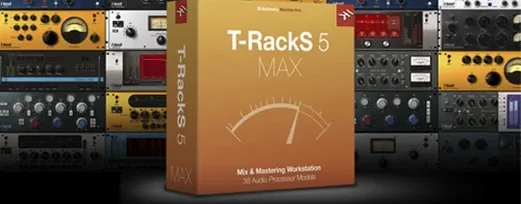
T-RackS 6.3.2 (Mac)
Updated
The catalogue note
T-RackS is modular mixing and mastering software that sits across tracks, buses and the final stereo output of a session.
Individual channel processing and master bus shaping
- Individual channel processing: insert the EQual or Dyna-Mu on a vocal or drum bus for surgical EQ and compression.
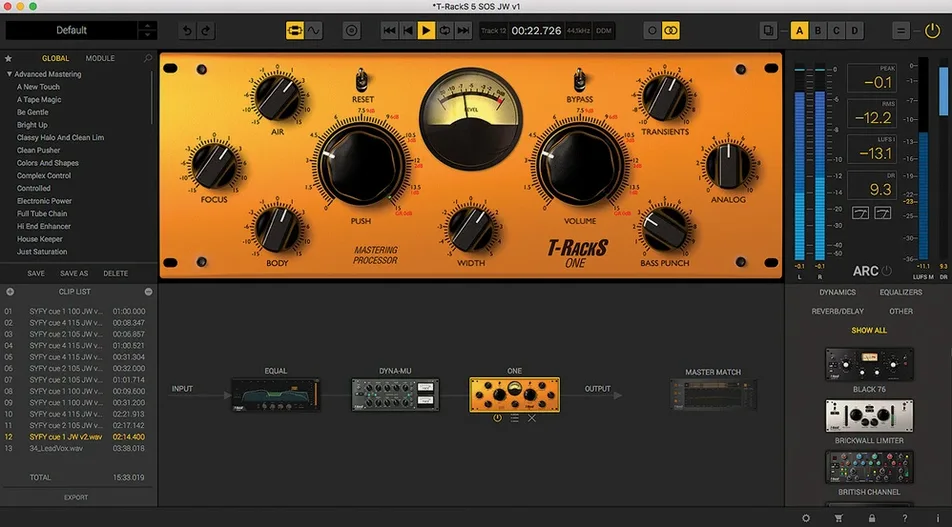
- Master bus work: load the full mastering chain — ONE, Master Match, and the vintage-style limiters — to shape the final mix.
- Album assembly: sequence tracks, embed metadata, and export as a finished album from the standalone Mastering Console.
- Multi-format export: bounce your master to WAV, AIFF, FLAC or MP3 without leaving the application.
Runs as AU, VST 3, AAX, or standalone on macOS 10.15+
- It runs as Audio Units, VST 3 and AAX plug-ins inside any major DAW, or as a standalone application.
- Version 6.3.2 adds four processors: Master Match, Dyna-Mu, EQual and ONE.
- macOS 10.15 or later required; 64-bit only, supports both Apple Silicon and Intel Macs.
Set audio device in standalone mode first
Once installed, a few configuration choices save time later. Open the standalone Mastering Console or load a plug-in in your DAW and look for the settings menu.
- Audio device selection — in standalone mode, set the correct audio interface and buffer size before you start processing. The default buffer may be too high for real-time work; a smaller buffer reduces latency when you adjust parameters while listening.
- Dithering defaults — four dithering options are available. If you export to 16-bit from a 24-bit session, choose one and leave it on. The default setting may not be your preferred type; check which sounds right for your material early on.
- Module Manager — the new Module Manager lets you organise your processor list. Remove the modules you never use and reorder the rest. This cuts down scrolling when you build chains.
- Export format preferences — set your usual sample rate, bit depth and file type (WAV, AIFF, FLAC or MP3) so you are not picking them every time. If you frequently master albums, enable metadata embedding by default.
None of these are permanent — you can change them later — but setting them once saves repeated clicks.
Fixes quiet voice and room echo on a podcast master bus
Consider someone who produces a weekly interview podcast. The raw audio arrives from a remote recording: one voice is slightly quiet, the other has room echo. Inside the DAW, the producer inserts T-RackS as a plug-in on the master bus. The EQual module cuts the low-end rumble from both voices, and Dyna-Mu evens out the level differences with gentle compression. Master Match analyses a reference episode and applies a tonal balance curve to match the established sound of the show. The final export goes straight to MP3 from the plug-in window. No separate mastering step, no extra application. The producer finishes the episode in the same session where the editing happened.
Leaves chain building in your hands, unlike Ozone's AI assistance
T-RackS sits alongside other modular mastering suites, but its approach differs in a few ways.
- Ozone (iZotope) — Ozone leans heavily on AI-assisted assistants and a more guided workflow. T-RackS leaves the chain building entirely in your hands. The processors here feel closer to individual hardware units than to a single integrated system. Ozone’s modules are deeper in some areas (the imager, the spectral shaper) but T-RackS offers more variety in compressor and EQ character across its nine processors.
- Wavesfactory Trackspacer — this is a different category: a single utility plug-in that ducks frequencies rather than a full mastering suite. T-RackS covers the whole chain. They are not direct alternatives; you would use Trackspacer inside a mix and T-RackS on the final stereo bus or as a complete standalone environment.
- DSP Quattro — a dedicated audio editor and masterer for macOS. DSP Quattro is more about destructive editing and spectral work; T-RackS stays closer to a modular signal-flow approach. For album assembly with metadata embedding, both can handle the job, but T-RackS does it inside a processor chain view rather than a waveform editor.
None of these are better or worse — they suit different habits. T-RackS is the middle ground: more manual than Ozone, more complete than a single utility, and more chain-oriented than a waveform editor.
Load each processor alone before stacking a full chain
- Load each processor alone first — before stacking a full chain, insert just EQual or just Dyna-Mu on a track and listen. Learn how each one behaves on its own. The interactions become clearer when you add them later.
- Use Master Match on a reference track you trust — drag in a professionally mastered song in the same genre. Master Match will suggest EQ and level adjustments. Compare its result with your own manual chain; you will hear where the tool agrees with your ear and where it does not.
- Try serial and parallel routing — the 16 slots support both. A parallel compressor alongside a serial EQ can give more control than a straight chain. Experiment with ONE in parallel on a drum bus while EQual runs in series on the same group.
- Export one song in multiple formats — use the multi-format export to produce WAV for archival, FLAC for streaming previews, and MP3 for quick sharing. Check that the metadata (track title, artist, album) carries over correctly in each format.
- Keep the standalone application open alongside your DAW — for quick A/B comparisons, run the same audio file in both. The standalone mode gives you a full-screen view of the chain without your DAW’s mixer layout getting in the way.
Before it goes on the Mac
- macOS 10.15 Catalina or later
- 64-bit CPU and 64-bit operating system
- Apple Silicon or Intel 64-bit Mac
Questions from the room
Can T-RackS be used as individual plug-ins in a DAW?
Yes, it can be used as individual plug-ins in a DAW, supporting Audio Units, VST 3, and AAX formats.
What macOS versions does T-RackS support?
It supports macOS 10.15 (Catalina) and later, with 64-bit architecture for both Apple Silicon and Intel Macs.
Does T-RackS include album assembly features?
Yes, the standalone Mastering Console includes album assembly with sequencing and metadata embedding, plus multi-format file export.
Installing it on the Mac
- Download the installer file from the provided source.
- Run the standard installation procedure on your Mac.
Notes from the control room
Sign in or open a catalogue account to leave a note.
No notes from the room yet. If you have used this build for a week, a short note helps the next person.
Also filed under VST Plugins
The whole VST Plugins rack Steinberg SpectraLayers Pro13.0.40 VST Plugins 3.8 GB Updated
 Tone Empire Goliath V31.0.0 VST Plugins 82 MB
 Sonic Academy KICK1.1.8 VST Plugins 358 MB
 Sonible smart:EQ 41.1.0 VST Plugins 432 MB
 UJAM Beatmaker VICE2.4.0 VST Plugins 262 MB
 ShaperBox3.6.1 VST Plugins 111 MB
 Serum2.1.5 VST Plugins 1.2 GB
 Valhalla DSP Bundle2025.12 VST Plugins 61 MB