
Home › VST Plugins › Serum

Serum 2.1.5 (Mac)
Updated
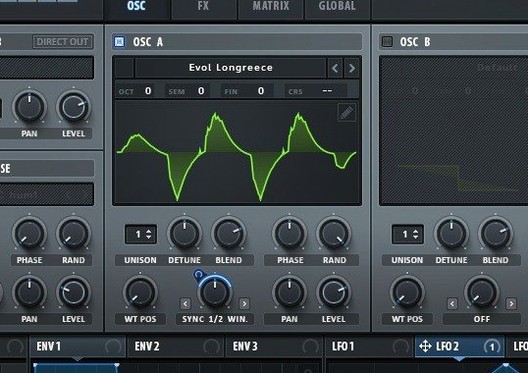
The catalogue note
Serum 2.1.5 keeps the same core engine as previous builds, so if you are already on 2.1.4 there is no dramatic shift in behaviour. The update addresses stability under current macOS versions rather than adding new oscillators or effects.
| Item | Detail |
|---|---|
| Developer | Xfer Records |
| Format | VST, AU, AAX |
| macOS | 10.13 and later |
| Architecture | Intel and Apple Silicon |
| Language | English |
In a session Serum lives mostly on instrument tracks. You route MIDI to it, it plays. The wavetable oscillators, each with per-voice unison and the ability to assign different waveforms across unison voices, give you thick pads or lean basses from a single instance. Its modulation system—envelopes, LFOs, and the matrix—handles everything from filter sweeps to wavetable position changes in real time. The effects section includes flangers, phasers and comb filters that track the note, which is useful when you want the processing to follow the key rather than stay fixed. Stack settings let you layer octaves on a single pressed note, saving a few insert slots. Serum does not normally sit on buses or the master unless you are resampling its output; it is a sound source, not a processor.
Treating Serum like a preset player misses its power
The most common error is treating Serum like a preset player and never touching the wavetable editor. People load a patch, tweak the cutoff and think they have learned the synth. The wavetable editor is where the instrument earns its name. Without editing the wavetable itself, you are leaving most of its character on the table. Beginners also overmodulate. They route six LFOs to the same filter, then wonder why the sound turns to mud. Serum’s modulation matrix is powerful, but restraint matters. Start with one or two targets per modulator until you hear what each does.
Another mistake is ignoring the unison parameters. Stack settings can layer octaves, and Unison WT Pos can assign a different waveform to every voice at once. New users often leave the voice count at one and forget this entirely. A single oscillator can sound like three or four without extra plugin instances. The opposite error is stacking too many unison voices without adjusting the Unison Warp setting. All voices then use the same waveform, and you get phase cancellation or a thin output instead of the fat sound you expected.
People also forget that the effects section—flangers, phasers, comb filters—tracks the played note. If you automate a filter sweep on a chord, the flanger might shift pitch with the notes and create unwanted beating. Beginners hear it and blame the synth, but the fix is to check whether the effect’s note-tracking mode is on. The manual covers it; reading that section saves hours of head-scratching.
Finally, beginners install Serum, load a few presets and expect it to work in Logic or Ableton without checking the plugin format. Serum 2.1.5 comes as VST, AU and AAX. If your DAW only reads AU, you need to install that variant. The wrong format does not show in the plugin list, and people assume the install failed.
Serum rewards sound designers who build from scratch
Serum rewards producers who build sounds from the ground up. If you spend time designing a bass patch or a lead texture rather than scrolling through preset banks, the wavetable oscillators and the modulation matrix are directly useful. Electronic musicians working in techno, house, ambient or experimental genres get the most benefit because their arrangements rely on timbre changes within a single note. The note-tracking effects and unison stacking let you create evolving sounds without writing automation on every track.
Film and game composers who use synthesisers for atmospheres or hits also gain. A single Serum instance can layer detuned waveforms with a comb filter that follows the melody, which reduces the number of tracks in a cue. The ability to import and edit wavetables from audio files means you can turn a field recording into an oscillator waveform and modulate it over time. That is quicker than bouncing and resampling in a sampler.
Producers on older Macs—say a 2016 MacBook Pro with macOS 10.13—still run this version without issue. The build is Intel-native and ARM-native, so it works on Rosetta-less on Apple Silicon machines too. The plugin does not demand a top-spec machine. What it does demand is willingness to read the modulation matrix. Users who skip that learn half the instrument.
Building a house bass with movement in Serum
I opened a project in my DAW where I needed a bass part for a house track. The existing sound was a plain sawtooth from a stock synth, and it lacked movement. I created a new instrument track, loaded Serum 2.1.5 as a VST and selected a basic wavetable from the browser—a saw waveform with a slight harmonic shift. The first oscillator stayed on one voice. I set a second oscillator to a square wave and tuned it one octave down. The unison settings on the second oscillator let me stack three voices with Unison WT Pos set to spread the waveform position across them. That gave a wide, shifting tone without any modulation.
I opened the modulation matrix and assigned LFO 1 to the filter cutoff. The LFO shape was a simple ramp down. I set LFO 2 to modulate the wavetable position on oscillator 1, so the sound moved from bright saw to hollow mid-range over each bar. The filter itself was a 12 dB low-pass with a mild resonance. I added a flanger from the effects section, set it to note-track, and let it follow the bass line. The result was a sound that filled the low end but changed texture every few bars without automation.
For the last step, I routed the track to a bus with a compressor and a reverb send. Serum’s output was already full, so I only needed light compression. I bounced the bass part to audio, then removed the Serum track to save CPU. The whole sound design took about twenty minutes. The modulation matrix was the key—without it, I would have needed three or four instances of a simpler synth to get the same movement.
Start with an init patch and eight unison voices
After you apply the patch and read the included installation and activation instructions file, open Serum with a clean init patch. Create a single oscillator using a basic sawtooth wavetable. Turn the unison voice count up to eight and play one note. Then change Unison WT Pos to different values while holding the note. You will hear how the waveform assignment spreads across voices. This exercise teaches the unison system in thirty seconds.
Next, open the modulation matrix and route one LFO to the overall volume. Set the LFO rate to a quarter note and listen. That is the simplest modulation you can do. Then route the same LFO to the filter cutoff and the wavetable position. Now the volume, brightness and timbre change together. Understanding that one LFO can target multiple destinations is the core of Serum’s sound design.
Do not install all three plugin formats. Pick the one your DAW uses. AU for Logic, VST for Ableton and Cubase, AAX for Pro Tools. Installing the wrong format wastes time during scanning. Also, keep the VR.nfo file open in a text viewer while installing. The instructions inside are short and specific to this build.
Finally, save your own wavetable edits. Serum lets you import audio files and turn them into wavetables. If you spend ten minutes editing a waveform, save it as a preset so you can recall it later. The browser’s user folder is easy to miss, but it is where your custom work lives.
Turning a vocal ah into an evolving pad in Serum
Start with a short audio file—a vocal ah, a string note or a field recording. Drag it onto Serum’s wavetable editor. The editor slices the audio into frames and creates a wavetable from them. You can adjust the number of frames and the smoothing. For a pad, use around 32 frames to get smooth transitions. Apply light smoothing so the frames blend.
Select the new wavetable for oscillator 1. Set the voice count to four and use Unison Warp to spread the pitch slightly across the voices—a few cents is enough. Unison WT Pos should cycle through the waveform frames so each voice plays a slightly different part of the sample. The result is a layered, evolving sound from a single oscillator.
Add oscillator 2 with a simple sine wave an octave below. Keep its voice count at one. This gives a stable low end so the pad does not drift tonally. Route LFO 1 to oscillator 1’s wavetable position, set the LFO rate to a half note and the shape to a slow sine. Route LFO 2 to the volume of oscillator 2, with a subtle depth so the bottom breathes in and out.
Apply a low-pass filter with moderate resonance. Set the cutoff to around 200 Hz and modulate it with the same LFO 1 that drives the wavetable position. Now the brightness of the pad rises and falls in sync with the timbral change. Add a comb filter from the effects section, set to note-track, and tune it to a minor third interval. This introduces a subtle harmonic dissonance that thickens the sound without clutter.
Play a chord—four or five notes held for eight bars. The pad will shift from the original sample character to a hollow texture and back. Bounce the output to audio. The entire process, from dragging the sample to bouncing, takes about ten minutes once you know the modulation matrix. This is the kind of sound that Serum 2.1.5 exists for: something that cannot be done with a sample player or a simpler synth.
Before it goes on the Mac
- macOS 10.13 or later
- Intel or Apple Silicon processor
- VST, AU or AAX-compatible host
Installing it on the Mac
- Run the standard installer for macOS.
- Apply the patch as directed in the included instructions.
- Open the installation and activation instructions file and follow the steps listed there.
- Refer to the VR.nfo file for supplementary notes.
Notes from the control room
Sign in or open a catalogue account to leave a note.
No notes from the room yet. If you have used this build for a week, a short note helps the next person.
Also filed under VST Plugins
The whole VST Plugins rack ShaperBox3.6.1 VST Plugins 111 MB
 RipX DAW Pro8.0.3 VST Plugins 1.6 GB
 Sonible smart:EQ 41.1.0 VST Plugins 432 MB
 Sonic Academy KICK1.1.8 VST Plugins 358 MB
 reFX Nexus5.5.21 VST Plugins 72 MB
 Steinberg SpectraLayers Pro13.0.40 VST Plugins 3.8 GB Updated
 Plugin Alliance Brainworx Bundle2025.06.16 VST Plugins 2.1 GB
 T-RackS6.3.2 VST Plugins 2.3 GB