
Home › VST Plugins › reFX Nexus

reFX Nexus 5.5.21 (Mac)
Updated
The catalogue note
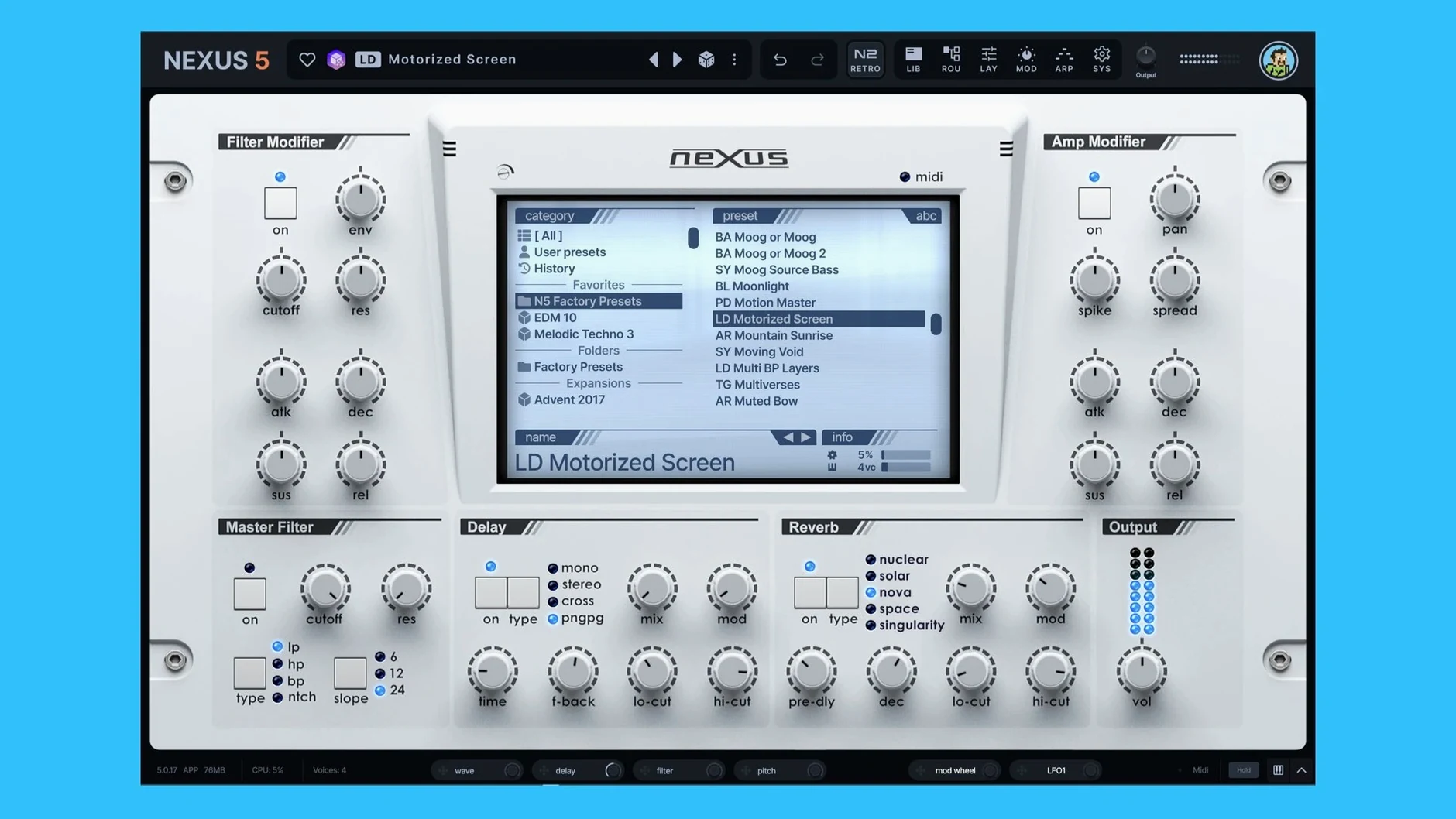
Nexus 5.5.12 runs as a plugin rather than a standard rompler, and that distinction matters. It loads in your DAW of choice, supports both Intel and Apple Silicon Macs on macOS 10.15 or later, and speaks the usual formats — AU, VST, and VST3. If you have existing NEXUS projects and libraries, they carry over without a fuss.
Build custom presets with modulation and the new Clipper FX
- Custom preset creation, so you can build your own patches from the ground up.
- A modulation section with proper routing — LFOs, envelopes, and a few surprises.
- A built-in effects section, including the new Clipper FX in 5.5.12.
- A unison overhaul that goes up to 16 voices; thick and wide is the default.
- Two new oscillator wrap modes for shaping waveforms in ways the old engine couldn't.
- A keyzone trigger for the Ducker, which is handy for rhythmic gating.
- A skin editor, because the default grey gets old.
Sample-based engine pushes beyond presets with arp-to-sequencer routing
The engine is sample-based, so the character comes from the libraries, but the new controls let you push beyond presets. The arp pattern can now seed the sequencer, and there's a modulation destination for oscillator phase minimum and maximum. It all stays in the box, quick to dial in, easy to automate.
Nexus sits comfortably alongside other studio tools because it doesn't demand to be the centre of attention. Route it through your DAW's own effects chain, sidechain it from a drum bus, or run it inside a multi‑instrument rack like Logic's Track Stack or Ableton's Instrument Rack. On the SYS page, you can use the fresh BPM readout and BPM override to either lock the plugin’s timing to the host or override it per instance — helpful when you need a pad to drift a bit against the grid.
reFX Cloud handles the housekeeping. It keeps Nexus itself, your expansions, and any updates in one place, so you are not hunting through download folders for the latest version. In version 5.5.12, the update process is simple: execute the upgrade and then proceed with the usual setup steps. The VR.nfo file details the remaining information, and the package contains installation and activation instructions.
Scenario: a soundtrack composer working to picture
A composer scoring a short film opens Nexus in their DAW, loads a string ensemble from an expansion, and drops in a custom sample — a field recording of footsteps on gravel — via the sample import. The sample is sliced and looped, then combined with a wavetable oscillator for texture. The new keyzone trigger for the Ducker makes the footsteps pulse in time with the on‑screen action without manual automation. The arp pattern is copied to the sequencer, so the rhythmic element stays locked to the tempo map. The whole patch is saved as a custom preset, ready for recall when the director asks for another pass. No bouncing, no freezing, just one plugin instance doing the work of three.
First‑days practical tips
- Start with the unison overhaul. The 16‑voice unison is the headline feature in 5.5.12. Dial it in on a simple pad first — you will hear the width increase without mud if you keep the detune moderate. Too many voices on a bass patch can lose low‑end punch, so adjust per patch.
- Use the skin editor early. The default skin is functional, but a high‑contrast skin reduces eye strain during long sessions. Spend ten minutes making a skin that works for your monitor and lighting. You can switch back if you change your mind.
- Map the modulation. The active modulation source tracking in the mod depth rings and tooltips is new. Click through the modulation destinations and watch the rings update — it is the quickest way to understand what is modulating what without diving into the routing page.
- Check the Clipper FX on drums. The new Clipper effect is not just for mastering. Insert it on a drum loop or a percussive layer to shave off transients cleanly. It beats a limiter for preserving attack.
Fix missing plugin in DAW by choosing the right format for your Mac
Plugin does not appear in the DAW. Nexus ships as AU, VST and VST3. If your DAW only scans one format, make sure the correct version is installed. On macOS, AU is the safest bet for Logic, while VST3 works in Cubase and Studio One. Run the installer again and select only the format you need.
Expansions from an older version do not show up. Nexus 5.5.12 is compatible with existing libraries, but expansions may need to be re‑authorised through reFX Cloud. Open the Cloud app, log in, and trigger a library refresh. The content should appear in the browser after a few seconds.
Unison sounds phasey or thin. The 16‑voice unison is powerful, but it can cancel out frequencies if the voices are spread too wide. Reduce the voice count to eight or four, or adjust the stereo spread parameter. The two new oscillator wrap modes can also help: try the alternative wrap mode on the oscillator before adding more unison voices.
The skin editor looks different after a restart. Custom skins are saved inside the plugin's user folder. If you reinstalled Nexus or moved your user directory, the skin file path may have broken. Export the skin from the editor, store it outside the plugin folder, and re‑import it after any update.
Host tempo and Nexus tempo disagree. The BPM readout on the SYS page shows the host tempo by default. If you need Nexus to ignore host tempo changes — for a preset that should stay at a fixed speed — enable the BPM override and set the value manually. This is useful when layering arpeggios from multiple instances that should run at different rates.
Changes in this build
- Unison overhaul with up to 16 voices.
- Added Clipper FX.
- Added a skin editor.
Before it goes on the Mac
- macOS 10.15 or later
- Intel or Apple Silicon
Installing it on the Mac
- Run the update first.
- Follow the standard installation procedure.
- Use the installation and activation instructions included in the package.
- Open the VR.nfo file for instructions.
Notes from the control room
Sign in or open a catalogue account to leave a note.
No notes from the room yet. If you have used this build for a week, a short note helps the next person.
Also filed under VST Plugins
The whole VST Plugins rack RipX DAW Pro8.0.3 VST Plugins 1.6 GB
 Plugin Alliance Brainworx Bundle2025.06.16 VST Plugins 2.1 GB
 Serum2.1.5 VST Plugins 1.2 GB
 ShaperBox3.6.1 VST Plugins 111 MB
 Sonible smart:EQ 41.1.0 VST Plugins 432 MB
 Sonic Academy KICK1.1.8 VST Plugins 358 MB
 Steinberg SpectraLayers Pro13.0.40 VST Plugins 3.8 GB Updated
 T-RackS6.3.2 VST Plugins 2.3 GB