
Home › VST Plugins › Tone Empire Goliath V3
Tone Empire Goliath V3 1.0.0 (Mac)
Updated
The catalogue note
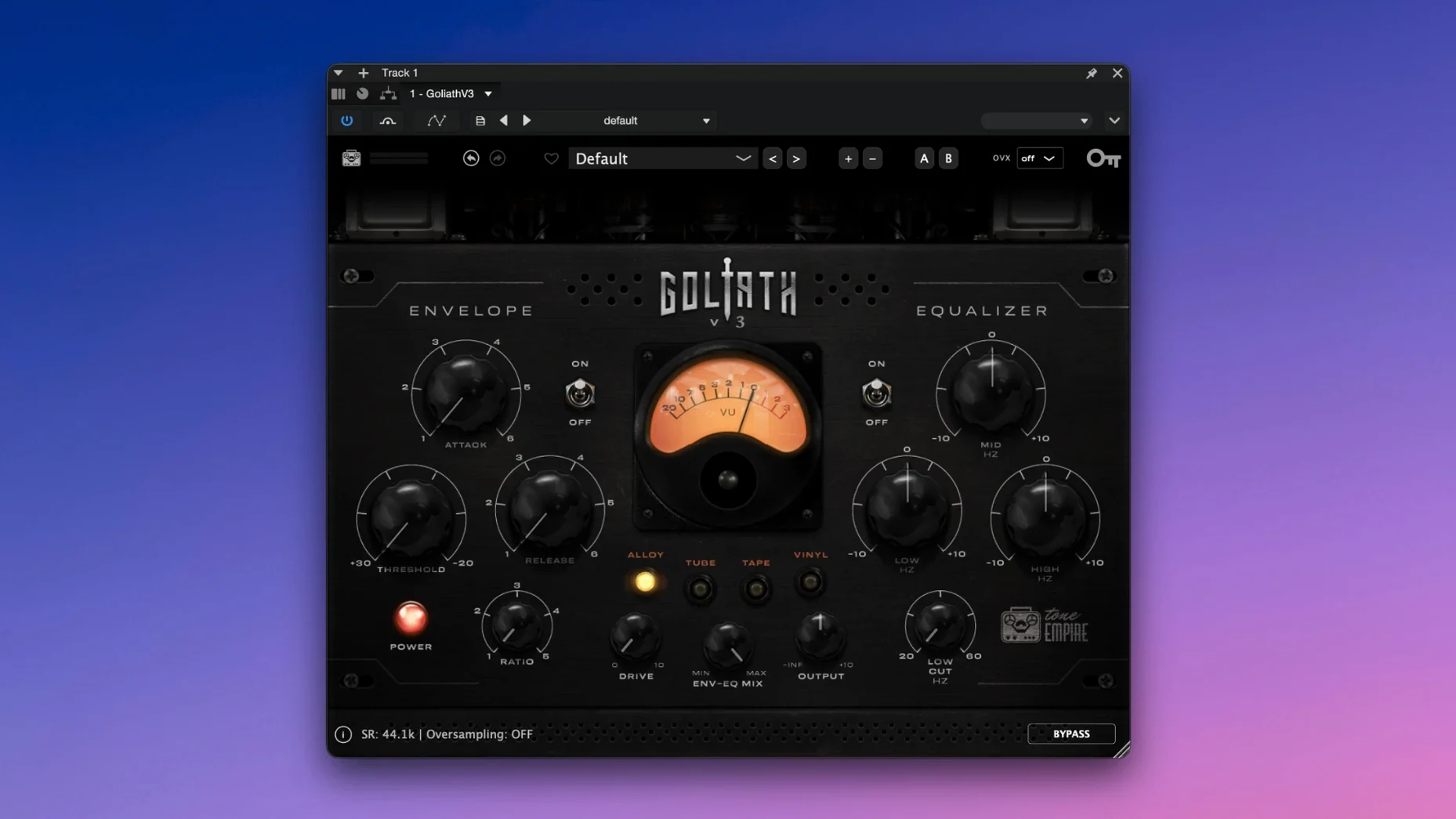
When a mix needs weight without turning into a brick, you reach for something that adds harmonic content and tames peaks at the same time. Goliath V3 does exactly that in one window: a three-band EQ with analog behaviour, a dynamics section, and saturation that can sit before or after the gain stage.
| Detail | Value |
|---|---|
| Developer | Tone Empire |
| Version | 1.0.0 |
| Format | VST (also AU/AAX) |
| macOS | 10.13 or later |
| Architecture | Intel & Apple Silicon |
The mix control blends the processed signal with the dry path, so you can push the drive hard and still keep the original transients. Automatic gain compensation keeps the level honest as you switch settings. It works on individual tracks, instrument groups, or the whole mix bus, and the EQ section behaves like analogue hardware rather than a clean digital filter. Simple to dial in, easy to back off.
Runs natively on Apple Silicon without Rosetta
The main question people ask is whether Goliath V3 works on Apple Silicon. Yes — it runs natively on ARM Macs and also on Intel 64-bit machines. No Rosetta translation is needed if your host and plugin format match the architecture. The installer is a standard disk image that mounts, runs the package, and places the plugin into the usual system locations for VST, AU, and AAX. It does not require an iLok or any online activation.
Another frequent concern is whether the plugin will work in Logic Pro. It will, because Logic uses Audio Units, and the AU version is included. The same applies to Ableton Live, Cubase, Pro Tools, Studio One, and Reaper — all common hosts on macOS. The plugin shows up under the Tone Empire vendor name in the plugin manager. If your host requires a rescan after installation, that is normal.
Some users wonder if Goliath V3 is a replacement for a channel strip. It is not a full channel strip — it does not have a gate, expander, or de-esser. What it does is combine three useful processes in one interface: saturation character, EQ shaping, and compression. The goal is speed, not depth. If you need surgical control over every parameter, you would use separate dedicated plugins. If you want to dial in a sound with three or four moves, Goliath V3 does that well.
Adding glue and body to a flat drum bus with Tube character
You open a mix that has been rough-mixed and needs some glue. The drum bus feels a little flat, and the snare lacks body. The character knob sits on Tube by default. You turn up the input drive until the snare starts to grow without losing its attack. The harmonic distortion is subtle, not fuzzy — more like a console that has been run warm for a few hours.
The EQ section has three bands. You boost the low band slightly around 100 Hz to give the kick more weight. The high band adds a touch of air to the cymbals. The mid band stays flat. The EQ behaves like an analogue circuit: boosting feels musical, not harsh, and the bands interact a little the way a hardware unit would. You do not need to look at a frequency analyser to know it sounds right.
Next, the compression knob. Single knob, no ratio or attack controls. You turn it until the snare sits more consistently in the mix. The automatic gain compensation keeps the output level from jumping, so you can compare the compressed sound against the original honestly. The compression is not aggressive — it feels like a bus compressor set to a moderate ratio, catching peaks without pumping.
The dry signal blends underneath, and the whole drum bus sounds bigger but still natural. You print the track and move on. The whole process took less than a minute once you knew what you wanted.
Requires macOS 10.13 or later for Intel and Apple Silicon Macs
Goliath V3 requires macOS 10.13 or later. That covers High Sierra through the current versions. It runs on both Intel and Apple Silicon Macs, so any Mac from about 2012 onward is supported as long as the OS version is met. The plugin is a single binary that installs into the standard VST, AU, and AAX folders. The installer is a disk image that you mount and run — no third-party installer tools, no background services.
The interface is English only. There is no resizable window, but the controls are large enough to read on a Retina display. CPU load depends on how many instances you run and how hard you drive the saturation. In normal use, you would put one instance per track or bus, not dozens, because the plugin is designed for character, not surgical correction. A typical mix might use it on two or three groups and the master bus.
Plugin formats are VST, AU, and AAX. If your host uses only VST3, check the plugin list carefully — the standard VST format is VST2 in this version. Most modern hosts still support VST2, but it is worth confirming before you rely on it in a session.
Avoid overdriving the input to prevent a mushy mix
The most common mistake is overdriving the input. The saturation sounds good, but turning it up too far turns the mix into mush. Start with the input at a moderate level and listen to how the character modes change the tone. Tube adds warmth, Tape adds compression and high-frequency roll-off, Solid State is cleaner, and Class A sits somewhere between Tube and Solid State. Each one responds differently to the same input level, so switch modes before you reach for the drive knob.
Another mistake is ignoring the mix control. The mix control is not just for parallel compression — it lets you blend the saturated signal with the original to keep transients intact.
Some users treat the compression knob as a volume control. It is not. It compresses the signal, and the automatic gain compensation brings the level back up. If you turn the compression knob all the way up, you get heavy compression, not more volume. Listen to what it does to the dynamics, not to the loudness. The compensation keeps the output consistent so you can hear the compression clearly.
Finally, beginners sometimes forget to check the plugin in mono. The EQ and saturation behave differently in stereo versus mono because of how harmonics sum. If you are mixing in mono or checking phase, listen to how Goliath V3 affects the centre image. It usually works fine, but it is worth verifying before you commit to a stereo setting.
Before it goes on the Mac
- macOS 10.13 or later
- Intel or Apple Silicon
- VST, AU or AAX host
Questions from the room
Does Goliath V3 work on Apple Silicon Macs?
Yes, it supports both ARM and x86 64-bit architectures, so it runs natively on M-series and Intel Macs.
Can I blend the processed signal with the dry signal?
Yes, the mix control lets you balance the wet and dry paths, useful for parallel saturation.
What kind of EQ does Goliath V3 have?
It has a three-band equalizer with analog behaviour, giving warmer, more musical tone shaping.
Installing it on the Mac
- Mount the downloaded disk image.
- Run the standard installation procedure.
Notes from the control room
Sign in or open a catalogue account to leave a note.
No notes from the room yet. If you have used this build for a week, a short note helps the next person.
Also filed under VST Plugins
The whole VST Plugins rack T-RackS6.3.2 VST Plugins 2.3 GB
 UJAM Beatmaker VICE2.4.0 VST Plugins 262 MB
 Valhalla DSP Bundle2025.12 VST Plugins 61 MB
 Steinberg SpectraLayers Pro13.0.40 VST Plugins 3.8 GB Updated
 VocalSynth 22.6.1 VST Plugins 259 MB
 WaveLab Pro13.0.30 VST Plugins
 Sonic Academy KICK1.1.8 VST Plugins 358 MB
 Sonible smart:EQ 41.1.0 VST Plugins 432 MB