
Home › VST Plugins › VocalSynth 2

VocalSynth 2 2.6.1 (Mac)
Updated
The catalogue note
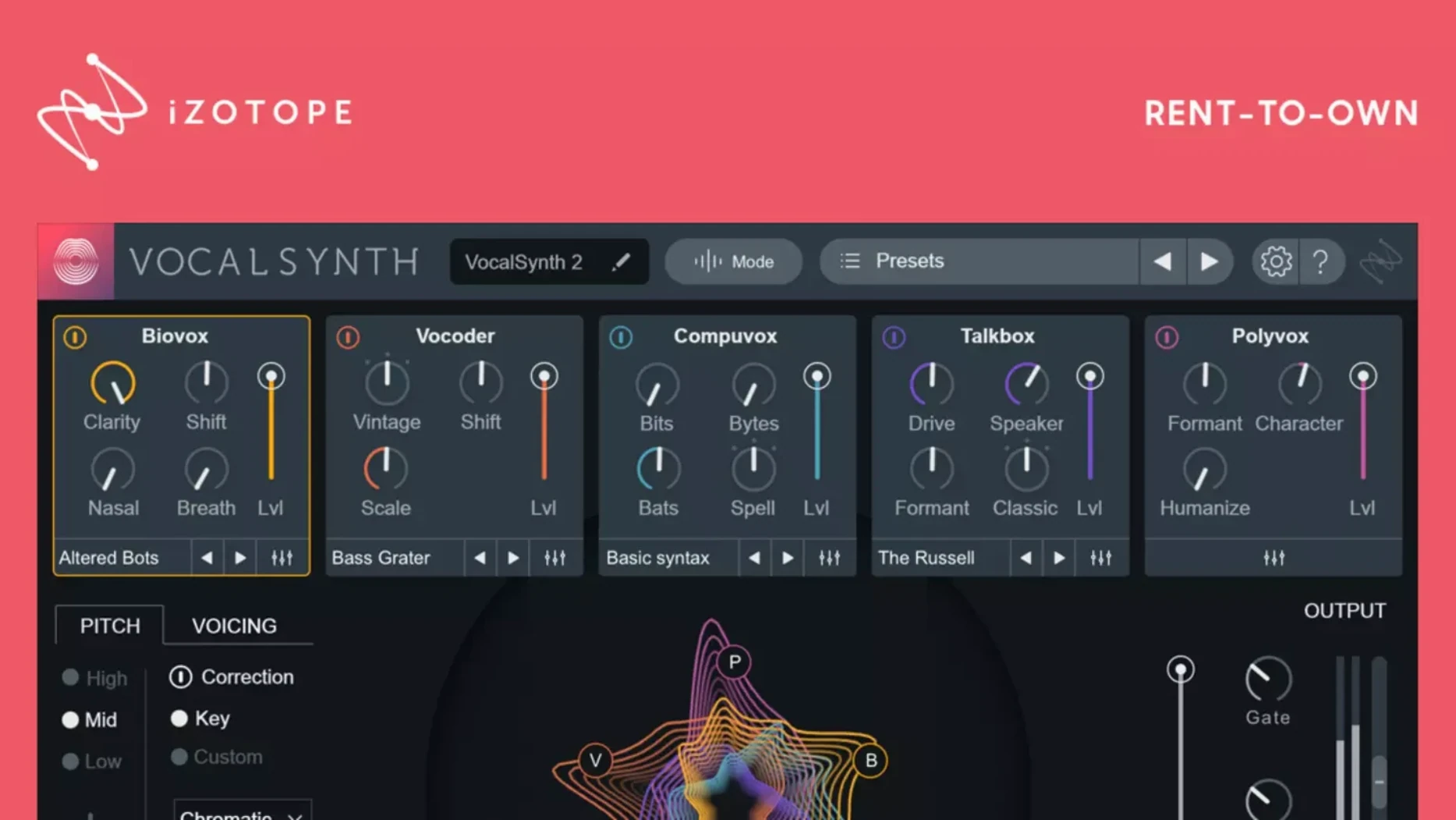
The spectral display in VocalSynth 2 responds to vowel shapes, so the visuals shift with the singer’s formants — useful when you are dialling in the vocoder or the polyphonic pitch shift without guessing. iZotope’s plugin runs as AAX, AU, and VST3 on both Intel and Apple Silicon Macs, and version 2.5.0 brought proper Monterey 12.3.x support. The current 2.6.1 patch fixed an authorisation hiccup for users updating from 2.5.0.
- Five mixable creative modules: Vocode, PolyPitch, Compressor, Delay, and Reverb, each switchable in the stompbox-style chain.
- Native Apple Silicon and Intel builds; works with Neutron, Ozone, and Tonal Balance Control for routed processing.
- Enhanced spectral display that visualises vowel characteristics — not a gimmick, it helps when editing formant-heavy material.
- Host formats: AAX, AU, VST3. English interface only.
- Works in any modern DAW supporting those formats on macOS 10.15 or later (Monterey 12.3.x tested).
If you already have Ozone or Neutron, the integration is straightforward — VocalSynth 2 can talk to them via iZotope’s relay. The plugin is a practical toolkit for vocal processing, not a one-knob fix.
Native Apple Silicon support arrived in version 2.5.0
Version 2.5.0 was the significant one for Mac users: native Apple Silicon support. If you moved to an M-series machine and kept running VocalSynth 2 through Rosetta, that update let you drop the translation layer. The plugin loads as a native ARM binary alongside the existing Intel build, so your DAW picks the right architecture automatically. No performance shift to report — just one fewer thing running through emulation.
Version 2.6.1 addressed a specific annoyance: some users who updated from 2.5.0 found their existing authorisation no longer recognised. The fix means you can install the newer build without deauthorising and re-authorising manually. If you are still on 2.5.0 and everything works, you can stay put. But if you ever need to reinstall or move the plugin to another machine, the 2.6.1 patch removes that potential roadblock.
Routes audio to Neutron or Ozone via inter-plugin communication
VocalSynth 2 talks to other iZotope plugins through the company’s inter-plugin communication system. In practice this means you can route audio from VocalSynth into Neutron for further EQ or compression, or send it to Ozone for final-stage processing, all within the same session. Tonal Balance Control can also read what VocalSynth is doing and give you a visual read on how the processed vocal sits against a reference curve. It is not automation — it is live relay data between plugins from the same developer.
On the macOS side, the plugin respects standard Audio Unit and VST3 conventions. It appears in your DAW’s plugin manager like any other AU or VST3. The installer places components in the usual system locations — /Library/Audio/Plug-Ins/Components for AU, /Library/Audio/Plug-Ins/VST3 for VST3, and /Library/Application Support/Avid/Audio/Plug-Ins for AAX. No special permissions or extra daemons needed. If you use macOS’s built-in Audio MIDI Setup for routing, VocalSynth does not interfere — it processes whatever audio your DAW sends to it.
Common pre-install questions answered
Authorises through iZotope account, no iLok needed
Yes. VocalSynth 2 uses iZotope’s own authorisation system, not iLok. The plugin authenticates through your iZotope account. You authorise the machine once during installation, and it stays active unless you deauthorise manually or change hardware. No USB key required.
Works with AU, VST3, and AAX in all major DAWs
It works with any DAW that supports AU (Logic, MainStage, GarageBand), VST3 (Ableton Live, Cubase, Studio One, Reaper), or AAX (Pro Tools). The same installer places all three formats, so you do not need to pick one during setup.
Internet only required for initial authorisation
Only during authorisation. Once the plugin is activated on your machine, it runs offline. The spectral display and all five modules work without a network connection.
No standalone version—requires a host DAW
No. VocalSynth 2 is a plugin only. It requires a host DAW to load audio into it. There is no standalone executable in the package.
Fixes for the plugin not appearing after installation
Restart your DAW or rescan plugins to make it show up
This usually means the DAW cached its plugin list before the install finished. Restart the DAW. If it still does not appear, rescan plugins from the DAW’s plugin manager. On Logic Pro, that is under the Plugin Manager in the Preferences. On Ableton Live, hold Option and click Rescan. If the plugin remains missing, check that the installer placed files in the correct folders — especially if you run multiple macOS volumes or a non-standard library path.
Authorisation not recognised after updating
This was the exact bug fixed in version 2.6.1. If you updated from 2.5.0 and hit it, download the 2.6.1 installer and run it over the top. The patch clears the stale authorisation state. If you are still on an earlier version and plan to update, go directly to 2.6.1 rather than stepping through intermediate builds.
Spectral display shows nothing or freezes
The spectral view relies on the host providing audio data in real time. If the track is frozen, bounced, or has no input, the display will be blank. Unfreeze the track and play audio through it. If the display still does not respond, check that your DAW is not in offline bounce mode — some hosts suspend real-time visualisation during offline rendering.
MIDI mode not triggering the vocoder
VocalSynth 2’s MIDI mode expects MIDI input routed to the plugin, not to the track. In your DAW, route a MIDI track to VocalSynth’s MIDI input. On Logic, create a software instrument track with VocalSynth loaded and play your MIDI controller. On Ableton, arm the track and ensure the MIDI from your controller reaches the plugin, not just the track’s instrument input.
Latency feels high when using sidechain mode
Sidechain mode introduces some lookahead processing because the plugin needs to analyse the incoming signal before applying modulation. This is normal behaviour. If the delay is noticeable during tracking, use Auto mode instead and switch to Sidechain during mixdown. The latency is not a bug — it is the cost of the formant-aware processing.
Changes in this build
- Fixed an issue where existing authorisation was not recognised for some users after updating from version 2.5.0.
Before it goes on the Mac
- macOS 10.15 or later (Monterey 12.3.x supported)
- Apple Silicon or Intel processor
- AAX, AU, or VST3 host
- English interface
Questions from the room
Does VocalSynth 2 run natively on Apple Silicon Macs?
Yes, version 2.5.0 and later include native support for Apple Silicon Macs, alongside Intel builds.
What plugin formats does VocalSynth 2 support?
It supports AAX, AU, and VST3 formats on macOS.
Installing it on the Mac
- Install and activation instructions are included in the package.
Notes from the control room
Sign in or open a catalogue account to leave a note.
No notes from the room yet. If you have used this build for a week, a short note helps the next person.
Also filed under VST Plugins
The whole VST Plugins rack WaveLab Pro13.0.30 VST Plugins
 Valhalla DSP Bundle2025.12 VST Plugins 61 MB
 UJAM Beatmaker VICE2.4.0 VST Plugins 262 MB
 XLN Audio Life1.2.3 VST Plugins 442 MB
 Tone Empire Goliath V31.0.0 VST Plugins 82 MB
 T-RackS6.3.2 VST Plugins 2.3 GB
 Steinberg SpectraLayers Pro13.0.40 VST Plugins 3.8 GB Updated
 Sonic Academy KICK1.1.8 VST Plugins 358 MB