
Home › Logic Pro Plugins › XLN Audio XO

XLN Audio XO 1.8.10 (Mac)
Updated
The catalogue note
The Accentuator is the first thing you notice — it nudges velocities and timings just enough to pull a pattern out of the grid without turning it into a mess. Underneath that, XO is a sample browser and beat maker that organises your drum one-shots by sound rather than by folder name. It works as a plugin (VST, AU, AAX) and as a standalone instrument, so you can audition loops before committing to a DAW session.
| Item | Detail |
|---|---|
| Format | VST, AU, AAX, standalone |
| Version | 1.8.10-2026.09.04-Complete |
| macOS | 10.13 or later, Intel & Apple Silicon |
Version 1.8.10 fixes a rare slow start-up and corrects MIDI export behaviour for muted lanes. The library ships with 8,700+ one-shot samples and 240 editable beat presets, all accessible from the built-in sequencer. You can drag audio or MIDI straight into your DAW, or keep working in standalone mode and export later. If you deal with unwieldy sample collections, the sound-sorting view alone is worth the space on the drive.
Browsing the XO Space grid for early-stage tracks
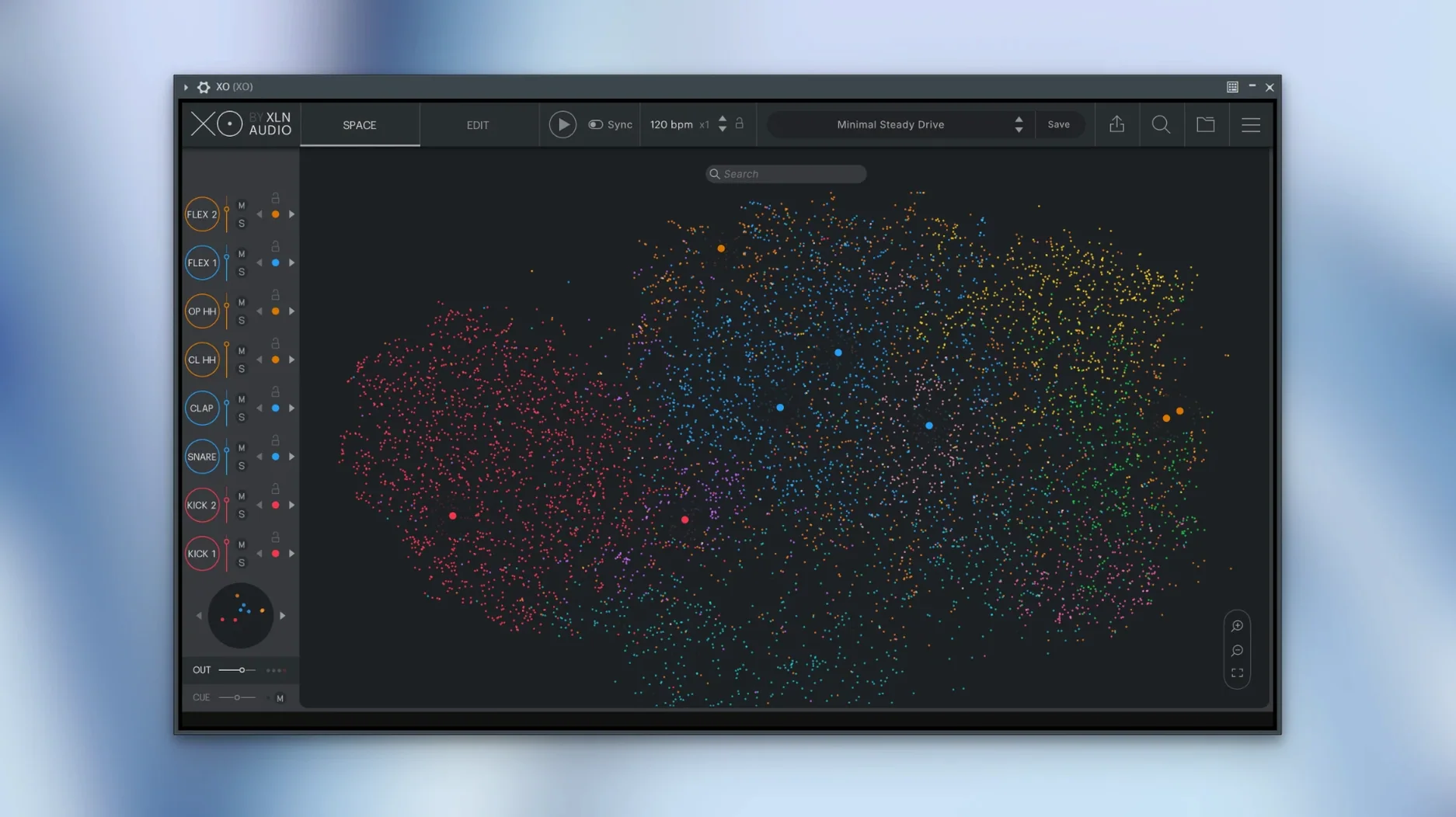
I usually start XO in standalone mode when I am in the early stages of a track. The library loads, and I browse the XO Space — the visual grid where every dot represents a sample, grouped by similarity. I click a cluster, hear a few kicks or snares, and drag the ones I like onto the sequencer pads. The whole process feels more like exploring a collection than digging through folders.
Once I have a handful of sounds assigned, I build a pattern in the sequencer. The grid is straightforward: sixteen steps per lane, velocity adjustable per hit. I toggle accents manually or let the Accentuator add some variation. After a few minutes I have a loop that sits in the pocket, but still sounds human.
From there, I switch to Groove Templates if the feel needs tightening or loosening. I pick a template that matches the genre — hip-hop, house, breakbeat — and the sequencer adapts the timing offsets. I export the MIDI pattern to my DAW, drop it onto a drum rack, and keep the audio from XO as a reference. If I want to keep the XO sounds themselves, I export audio stems directly.
When the track calls for a different palette, I use Hot Swap: I click a pad, and XO replaces that sound with a similar one from the same region of the space. It is a quick way to audition alternatives without rebuilding the pattern.
MIDI export now respects muted lanes
The update addressed three practical issues that affect how you work day to day:
- MIDI export with muted lanes — earlier versions could export muted lanes as active, so you had to unmute everything before dragging. Now the export respects the mute state, which saves a step when you are arranging a finished pattern.
- Audio export while playing in the host — exporting audio while the DAW was running could produce glitches or incomplete files. That is fixed, so you can render stems without stopping playback.
- Rare slow start-up — some configurations caused the plugin to hang for several seconds on launch. The fix makes loading consistent, especially when the library is on an external drive.
The sample count and preset library remain the same — 8,700+ one-shots and 240 beat presets — so the core content is unchanged. The improvements are under the hood, but they remove small friction points that add up over a session.
Setting audio output routing in standalone mode
When you open XO for the first time, a few settings make the experience smoother:
- Audio output routing — in standalone mode, check the output device matches your interface or built-in output. XO defaults to the system output, which may not be what you want if you run a multi-output setup.
- MIDI input — if you plan to play the pads from a controller, enable the correct MIDI port in the preferences. XO maps each pad to a MIDI note, so you can trigger sounds live.
- Default tempo — set the sequencer tempo to your project’s BPM before you start building patterns. Changing it later shifts the timing of exported loops.
- Library location — if you store samples on an external SSD, point XO to that folder in the browser settings. The search and similarity analysis works across any folder you add.
I also recommend turning on the metronome in standalone mode when you start a new pattern. It is a small thing, but it keeps you locked to the grid from the first hit.
How XO fits with other apps and macOS features
XO integrates with the DAW ecosystem through standard plugin formats — VST, AU, and AAX — so it works in Logic Pro, Ableton Live, Pro Tools, Cubase, and most other hosts. The drag-and-drop export sends audio or MIDI to the DAW’s arrange window, which means you do not need to bounce tracks internally.
On the macOS side, the plugin runs natively on both Intel and Apple Silicon Macs. The standalone mode is useful when you want to sketch beats without opening a full DAW session — it behaves like a self-contained instrument that can run alongside other audio apps if your interface supports multi-client drivers.
If you use the macOS Files app or Finder to manage samples, XO can import from any folder you point it to. The similarity analysis works on the fly, so you do not need to pre-process or rename files. This is particularly handy when you have accumulated one-shots from different sample packs and want to organise them by sound rather than by source.
The Groove Templates can also be applied to MIDI patterns you have already exported, so you can tweak timing in XO and re-export. For producers who xln audio xo crack mac might be searching for a way to avoid folder fatigue, the sound-sorting approach is a genuine workflow change — you spend less time hunting and more time building.
Before it goes on the Mac
- macOS 10.13 or later
- Intel or Apple Silicon
Questions from the room
Can XO run as a standalone application without a DAW?
Yes, XO includes a standalone mode in addition to VST, AU and AAX plugin formats.
What is the Accentuator in XO?
The Accentuator is a built-in feature that subtly varies velocity and timing to make programmed beats feel more human and less quantised.
Installing it on the Mac
- Open the downloaded disk image.
- Run the standard installation procedure.
Notes from the control room
Sign in or open a catalogue account to leave a note.
No notes from the room yet. If you have used this build for a week, a short note helps the next person.
Also filed under Logic Pro Plugins
The whole Logic Pro Plugins rack Xpand!22.3.1 Logic Pro Plugins 1.2 GB
 Wave Alchemy Tapewave1.0.1 Logic Pro Plugins 356 MB
 VocalNet1.0.4 Logic Pro Plugins 669 MB
 UnderTone Audio UnFairchild1.0.8 Logic Pro Plugins 220 MB
 UJAM Symphonic Elements STRIIIINGS1.3.1 Logic Pro Plugins 4.4 GB
 uJAM Cinedream1.0.1 Logic Pro Plugins 3.5 GB
 Tsuga Audio MoonBass1.0.0 Logic Pro Plugins 7 MB
 Toontrack EZmix Bundle3.2.2 Logic Pro Plugins 977 MB