
Home › Logic Pro Plugins › Toontrack EZmix Bundle
Toontrack EZmix Bundle 3.2.2 (Mac)
Updated
The catalogue note
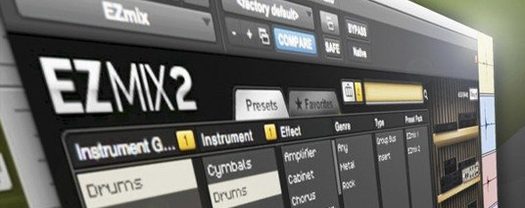
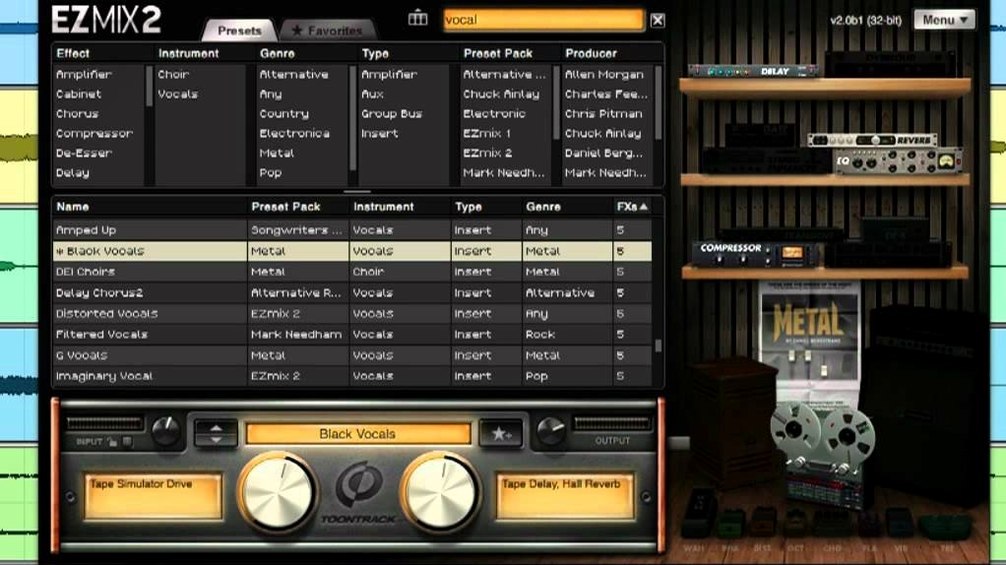
EZmix is for engineers who want a quick mix without opening a dozen plugins. Drop it on a sequencer channel, choose a preset, and it handles the rest — EQ, compression, amp tones, even mastering moves. The interface in EZmix 2 was redesigned, and version 3 continues that line, with all previous content and functionality carried over.
Find the drum sound
Scroll the preset list for drums. One click and the kit sits differently in the track — punch, room, or a tighter shell. The controls stay minimal, so you adjust a single knob for blend or intensity rather than wrestling with a channel strip.
Shape a vocal or guitar
Vocals get presence or depth from the same preset browser. For guitar and bass, EZmix doubles as an amp. Pick a cabinet or drive setting and the tone follows, without routing to a separate amp sim.
Finish the master
The mastering presets work on the mix bus. A little glue, a touch of width, or a final EQ tilt. It is a mixing tool, a mastering tool, and an amp in one package, and it runs on Intel or Apple silicon Macs.
Update supports Q4 2025 packs and keeps presets current
The latest update is straightforward: support for EZmix packs released from Q4 2025 onward requires version 3.2.2. If you already have EZmix 3 installed, updating through Toontrack Product Manager or your My Products area means the preset library stays current. No new interface elements or workflow shifts — just compatibility for newer content packs when they arrive.
Runs in any host or standalone on Intel and Apple Silicon
EZmix loads as a plugin in any AU- or VST-compatible sequencer, and the standalone host works independently for guitar practice. On macOS 10.13 or later, it runs on both Intel and Apple Silicon machines without Rosetta translation. The standalone host routes audio through the system's selected input and output devices, so it pairs with any interface Core Audio recognises. For quick sessions, you can keep EZmix open alongside a DAW and switch between the two without conflicts.
If you use Toontrack's Superior Drummer or EZdrummer, the drum presets in EZmix complement those libraries. Drop EZmix on the drum bus and pick a room or parallel compression preset — it saves loading separate compressors and reverbs. The same applies to EZbass: EZmix can shape the DI signal or the processed track.
Fixes a flat rock mix with drums, guitars, bass DI, and vocal
You open a project in Logic Pro — a rock track with recorded drums, two electric guitars, a bass DI, and a vocal. The mix is flat. You insert EZmix on the drum bus, scroll past the first few presets, and land on "Rock Kit – Punchy". The kick gains weight, the snare cuts through. One knob tweak to the blend control and the overheads sit right.
Next, the bass. EZmix on that channel, pick "Bass – Ampeg Drive". The DI signal turns into something that moves the speakers. The guitarist wants a cleaner amp tone for the verses: EZmix on both guitar tracks, "Clean Combo" preset, adjust the drive knob to taste. The vocals need presence without harshness — "Vocal – Present" does it, and you pull the mix knob back a touch.
On the master bus, you add another instance. "Master – Glue" brings the whole mix together. The song sounds like a rough mix ready for refinement, not a raw session. Total time: under ten minutes.
Workflow: dial in a guitar tone from scratch
- Insert EZmix on the guitar track in your sequencer, or open the standalone host and select your interface input.
- Browse the Amp & Cabinet category. Try "British Crunch" for an overdriven rock tone or "American Clean" for headroom.
- Adjust the single control knob — labelled Drive in most guitar presets — to balance grit and clarity.
- If the preset includes a reverb or delay, the second knob controls its level. Turn it down for a dry recording or up for a live feel.
- Record the part, then automate the EZmix bypass or the knob for verse-chorus contrast.
The same approach works for bass: pick a bass amp preset, adjust drive, and the tone is ready without loading a separate amp sim. Toontrack EZmix Bundle simplifies mixing with instant presets, and ezmix 3 free download is not available from the developer.
Changes in this build
- Support for EZmix packs released from Q4 2025 onward requires version 3.2.2.
Before it goes on the Mac
- macOS 10.13 or later
- Intel or Apple silicon processor
Installing it on the Mac
- Mount the downloaded disk image.
- Run the standard installation procedure.
Notes from the control room
Sign in or open a catalogue account to leave a note.
No notes from the room yet. If you have used this build for a week, a short note helps the next person.
Also filed under Logic Pro Plugins
The whole Logic Pro Plugins rack Toontrack EZkeys2.1.5 Logic Pro Plugins 707 MB
 Tone Empire EDYN1.0.2 Logic Pro Plugins 198 MB
 Tsuga Audio MoonBass1.0.0 Logic Pro Plugins 7 MB
 uJAM Cinedream1.0.1 Logic Pro Plugins 3.5 GB
 UJAM Symphonic Elements STRIIIINGS1.3.1 Logic Pro Plugins 4.4 GB
 Synapse Audio The Legend HZ v2.0.2.R12.1 Logic Pro Plugins 472 MB
 UnderTone Audio UnFairchild1.0.8 Logic Pro Plugins 220 MB
 Supertone Air1.0.1 Logic Pro Plugins 408 MB