
Home › Logic Pro Plugins › Wave Alchemy Tapewave

Wave Alchemy Tapewave 1.0.1 (Mac)
Updated
The catalogue note
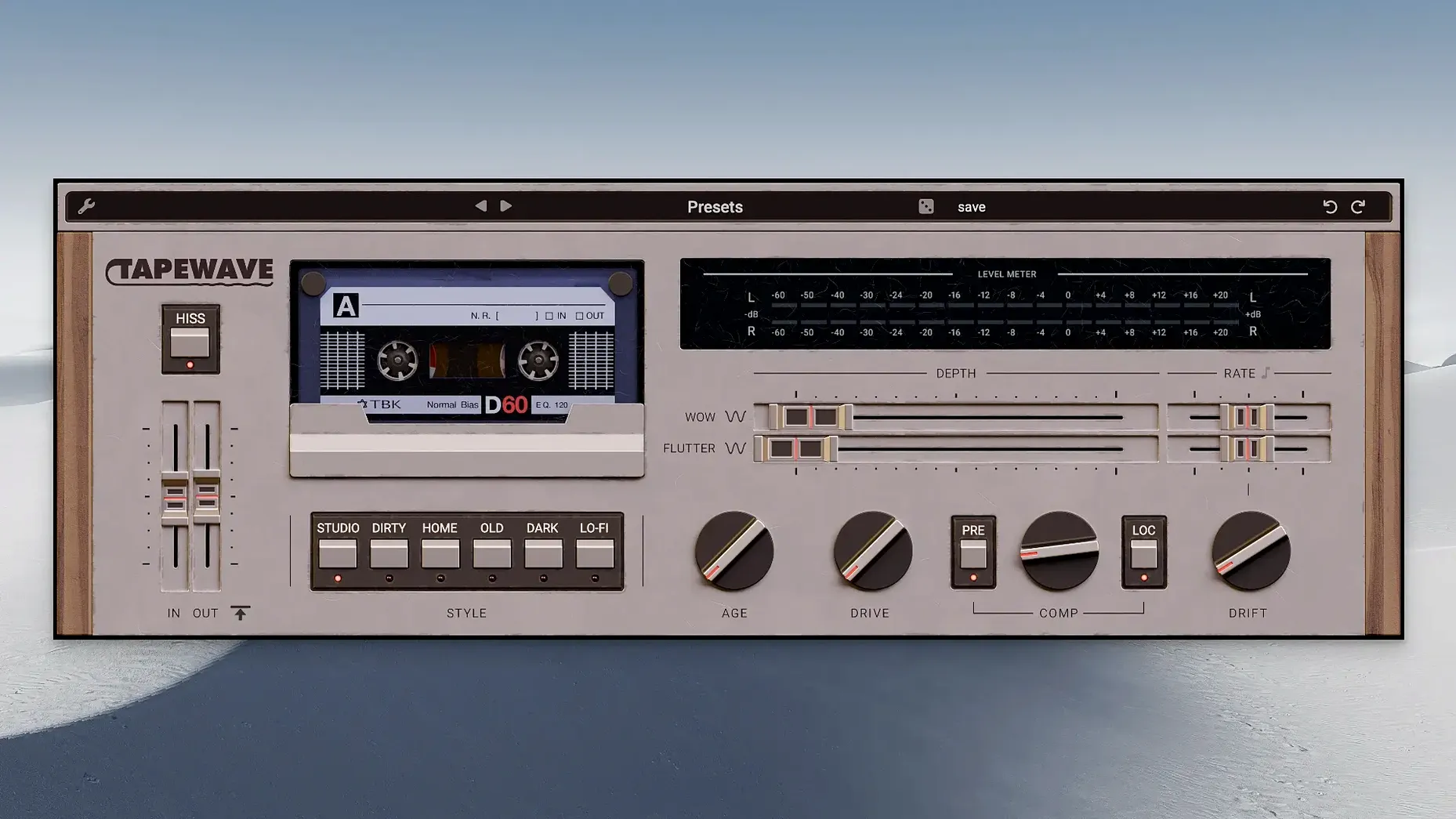
If you’ve ever reached for a tape emulation plugin and wished it had more of the grit and unpredictability of a worn cassette deck, Tapewave is worth a look. It blends analog tape tones with aged lo-fi cassette character, and the controls let you dial in everything from subtle warmth to pronounced wobble.
- Six tape styles — from clean studio reel to heavily degraded cassette, each with its own EQ and compression curve.
- Rich tape saturation — the drive control adds harmonic distortion that thickens instruments, vocals, or full mixes without turning brittle.
- Analog compression — built-in compression emulates the natural leveling of tape, taming peaks as you push the input.
- Authentic wow and flutter modulation — independent depth and rate controls let you recreate mechanical pitch instability, from subtle chorusing to seasick wobble.
- Native Apple Silicon support — runs natively on M-series Macs, so no Rosetta overhead in your session.
Across a drum bus or a vocal track, Tapewave adds the sort of analogue character that digital recordings often lack. The simplicity of the controls means you spend more time listening and less time menu-diving.
Inject life into sterile virtual instruments
Music producers working with electronic genres often find Tapewave useful for injecting life into sterile virtual instruments. A synth pad that sounds too clean in the box gains density and a gentle pitch weave that makes it sit differently in a mix. Mix engineers who deal with dense digital productions can use the tape styles to create separation — putting a vocal through a worn cassette setting while leaving the instrumental bus cleaner gives a contrasting texture that feels intentional rather than accidental.
Sound designers benefit from the adjustable tape age control. Pushing it into heavily degraded territory produces artefacts that are difficult to replicate with distortion or bit-crushing alone; the combination of saturation, compression and pitch fluctuation creates a unified lo-fi character rather than a stack of separate effects. For anyone who works with dialogue or field recordings, the wow and flutter section can add a convincing period-authentic wobble that matches old answering machine or portable cassette recorder sources.
Podcast and voiceover editors who want to avoid a sterile sound can use the cleanest tape style with low drive to add a subtle analogue glue without obvious degradation. It does not replace a dedicated compressor, but the built-in leveling means you might need one less plugin on the chain.
Start with the tape style selector for instant character
When you open Tapewave on a track for the first time, start with the tape style selector. The default position is usually one of the cleaner options, but scrolling through the six styles while your audio plays gives an immediate sense of how the plugin colours the source. Listen for the compression curve change as much as the EQ shift — some styles clamp down harder on transients than others.
The drive control is the next stop. Turn it up until you hear the harmonic saturation become audible, then back off slightly. This point varies per style and per source, so trust your ears rather than a fixed number. If you want the pitch instability, enable wow and flutter and set the rate to a slow speed first; adjusting depth afterwards is easier than chasing a combination that feels right from scratch.
For a full mix bus, a light touch on both drive and age keeps the effect transparent. For individual tracks, pushing both further is where Tapewave reveals its character.
Works with VST3, AU, and AAX in most Mac DAWs
Will this plugin work in my DAW? Tapewave ships as VST3, AU and AAX, so it covers the vast majority of modern Mac DAWs including Logic Pro, Ableton Live, Cubase, Pro Tools, Studio One and Reaper. The installer handles the correct format placement automatically.
Does it run on older Macs? The minimum system requirement is macOS 10.12, which means any Mac from late 2012 onwards should run it. Both Intel and Apple Silicon are supported natively, so you do not need to worry about Rosetta performance on M-series machines.
Is it a resource hog? As a single tape emulation plugin, Tapewave is not unusually heavy. You can run multiple instances on a track group without your session grinding to a halt, but as with any plugin, the exact impact depends on your project size and buffer settings.
Before it goes on the Mac
- macOS 10.12 or later
- Intel or Apple Silicon
- English interface language
Installing it on the Mac
- Open the downloaded disk image.
- Run the standard installation procedure.
Notes from the control room
Sign in or open a catalogue account to leave a note.
No notes from the room yet. If you have used this build for a week, a short note helps the next person.
Also filed under Logic Pro Plugins
The whole Logic Pro Plugins rack VocalNet1.0.4 Logic Pro Plugins 669 MB
 XLN Audio XO1.8.10 Logic Pro Plugins 2.3 GB
 Xpand!22.3.1 Logic Pro Plugins 1.2 GB
 UnderTone Audio UnFairchild1.0.8 Logic Pro Plugins 220 MB
 UJAM Symphonic Elements STRIIIINGS1.3.1 Logic Pro Plugins 4.4 GB
 uJAM Cinedream1.0.1 Logic Pro Plugins 3.5 GB
 Tsuga Audio MoonBass1.0.0 Logic Pro Plugins 7 MB
 Toontrack EZmix Bundle3.2.2 Logic Pro Plugins 977 MB