RetroDither 1.11 (Mac)
Updated
The catalogue note
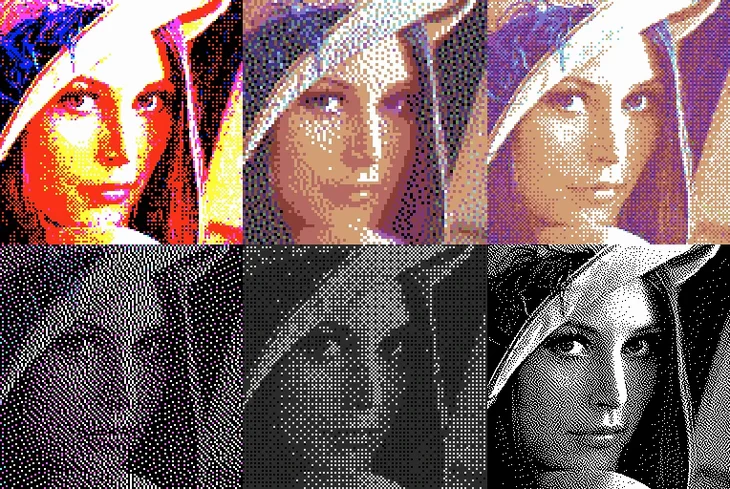
When a client asks for a pixel-art look or a chiptune-era music video, you can spend an evening hand-placing colour constraints. RetroDither shortens that to a single effect pass. It sits on an adjustment layer above your footage, applying one of its ten-plus ordered or error-diffusion dithering algorithms and a matching hardware palette in one go.
Drops onto a single clip or a pre-comp
Run it on a single clip for a hero shot, or drop it on a pre-comp to keep the whole timeline consistent. The GPU acceleration means it handles 4K without turning the render into a coffee break.
Which palettes are included?
You get the classics — ZX Spectrum, CGA, MSX — plus adaptive palettes that pull colours from the source footage. That covers both strict retro recreation and a softer, posterised look.
Runs natively on M-series and Intel Macs
Yes. The plugin ships with ARM and x86 64-bit builds, so it runs natively on M-series Macs and Intel models alike.
A stylisation tool, not a pixel-art replacement
No, and it isn't trying to be. It's a stylisation tool for video work — fast, predictable, and easy to tweak. Fine control still lives in your compositing skills.
Competes with Red Giant VHS and indie pixel sorters
If you work in After Effects, the two other options you'll come across are Red Giant's VHS (part of the Trapcode suite) and Pixel Sorter from a handful of indie developers. VHS gives you scan lines, colour bleed and analogue noise, but its colour treatment is a general degrade, not a palette-limited dither. It nails the worn-tape look, not the crisp 8-bit palette constraint that RetroDither targets. Pixel Sorter, on the other hand, is a glitch tool — it shifts and displaces pixels horizontally. Useful for data-bend aesthetics, but it has no dithering algorithms and no palette presets. RetroDither sits in a gap neither of them fills: it gives you the math of ordered and error-diffusion dithering with exact hardware colour maps. For a chiptune video or a pixel-art intro, it's the only plugin that does that inside After Effects without scripting or external image sequences.
GPU preview speed depends on your Mac's graphics
Will it slow down my preview?
The plugin runs on the GPU, so it depends on your graphics hardware. On a Mac with a discrete or Apple Silicon GPU, you can scrub the timeline with the effect enabled. On a system with only the integrated Intel GPU, preview might stutter at 4K — dropping the resolution to half or quarter in the viewer is the usual workaround.
Can I use it on still images?
Yes, it works on any layer After Effects can process. A still image is just a single-frame composition layer. The dithering and palette reduction apply the same way.
Does it support 10-bit or HDR footage?
The plugin reduces colours to palette-limited 8-bit output. If your source is 10-bit or HDR, you should apply RetroDither after a colour-management conversion to a standard 8-bit working space, otherwise the palette mapping may produce unexpected banding.
Marta's Commodore 64 loading screen from 4K footage
Marta edits music videos for independent synthwave artists. One track needed a sequence that looked like a Commodore 64 loading screen — blocky, dithered, with that specific blue-and-yellow CGA palette. She had a 4K clip of a neon-lit cityscape at night. She dropped RetroDither on an adjustment layer, chose the CGA palette and a 2x2 ordered dither, and scaled the output down to 320×240 in the comp settings. The GPU handled the resize and the dither in real time. She keyframed the palette intensity so the dither faded in over two seconds. The artist approved the cut without revisions. Without RetroDither, she would have had to render out a PNG sequence, process it through a pixel-art converter, and re-import — about forty minutes of extra work per revision.
Start with a 1080p test comp and cycle dithering algorithms
- Start with a test comp at 1080p. Apply the plugin to a solid colour layer with a gradient or a photograph. Cycle through the dithering algorithms to see which one gives the texture you want — ordered dithers produce a cleaner grid, error-diffusion ones scatter noise more organically.
- Try the adaptive palette first. It pulls colours from the source footage rather than clamping to a fixed set. If the result looks too loose, switch to ZX Spectrum or CGA for a stricter limitation.
- Use the palette as a creative constraint, not a filter. You can layer a colour correction effect underneath RetroDither to shift hues before the palette reduction happens. That gives you control over which colours survive the dither.
- Keep a pre-comp with the raw footage. If you apply the effect directly to a clip and later need to change the dither settings, you'll have to rebuild. Working on an adjustment layer over the pre-comp lets you swap palettes and algorithms without touching the source.
- Test render a short segment before the final export. GPU-accelerated plugins can behave differently at render time than in the viewer — a quick test at full resolution saves surprises.
Before it goes on the Mac
- macOS
- Apple Silicon or Intel (ARM and x86 64-bit)
- After Effects
Questions from the room
Which After Effects versions does RetroDither support?
The plugin supports both ARM and x86 64-bit architectures on macOS, covering Apple Silicon and Intel Macs. Version 1.11 is the current listed release.
Installing it on the Mac
- Perform the standard installation procedure for After Effects plugins.
Notes from the control room
Sign in or open a catalogue account to leave a note.
No notes from the room yet. If you have used this build for a week, a short note helps the next person.