
Home › VST Plugins › EZdrummer

EZdrummer 3.1.2 (Mac)
Updated
The catalogue note
You open EZdrummer 3 on a Mac, and the first thing that hits you is the browser. No blank canvas, no intimidating mixer — just a library of MIDI grooves organised by style and tempo. That is where you start: pick a groove, hit play, and the drummer plays it instantly. No MIDI knowledge required.
Browse and tweak grooves with a single click
Groove Browser — the central panel for finding MIDI grooves. Browse by genre, style or feel, preview with a single click, and star the ones you like.
Edit Play Style — a set of sliders that change a base groove in real time. Turn up the backbeat, loosen the timing, or add ghost notes. It is the fastest way to make a generic pattern sound like a human drummer.
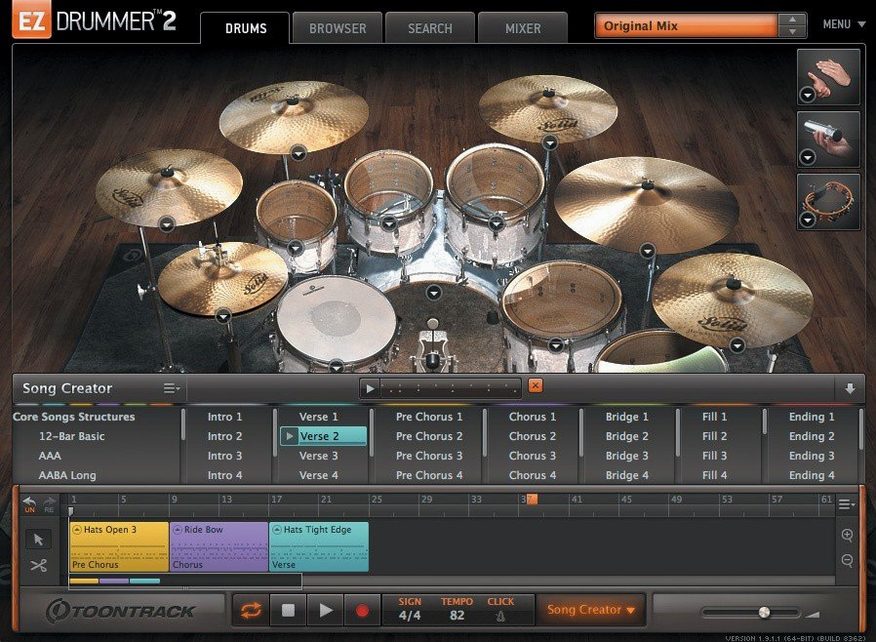
Song Track — drag grooves from the browser straight onto the song track, then cut, rearrange, copy and paste parts to build a full arrangement. The drummer follows the song form without you touching a timeline.
Grid Editor — when you want something from scratch, the built-in grid lets you write patterns note by note. It is there when the library does not have what you need.
Presets and rooms — mix-ready presets give you a finished drum sound in one click. Three different room mics are included, so you can move from a tight pop kit to a live room sound quickly.
EZdrummer 3 is drum software for songwriters. You can generate a full drum track without leaving the program — no external MIDI editor, no mixing console, just a groove, a song track, and a sound.
Tap2Find — a feature tucked into the browser that is easy to miss. Tap a rhythm on your keyboard or a MIDI controller, and it searches the groove library for patterns that match. Useful when you have a beat in your head but no idea what genre folder it lives in.
Bandmate — drag an audio file or MIDI clip onto it, and it analyses the material for tempo, feel and structure, then suggests grooves that fit. Works with a guitar riff you recorded on your phone or a drum loop you pulled from another session. No tap tempo needed.
Song Creator — takes the guesswork out of arrangement. Feed it an idea — a groove, a chord progression, a reference tempo — and it generates a full song structure with verses, choruses and fills. You can then edit the song track by cutting, rearranging, copying and pasting groove parts as you see fit.
Percussion — not just a drum kit. EZdrummer 3 includes percussion sounds that sit alongside the main kit, accessible from the browser. They are part of the MIDI groove library, so you get shakers, tambourines and hand percussion written to complement the drum patterns, not glued on afterwards.
macOS Tahoe icons and two annoyance fixes
Version 3.1.2 is a maintenance release that fixes two annoyances and adds a couple of visual updates.
- Standalone and project icons updated to macOS Tahoe style. The icon you see in the Dock and the project file icon now match the rounded-square look of macOS Tahoe. Nothing changes in the interface itself, but the icon no longer looks like it belongs on an older system.
- Internal improvements for Infinity Grid EZX. If you use the Infinity Grid EZX expansion, the internal changes in 3.1.2 affect how the grid behaves. No new features — just backend work that keeps that expansion running correctly.
- Song-track CC recording fix. Before 3.1.2, recording hi-hat pedal and other continuous controller data on the song track could fail — notes recorded but CC events dropped. That is fixed. If you record live hi-hat parts into the song track, the pedal data now arrives intact.
- Mixer Solo/Mute recall fix. Toggling Solo or Mute in the mixer used to clear the opposite recall state. For example, muting a track would forget that you had previously soloed it. In 3.1.2, the two states are independent again.
Version 3.1.2 is also required for support of EZX expansion packs released from Q4 2025 onward. If you plan to buy newer expansions, you need this version installed.
Runs natively on Apple Silicon without Rosetta
EZdrummer 3 runs on macOS 10.15 or later, on both Intel and Apple Silicon Macs. It is a Universal binary, so it runs natively on M-series chips without Rosetta translation.
The installer comes as a disk image. Mount it, run the standard installation, and the application lands in your Applications folder. The drum samples, MIDI grooves and presets are installed to the Toontrack library location on your system drive.
Once installed, the application occupies disk space proportional to the included content — seven kits, three rooms, mix-ready presets, MIDI grooves and percussion samples. Additional EZX expansions, if you add them later, increase the footprint.
The interface runs at standard display resolutions. No special GPU requirements, no Metal version requirements — it is a 2D interface that works on any Mac that meets the minimum OS version.
A workflow: write a verse and chorus from scratch
Here is one way to use EZdrummer 3 to build a drum part for a song that exists only as a voice memo or a rough guitar idea.
- Set the tempo. Tap the tempo into the transport bar, or drag your audio file onto Bandmate to let it detect the tempo automatically.
- Find a starting groove. Open the Groove Browser, browse by style, and preview grooves until one feels right for the verse. Star it so it is easy to find again.
- Adjust the feel. Open Edit Play Style and nudge the timing and backbeat sliders until the groove sounds less mechanical. If you want a laid-back verse, loosen the timing slightly.
- Build the verse. Drag the groove onto the song track. It places one instance of the groove. Copy and paste it to fill the verse section length you need.
- Create a chorus variation. Find a busier groove in the browser — maybe one with more cymbal work or a different kick pattern. Drag it onto the song track after the verse. Use Edit Play Style again to match the energy level.
- Add fills and transitions. Browse the MIDI groove library for fills. Drag them onto the song track at the end of the verse or before the chorus. Cut and rearrange parts on the song track until the arrangement flows.
- Write a custom fill if needed. Open the Grid Editor and draw in a fill that matches your song's accent points. Drag that onto the song track in place of a library fill.
- Pick a preset. Select a mix-ready preset from the mixer section. Switch between the three room mics to hear the kit in a tighter or more ambient space. Adjust the faders if the kick or snare needs more presence.
- Export or record. Drag the finished drum track from the song track to your DAW as MIDI, or route the audio outputs directly. The arrangement, the fills and the sound are all done inside EZdrummer 3.
Changes in this build
- Standalone and project icons updated to macOS Tahoe style.
- Internal improvements added for Infinity Grid EZX.
- Fixes for song-track CC recording and mixer Solo/Mute recall states.
Before it goes on the Mac
- macOS 10.15 or later
- Intel or Apple Silicon
Installing it on the Mac
- Mount the downloaded disk image.
- Run the standard installation.
Notes from the control room
Sign in or open a catalogue account to leave a note.
No notes from the room yet. If you have used this build for a week, a short note helps the next person.
Also filed under VST Plugins
The whole VST Plugins rack Effectrix1.4.8 VST Plugins 20 MB
 Devious Machines Infiltrator2.5.26 VST Plugins 46 MB
 iZotope Insight2.4.0 VST Plugins
 Komplete Kontrol3.5.4 VST Plugins 785 MB
 LFOTool1.768 VST Plugins 7 MB
 Baby Audio IHNY-21.5.0 VST Plugins 28 MB
 Arturia Rotary CLS-2221.2.0 VST Plugins 359 MB
 Arturia Modular V3.13.3 VST Plugins 707 MB