
Home › VST Plugins › iZotope Insight

iZotope Insight 2.4.0 (Mac)
Updated
The catalogue note
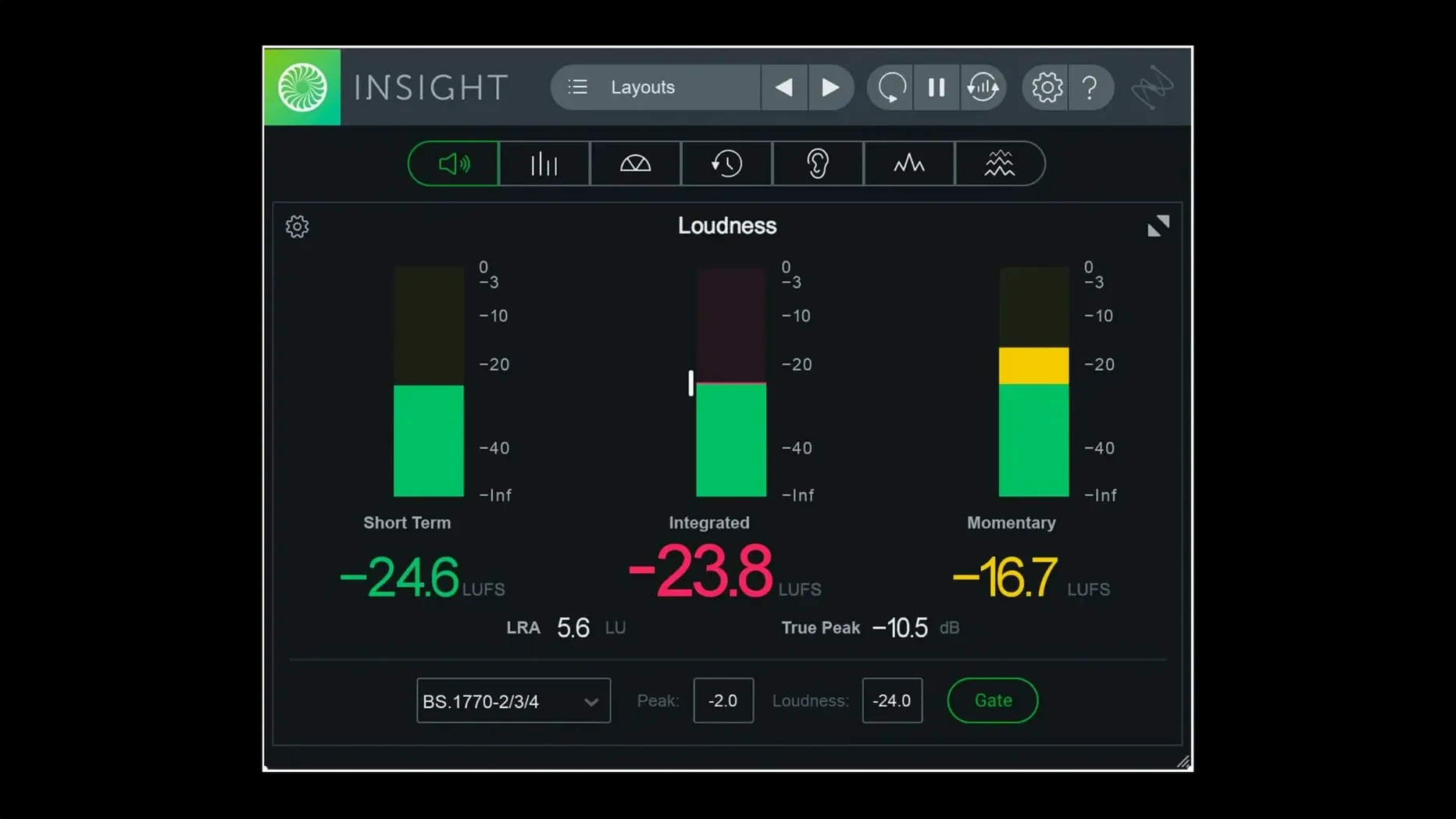
Version 2.4.0, released on 2023-08-23, is the current build of iZotope Insight 2, a metering and analysis plugin that sits across your mix bus and individual tracks to show what's actually happening to the audio.
Mix bus — loudness and dynamics — Insight 2 shows integrated loudness, true peak, and dynamics range, with broadcast standards updated to current specs. Useful for checking how close you are to a target loudness before mastering.
Individual tracks — spectral balance — The spectrogram and real-time analyser reveal frequency build-ups or gaps. Colour-coded signals flag potential problems before they become obvious in a listen.
Intelligibility — dialogue and voice — A dedicated meter estimates speech clarity, handy for post-production or podcast sessions where words need to cut through.
Surround — up to Dolby Atmos 7.1.2 — Multichannel support covers beds and objects, so the same plugin works on stereo and immersive sessions.
Customisation — resizable meters — Meters can be scaled and configured to fit the session, so you keep only what you need on screen.
Runs natively on M-series Macs
Insight 2 requires macOS Big Sur or later and runs natively on both Intel and Apple Silicon Macs. The version 2.4.0 installer includes native arm64 support, meaning the plugin loads as a native process on M-series machines rather than running through Rosetta 2. For Pro Tools users on Apple Silicon, native AAX support was added for Pro Tools 2023.3 and later, so no bridging layer is needed there either.
The installer is DRM-free, and multi-user installation is supported — useful for shared studio machines where several engineers need access without repeated authorisation steps. The authorisation workflow was changed in this version, so if you're updating from an earlier build, expect a fresh activation prompt. Install instructions come inside the package.
English is the only interface language. The plugin occupies a moderate footprint in your plugins folder and loads as a single window with resizable panels. No separate helper apps or background services are installed.
Works as an insert in any AU, VST3, VST2, or AAX DAW
Insight 2 works as an insert plugin in any AU, VST3, VST2, or AAX-compatible DAW. You can place it on the master bus for overall loudness monitoring, on individual tracks for spectral analysis, or on aux sends for side-chain inspection. The meters update in real time, so routing audio from any track or bus gives you immediate visual feedback.
On macOS, the plugin respects system audio routing and Core Audio latency compensation. Because it's a standard plugin format, it integrates with DAW project recall, session templates, and automation lanes — though Insight 2 doesn't itself automate parameters beyond what the DAW exposes.
For post-production workflows, Insight 2 pairs naturally with iZotope's own RX suite: you can use Insight to identify problem frequencies or loudness violations, then open the corresponding RX module to fix them. No direct plugin-to-plugin link exists, but the two tools complement each other in a diagnostic-then-repair sequence.
The preset manager in version 2.4.0 now has separate factory and custom preset tabs, making it easier to save your own metering layouts without scrolling through the built-in ones. These presets are stored in standard locations and can be shared between sessions or with collaborators.
Compares to Waves WLM, Nugen VisLM, and DPA Meter
Three other metering plugins occupy a similar space: Waves WLM Plus Loudness Meter, Nugen Audio VisLM, and DPA (Danish Pro Audio) Meter. Here's how Insight 2 differs.
Waves WLM Plus focuses almost exclusively on loudness metering against broadcast standards. It's clean and lightweight, but lacks the spectral analyser, vectorscope, and surround scope that Insight 2 includes. If you only need loudness numbers, WLM Plus is enough; if you also want to see frequency content or stereo imaging, Insight 2 covers more ground in one window.
Nugen Audio VisLM offers loudness history graphs and multichannel support, similar to Insight 2, but its interface is more static. Insight 2's meters are fully resizable and configurable, which helps when working on a single screen or when you need to see multiple metrics at once. VisLM also doesn't include a spectrogram or speech intelligibility meter.
DPA Meter is a capable loudness and true peak meter, especially for broadcast compliance, but it's more narrowly focused. Insight 2 adds the 2D/3D spectrogram, stereo vectorscope, and surround scope, making it a more versatile analysis tool for mixing and mastering beyond just loudness checking.
None of these alternatives offer the speech intelligibility meter that Insight 2 includes, which is a genuine differentiator for post-production and podcast work.
Troubleshoots Insight 2 metering and plugin issues
Plugin doesn't appear in your DAW
First, check that the installer completed and that the plugin format your DAW uses (AU, VST3, AAX) was selected during installation. Some DAWs rescan plugins on launch; others need a manual rescan. If you're on Apple Silicon and using Pro Tools, confirm you're on version 2023.3 or later for native AAX support — otherwise the plugin won't load.
Meters show no signal
Insight 2 reads audio from the track or bus it's inserted on. If you've placed it on an aux send that isn't receiving audio, or on a track with no input, the meters stay flat. Check your routing. Also verify that the plugin isn't bypassed in the DAW's mixer.
Loudness readings seem off
The plugin applies the loudness standard you've selected in its settings. If your project targets a specific broadcast spec (ITU-R BS.1770-4, EBU R128, etc.), make sure Insight 2 is set to match. The default may not align with your deliverable. The integrated loudness reading needs the full track or a long enough window to stabilise — short clips give unreliable numbers.
UI is too large or too small
Insight 2's meters are resizable. Drag the window edge or use the resize handles on individual meter panels to fit your screen. On smaller laptop displays, scaling down the window helps keep the plugin from overwhelming the mixer view.
Authorisation prompts after update
Version 2.4.0 changed the authorisation workflow. If you updated from an earlier build, you may need to re-authorise. The instructions are in the downloaded package. Because the plugin is DRM-free, the process is straightforward — no online account required.
For anyone searching for izotope insight 2 crack mac or izotope insight 2 torrent, note that the version 2.4.0 installer is DRM-free, which simplifies legitimate installation. izotope insight 2 mac torrent and izotope insight 2 free download mac searches often lead to outdated builds; the current version includes native Apple Silicon support and the updated preset manager.
Insight 2 doesn't replace your ears, but it gives you a second opinion on the numbers behind the sound.
Changes in this build
- Native arm64 AAX support added for Pro Tools 2023.3+ on Apple silicon Macs.
- Native arm64 install support for Apple silicon Macs added.
- Factory and custom preset tabs added to the preset manager.
Before it goes on the Mac
- macOS Big Sur or later
- Apple silicon or Intel Mac
Installing it on the Mac
- Install the plugin using the included installer.
- Follow the activation instructions provided in the package.
Notes from the control room
Sign in or open a catalogue account to leave a note.
No notes from the room yet. If you have used this build for a week, a short note helps the next person.
Also filed under VST Plugins
The whole VST Plugins rack Komplete Kontrol3.5.4 VST Plugins 785 MB
 LFOTool1.768 VST Plugins 7 MB
 Melodyne5.4.2 VST Plugins 97 MB
 EZdrummer3.1.2 VST Plugins 786 MB
 Effectrix1.4.8 VST Plugins 20 MB
 Devious Machines Infiltrator2.5.26 VST Plugins 46 MB
 Plugin Alliance Brainworx Bundle2025.06.16 VST Plugins 2.1 GB
 reFX Nexus5.5.21 VST Plugins 72 MB