
Home › Logic Pro Plugins › Revoice Pro

Revoice Pro 5.1.30 (Mac)
Updated
The catalogue note
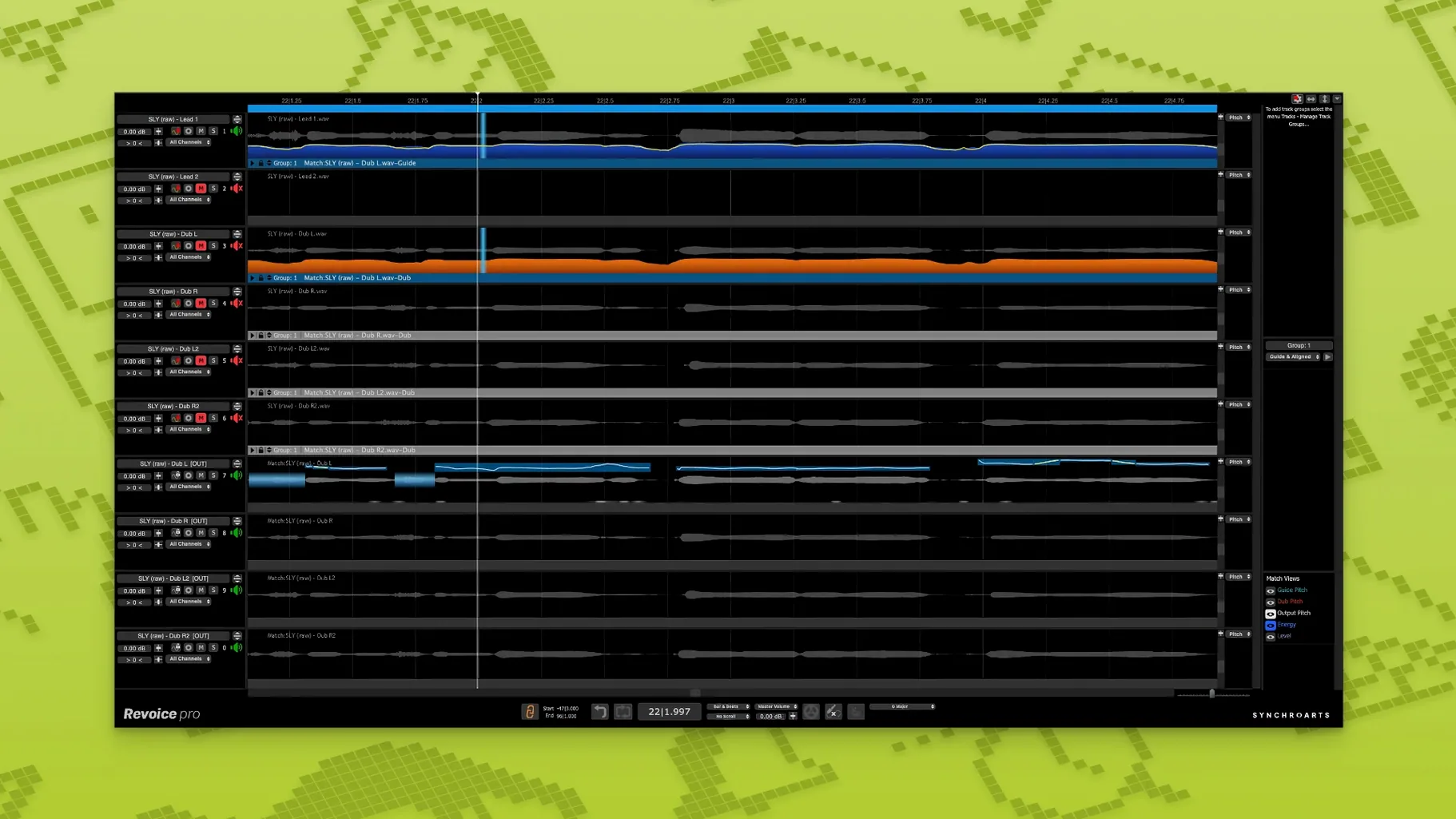
Revoice Pro 5 processes time, pitch, and loudness in three distinct tools, each aimed at a specific vocal task.
SmartAlign — synchronises track timing
Matches the timing of a performance to a guide track. Works even when takes begin or end at different positions on the timeline, so you can align parts that don't share the same start point.
SmartPitch — matches pitch for doubles and harmonies
Pulls the pitch of a double or harmony part to match the lead vocal. Useful for tightening layered vocals without losing the natural character of the second take.
Shaper Tool — pitch adjustment
A manual pitch-editing tool for fine-tuning individual notes or phrases. Gives you control over the shape of a pitch curve.
Stability improvements in the latest maintenance release
Version 5.1.30 is a maintenance release that keeps the toolset established in Revoice Pro 5. The three core tools — SmartAlign, SmartPitch, and the Shaper Tool — remain the same in behaviour. What changed is the overall stability on current macOS versions. Users moving from earlier 4.x builds will notice that the interface now responds faster when switching between alignment and pitch tasks, and the AAX format works reliably in Pro Tools sessions on both Intel and Apple Silicon machines.
For everyday vocal editing, the practical difference is that you spend less time waiting for processing to catch up with edits. SmartAlign recalculates timing quickly after you adjust a section boundary. SmartPitch applies pitch correction in real time during playback, so you can hear the result without bouncing. These are small gains, but they add up when you are aligning forty backing vocal takes in a single session.
Designed for vocal producers and audio engineers
Revoice Pro is built for people who edit vocals for a living. Music producers and audio engineers working in pop, rock, or any genre with layered harmonies will find the most use. The software handles monophonic instruments too — think bass lines or solo sax — but its real strength is voice.
Post-production engineers who need to sync ADR or voice-over takes to picture also benefit from SmartAlign, especially when the replacement takes have different lengths or start points. The tool does not care about timeline positions; it matches content, not timecode.
Apple Silicon users gain a slight edge here because the software runs natively on M-series chips. No Rosetta translation is needed, so the processing overhead stays low even when you run Revoice Pro as a plugin inside a large session. Intel Mac users are not left out — the x86 64-bit version performs identically on older hardware, just with the expected CPU load of native code.
Adjust the processing buffer for multi-track sessions
After installing Revoice Pro 5.1.30, open the preferences panel and adjust the processing buffer size. The default setting works for most sessions, but if you are working on a project with many aligned tracks, increasing the buffer reduces the chance of audio glitches during playback. Lower it when you need faster response for manual pitch editing with the Shaper Tool.
Set the output routing to match your workflow. If you use Revoice Pro as a plugin inside your DAW, the default channel mapping is fine. If you run it as a standalone application, assign the audio inputs and outputs to your interface channels before loading any audio. Doing this first avoids the moment when you press play and hear nothing because the routing is pointing at system audio.
For the vocal doubler, adjust the timing variation parameter. The default spread is moderate; increasing it gives a wider, more natural double, while reducing it keeps the double tight against the original. Start with the default, listen to the result in context with the mix, then nudge the value up or down by small increments.
Start with a single SmartAlign alignment job
Start with a simple alignment job before tackling a full session. Import one guide track and one double, run SmartAlign, and listen to the result. This gives you a feel for how the tool handles timing differences without the confusion of multiple tracks. Once you trust the output, layer in more parts.
Use the Shaper Tool on a single phrase first. Draw a pitch curve manually, listen to how it changes the note, and undo if the result sounds unnatural. The Shaper Tool is powerful, but it is easy to over-correct. A small adjustment often sounds better than a perfectly flat line.
Keep the original takes on separate tracks in your DAW. Revoice Pro processes audio destructively when you render alignment or pitch changes, so having the unprocessed versions saved means you can go back if a later edit does not work. Duplicate the track or bounce the original region before applying any processing.
Revoice Pro aligns and tightens vocal doubles, making it ideal for audio editors who avoid the revoice pro torrent. The standard installation procedure is straightforward: open the disk image, run the installer, and authorise the audio unit or VST3 plugin in your DAW's plugin manager. A mismatched build can cause unexpected behaviour, so check the version number in the installer window before proceeding.
For Apple Silicon users, confirm that your DAW is running in native mode. Some hosts still launch under Rosetta by default, and Revoice Pro's plugins will load correctly regardless, but you get better performance when everything runs on the same architecture. Check your DAW's info window in the Applications folder — if it says "Intel" next to the kind, switch to the native version in the get-info panel.
Finally, spend ten minutes with the vocal doubler on a solo vocal. Adjust the timing variation and pitch spread, then toggle the effect on and off. Hear how the double thickens the sound without making it sound like two separate takes. That is the point — you want one voice that sounds like two, not two voices that sound out of sync.
Generates natural-sounding double tracks from a single vocal take, reducing the need for multiple recording passes.
Changes in this build
- Shaper Tool added as a pitch-adjustment tool.
- SmartPitch introduced for matching pitch of doubles and harmonies.
- SmartAlign now handles takes with different start or end positions.
Before it goes on the Mac
- macOS 10.14 or higher
- Intel or Apple Silicon processor
- AU, VST3, or AAX 64-bit host
- Interface language: English
Questions from the room
Does Revoice Pro 5 run on Apple Silicon Macs?
Yes, it supports both Intel and Apple Silicon processors, and is available as AU, VST3, and AAX 64-bit plugins.
Installing it on the Mac
- Open the downloaded disk image.
- Run the standard installation procedure.
Notes from the control room
Sign in or open a catalogue account to leave a note.
No notes from the room yet. If you have used this build for a week, a short note helps the next person.
Also filed under Logic Pro Plugins
The whole Logic Pro Plugins rack RC-20 Retro Color1.5.1 Logic Pro Plugins 170 MB
 Roland Cloud Legendary Series2025.06.29 Logic Pro Plugins 1.3 GB
 Roland ZENOLOGY Pro2.0.7 Logic Pro Plugins 1.8 GB
 Safari Pedals Everything Bundle2026.05 Logic Pro Plugins 628 MB
 Scaler 33.3.2 Logic Pro Plugins 1.4 GB
 Pulsar Audio Pulsar Primavera1.2.4 Logic Pro Plugins 103 MB
 Pulsar Audio Pulsar Massive1.4.4 Logic Pro Plugins 102 MB
 Pulsar Audio IPA1.0.9 Logic Pro Plugins 75 MB