
Home › Logic Pro Plugins › Pulsar Audio IPA

Pulsar Audio IPA 1.0.9 (Mac)
Updated
The catalogue note
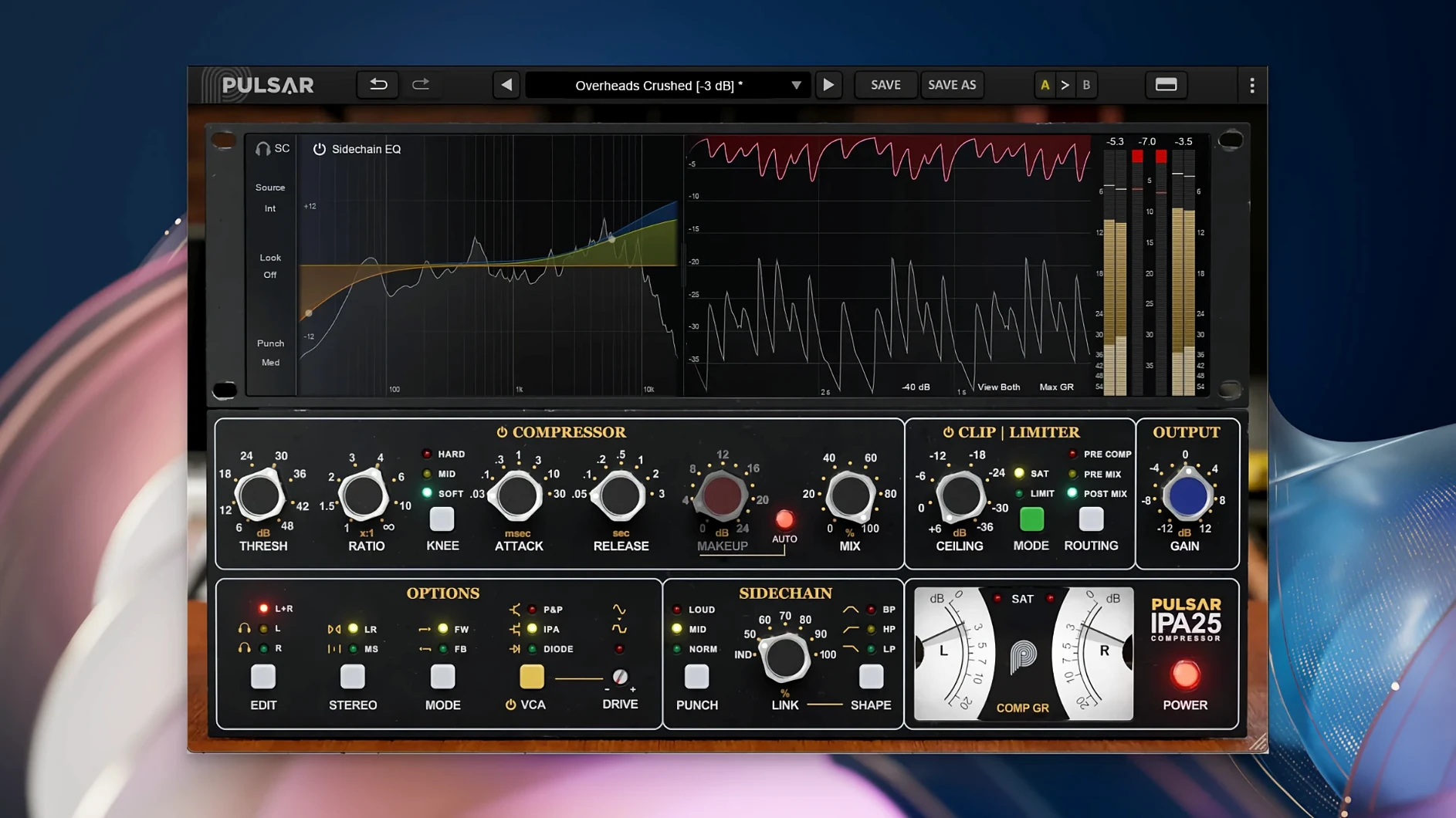
Studio engineers who reach for an API 2500-style VCA compressor on the mix bus will find a familiar architecture in Pulsar Audio IPA, but with a few extra tools that make it useful beyond a single stereo pair. It is a multi-VCA dynamics processor with a built-in clipper and limiter, plus Mid/Side processing and a sidechain visual EQ — a modern take on a classic bus compressor that also works for individual tracks.
On the mix bus, IPA behaves like the hardware it emulates: fast, punchy gain reduction that glues drums and bass together without smearing the transients. The additional clipper and limiter let you catch peaks before they hit the master fader, so you can push the compressor harder and still stay clean. For rock, pop and electronic music, this is a straightforward chain that keeps the low end tight and the top end open.
IPA works just as well on subgroups and individual sources. A drum bus gets the same VCA character, but you can switch to Mid/Side mode to compress only the centre or the sides. Vocals, bass lines and full mixes all respond to the same controls — threshold, ratio, attack, release and the built-in sidechain EQ that helps the compressor react to specific frequencies. The plugin loads as VST 2.4, VST 3, AAX Native or Audio Unit, so it slots into any 64-bit DAW on macOS 11 or later, Apple Silicon native.
IPA runs natively on Apple Silicon without Rosetta
Can IPA work inside Logic on Apple Silicon without Rosetta? Yes. The current version is compiled natively for ARM, so it runs as a native AU or VST3 plugin in Logic, Ableton Live and other DAWs. No translation layer is needed, and no extra configuration is required beyond a standard plugin install.
Will it conflict with other compressor plugins on the same bus? It should not. IPA is a single .dll or .so file per format. It does not install background services, licensing daemons or system-wide audio hooks. If you already have other Pulsar Audio plugins, they share no resources at runtime beyond the host DAW's plugin bridge.
Does it need an iLok or an internet connection? No hardware or cloud-based licensing is involved. The installed plugin runs directly after the standard installation procedure. Activation is handled locally.
Can I use IPA as a send effect rather than an insert? Yes, but it is designed as an insert processor. Most users insert it directly on the track or bus.
Will the sidechain EQ affect the dry signal? No. The sidechain visual EQ only controls what the compressor hears for its gain-reduction detection. The audio itself passes through the main signal path unchanged by the EQ filter — a standard sidechain design. The Mid/Side processing, clipper and limiter act on the main signal independently.
Adjust threshold and gain staging for predictable mix-bus work
Out of the box, IPA defaults to a moderate ratio and auto-release. For most mix-bus work, this is fine, but a few adjustments make it more predictable:
- Threshold and gain staging. The VCA modes respond differently to input level. Lower the threshold gradually until you see 2-3 dB of gain reduction on the loudest section, then adjust makeup gain. The three modes — IPA, P&P/Mu and Diode — have different compression curves, so you may need to reset threshold when switching between them.
- The fastest attack settings produce the classic VCA pump; slower settings let transients through.
- Clipper and limiter ratio. If you use the built-in clipper, set its ceiling a few dB below the limiter's ceiling. The clipper catches fast peaks; the limiter catches the rest. A 2:1 ratio (clipper at -6 dB, limiter at -3 dB, for example) keeps the output controlled without audible distortion.
- Sidechain EQ filter. A high-pass filter at 100-150 Hz stops the compressor from pumping on bass and kick. For vocals, a bell cut around 300 Hz reduces sibilance-driven gain reduction. The visual display helps you spot the problem frequency.
- Mid/Side toggle. Try Mid-only compression on a stereo mix if the sides sound too aggressive. The centre stays controlled while the sides retain their width. This is a quick fix for overly dense mixes.
Version 1.0.9 fixed VST3 scanning issues in hosts
Version 1.0.9 is the current release. It did not introduce new VCA modes or a redesigned GUI. The change log covers internal optimisations and compatibility fixes for host applications that had trouble scanning the VST3 variant. In practice, this means:
- Faster plugin scanning in DAWs that validate VST3 plugins on launch — no false positives or missing parameter lists.
- Improved window refresh when toggling Mid/Side processing while automation lanes are active. Earlier builds could lag the GUI by one redraw cycle.
- Sidechain EQ filter edges now snap to the nearest note frequency when fine-tuning by ear. This is a small convenience but saves clicking around near 100-200 Hz.
- No change to the compressor sound or the clipper/limiter behaviour. If you were happy with 1.0.8, the upgrade is transparent for existing projects.
Workflow: drum bus compression with Mid/Side control
This sequence assumes a stereo drum bus with kick, snare, overheads and room mics summed to one stereo track in your DAW.
- Insert IPA on the drum bus as a stereo insert. Leave the mode on IPA (the default VCA behaviour).
- Switch the processing mode from L+R to Mid/Side using the toggle. The gain reduction meters now show separate reduction for the centre (kick, snare) and the sides (overheads, room).
- These are a reasonable starting point for a drum bus — fast enough to control the snare, slow enough to let the kick through.
- Lower the threshold until the centre channel shows 2-4 dB of gain reduction on the loudest section. The side channel will show less reduction unless the overheads are very dense.
- Engage the sidechain high-pass filter at 100 Hz. This prevents the kick and low tom from pumping the overhead compression.
- Enable the clipper, set its ceiling to -1.5 dB. Enable the limiter, set its ceiling to -0.5 dB. The clipper catches stray transient peaks from the snare; the limiter handles the rest.
- Adjust the output gain so the drum bus hits the same level as before IPA. Listen for the punch: the kick should stay solid, the snare should stay present, and the overheads should not suck in and out with each kick hit.
- If the sides sound too compressed, dial the threshold back up by 1 dB or switch the sidechain filter to a gentle shelf instead of a steep high-pass. The visual EQ display shows you what the compressor is reacting to.
The same workflow works for a full mix bus if you want centre-glue with open sides. On a vocal subgroup, switch to P&P/Mu mode for a smoother compression curve, then use the sidechain EQ to de-ess the group before hitting the limiter.
Before it goes on the Mac
- macOS 11 or later
- Apple Silicon or Intel Mac (64-bit)
- AAX Native, Audio Unit, VST 2.4 or VST 3 host application
- English interface language
Installing it on the Mac
- Run the installer provided by Pulsar Audio.
- Follow the on-screen prompts to complete the standard installation.
Notes from the control room
Sign in or open a catalogue account to leave a note.
No notes from the room yet. If you have used this build for a week, a short note helps the next person.
Also filed under Logic Pro Plugins
The whole Logic Pro Plugins rack Pulsar Audio Pulsar Massive1.4.4 Logic Pro Plugins 102 MB
 Pulsar Audio Pulsar Primavera1.2.4 Logic Pro Plugins 103 MB
 Plug and Mix VIP Bundle4.0.0 Logic Pro Plugins 3.7 GB
 RC-20 Retro Color1.5.1 Logic Pro Plugins 170 MB
 Revoice Pro5.1.30 Logic Pro Plugins 39 MB
 Roland Cloud Legendary Series2025.06.29 Logic Pro Plugins 1.3 GB
 Roland ZENOLOGY Pro2.0.7 Logic Pro Plugins 1.8 GB
 Safari Pedals Everything Bundle2026.05 Logic Pro Plugins 628 MB