
Home › Logic Pro Plugins › Pulsar Audio Pulsar Massive

Pulsar Audio Pulsar Massive 1.4.4 (Mac)
Updated
The catalogue note
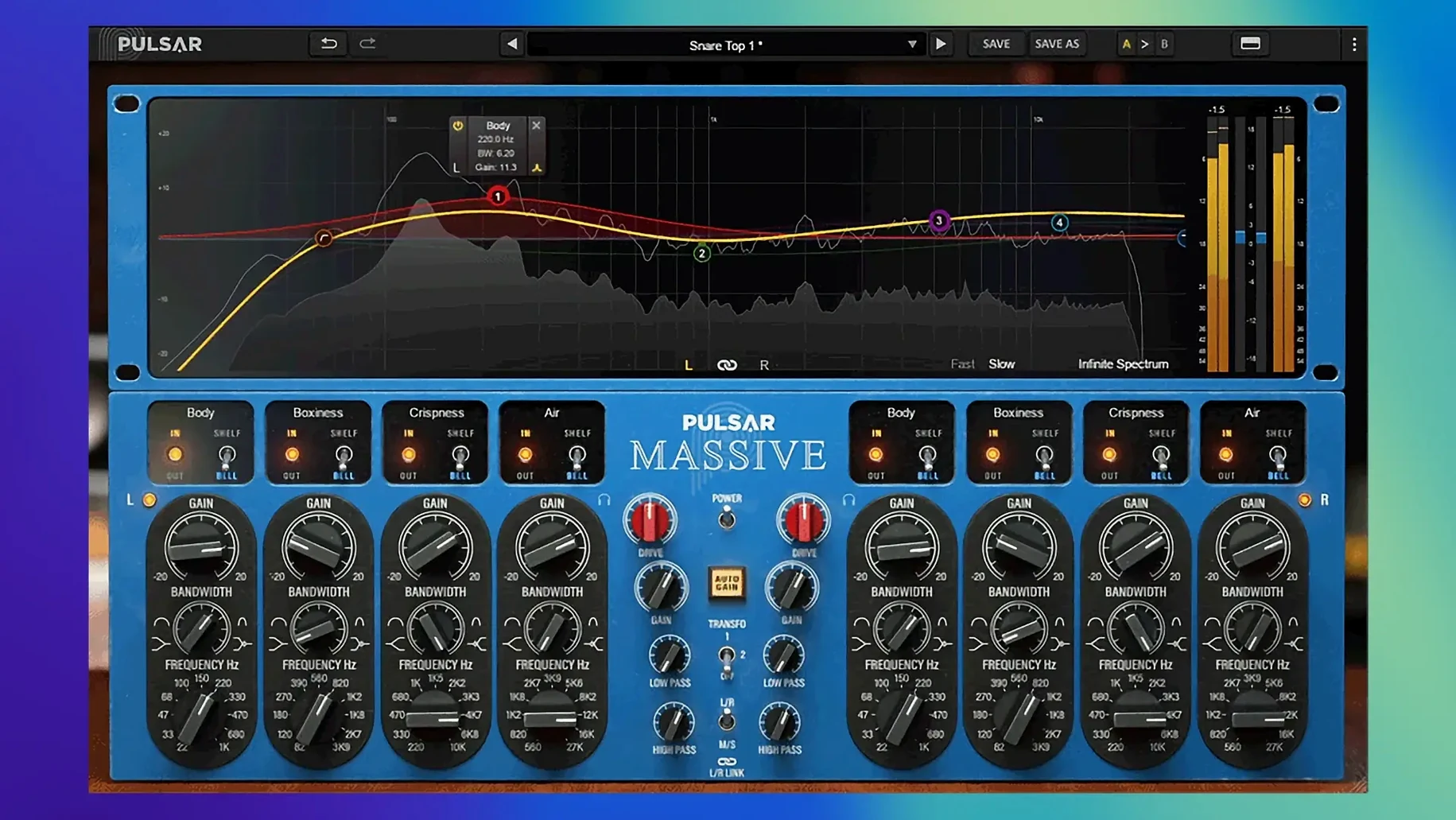
Pulsar Audio Pulsar Massive is a plugin that emulates a passive equalizer, delivering four bands of stereo EQ with a character derived from vintage hardware.
Adds musical EQ curves and saturation to tracks or mix bus
- Adding musical EQ curves to individual tracks or a mix bus, with a drive control that introduces saturation for extra warmth.
- Working in Apple Silicon-native DAWs on macOS 11 or later — it runs natively on M-series Macs without Rosetta overhead.
- Choosing between three transformer modes (original, brighter, no transformers) to tailor the harmonic flavour.
- Visual feedback via a spectrum analyser that offers real-time and Infinite Spectrum modes.
Requires a DAW host and iLok account for activation
- The plugin requires a third-party DAW to host it; it is not a standalone application.
- An iLok account is needed for activation, though no physical iLok key is required.
- Pulsar Massive was later rebranded as Pulsar MP-EQ, but version 1.4.4 remains available as a separate installer.
- Interface is in English only.
For engineers who work across mix bus and individual tracks, Pulsar Massive fits naturally into a workflow that already uses other Pulsar Audio plugins. The same topology preservation approach and transformer modelling carry through the line, so swapping between Pulsar Massive and, say, Pulsar Mu or Pulsar 8200 keeps the tonal character consistent. It also integrates well with Logic Pro’s native channel EQ for surgical cuts before applying Massive’s broader curves, or with FabFilter Pro‑Q for precision notching — the two tools complement rather than overlap.
Best for engineers wanting hardware-style EQ on drums, vocals, or mix bus
Mixing engineers who reach for hardware-style EQ on drums, vocals or the mix bus will find the four bands and drive control familiar. The mid/side mode is especially useful for mastering engineers who want to tighten the stereo image without affecting the centre. Vocal editors working on dialogue or lead vocals appreciate the three transformer modes: the original setting adds a gentle low‑end bump and air, while the brighter mode lifts presence without harshness. Music producers tracking through a DAW can use the spectrum analyser to spot problem frequencies before they commit to tape.
Runs as AU, VST2, VST3, and AAX with fast Apple Silicon loading
Because it runs as AU, VST2, VST3 and AAX, Pulsar Massive slots into almost any host — Logic, Ableton Live, Pro Tools, Reaper, Cubase, Studio One. The ARM-native build means it loads quickly on Apple Silicon Macs and uses the same process as the rest of your plugin chain. It plays well with macOS’s Audio Units validation, so Logic’s plugin manager recognises it without extra steps. For those who also use iLok‑managed plugins from other developers, the account requirement is already in place — no separate dongle or licence manager to learn.
A mastering engineer’s morning session
A mastering engineer finishes a rock mix and opens the stereo bus in Pro Tools. The low end feels loose, the vocal sits slightly left. They insert Pulsar Massive in mid/side mode, pull up the low‑mid band on the side channel by 1.5 dB to tighten the stereo image, and use the high shelf on the mid channel to add air without widening the vocal. The spectrum analyser in Infinite Spectrum mode shows the cumulative energy across the full session — no guesswork needed. After a quick A/B against the bypassed plugin, the mix has more focus and a subtle weight that wasn’t there before.
Pulsar Audio Pulsar Massive mac free download offers a vintage tube equalizer plugin for mixing and mastering.
Before it goes on the Mac
- macOS 11 or later
- Apple Silicon (ARM) architecture
- A third-party DAW
- An iLok account (free) for activation
Questions from the room
Does Pulsar Audio Pulsar Massive run on Intel Macs?
No — it is built for ARM architecture and requires macOS 11 or later, so it runs only on Apple Silicon Macs (M1, M2, M3).
Installing it on the Mac
- Run the included installer.
- Follow the supplied instructions for installation and activation.
Notes from the control room
Sign in or open a catalogue account to leave a note.
No notes from the room yet. If you have used this build for a week, a short note helps the next person.
Also filed under Logic Pro Plugins
The whole Logic Pro Plugins rack Pulsar Audio Pulsar Primavera1.2.4 Logic Pro Plugins 103 MB
 Pulsar Audio IPA1.0.9 Logic Pro Plugins 75 MB
 RC-20 Retro Color1.5.1 Logic Pro Plugins 170 MB
 Plug and Mix VIP Bundle4.0.0 Logic Pro Plugins 3.7 GB
 Revoice Pro5.1.30 Logic Pro Plugins 39 MB
 Roland Cloud Legendary Series2025.06.29 Logic Pro Plugins 1.3 GB
 Roland ZENOLOGY Pro2.0.7 Logic Pro Plugins 1.8 GB
 Safari Pedals Everything Bundle2026.05 Logic Pro Plugins 628 MB