VueScan Pro 9.8.59 (Mac)
Updated
The catalogue note
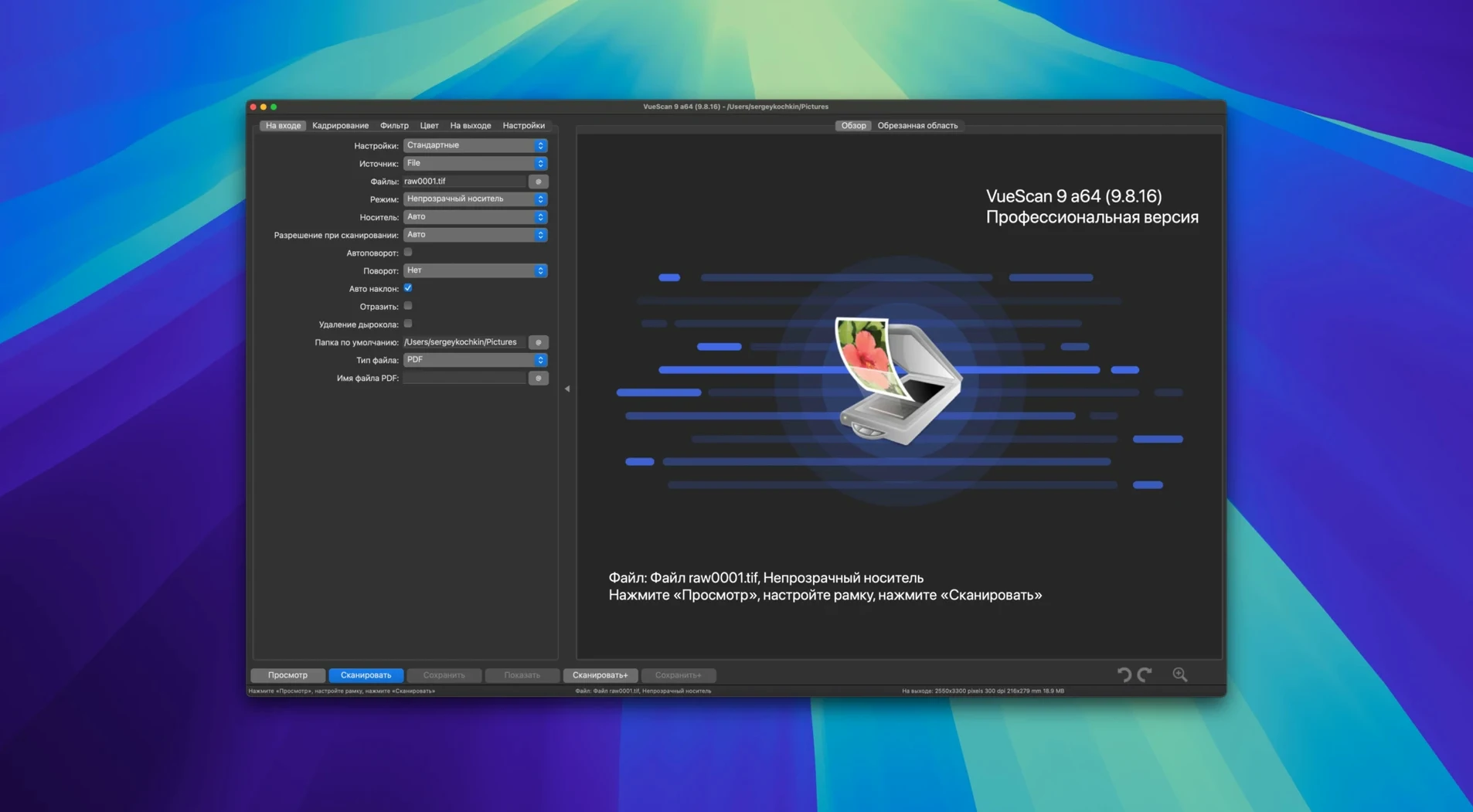
VueScan Pro works with over 2,600 scanner models, which means the odds are high it will support the flatbed or film scanner you already own. It sits alongside the existing imaging tools on your Mac — Preview, Image Capture, or dedicated scanner software — but offers control that those utilities often skip: per-channel tonal curves, infrared defect removal, multi-pass averaging, and the option to save raw scanner data for later processing offline. You can adjust exposure, colour depth and output format manually, or rely on automatic detection for most settings. User profiles can be saved as separate files, making it straightforward to switch between different scan workflows without resetting everything each time.
| Detail | Specification |
|---|---|
| Developer | Hamrick Software |
| Current version | 9.8.57 |
| macOS support | macOS 10.15 and later |
| Architecture | Intel and Apple Silicon |
| Interface languages | 34 languages including English, German, French, Spanish, Chinese, Japanese |
Version 9.8.57 adds batch processing for colourisation and super-resolution, improves AI-assisted touch-up quality, and brings support for 7 new Epson and 11 new Brother scanners. USB scanner support on macOS has also been improved. If you keep your scanner past its manufacturer’s software updates, VueScan Pro is a practical addition to your existing toolkit, not a replacement for everything else you use.
Runs on any Mac with macOS 10.15 or later
VueScan Pro runs on any Mac that meets the system requirement of macOS 10.15 or later, covering both Intel and Apple Silicon machines. The installer package includes activation instructions, and the application itself occupies a modest footprint on disk — no additional frameworks, driver bundles, or background services are forced onto your system. Because VueScan supplies its own scanning software for many models, it does not rely on the scanner manufacturer's drivers being present or up to date, which is a common source of relief when dealing with older hardware on newer macOS versions.
The interface language can be set to any of the 34 included options, including English, German, French, Spanish, Japanese, and Chinese. This is configured within the application, not through system-level locale settings, so you can run VueScan in one language while the rest of macOS stays in another. The application supports both ARM and 64-bit x86 architecture natively, meaning it will launch and function correctly regardless of which Mac you own, without needing Rosetta translation.
Permission issues and connection handshakes are the main macOS snags
Most issues people encounter with VueScan Pro on macOS stem from permission restrictions or connection handshakes, not from the software itself. Here are the situations I have seen come up regularly:
- Scanner not detected. If VueScan does not see your scanner on first launch, check that the scanner is powered on and connected directly to the Mac — avoid USB hubs, especially unpowered ones. On some Macs, especially those with USB-C ports, a simple cable swap to a known-working USB-C to USB-A adapter can resolve detection issues. VueScan's own improved USB support in version 9.8.57 helps here, but the physical connection still matters.
- Permission prompts on macOS. Modern macOS versions ask for permission to access external devices, files, and folders. If VueScan cannot save scans or cannot communicate with the scanner, open System Settings > Privacy & Security and verify that VueScan has been granted the necessary permissions for files and folders, and for USB devices if your scanner uses that connection.
- Scanner shows up but scanning fails or produces a blank image. This often means the scanner's internal colour depth or resolution is set too high for the connection. Try lowering the resolution to 300 DPI and selecting a basic output format like JPEG before attempting more advanced settings. If the scanner supports it, also try switching the input to grayscale mode to isolate the issue.
- Saved profiles not applying correctly. Profiles are saved as separate files. If you move them between Macs or rename the scanner connection, VueScan may not find the correct device path. Re-save the profile with the scanner connected and named as it appears in VueScan's device list.
- Raw data files not opening for later processing. Ensure you saved the raw file from VueScan itself, not from another application. The raw format is proprietary and requires VueScan to open it — you cannot open it in Preview or Photoshop directly. Launch VueScan, choose File > Open Raw, and navigate to the saved file.
Works with over 6,000 scanner models
Will VueScan Pro work with my specific scanner model? The software supports over 6,000 models from HP, Minolta, Nikon, Polaroid, Epson, Canon, and others. Hamrick Software maintains an online compatibility list, but a practical check is simply to install VueScan and see if it detects your scanner on first launch — there is no harm in trying. If the scanner is a recent Epson or Brother model, version 9.8.57 adds explicit support for 7 new Epson and 11 new Brother scanners.
Do I need to uninstall the manufacturer's software first? No. VueScan runs alongside existing scanner software without conflict. It uses its own scanning routines, not the manufacturer's drivers, so both can coexist. Some users prefer to keep the manufacturer's utility for maintenance tasks like head cleaning and use VueScan for actual scanning.
Can I scan directly to a network folder or cloud service? VueScan saves scans to a local folder on your Mac. If you want scans to end up in Dropbox, Google Drive, or a network share, you can set the output folder to a location that those services monitor, or use macOS's built-in folder actions to move files after scanning. The software itself does not push to cloud services directly.
Does VueScan Pro support film and slide scanning? Yes, provided your scanner has a transparency unit or film holder. VueScan recognises the scanner's hardware capabilities and offers film-specific settings like film type, colour correction for different film stocks, and infrared defect removal if the scanner supports it.
Is the interface difficult to learn? The interface is dense with options, but you do not need to touch all of them. Most users can start with automatic settings and gradually explore manual controls as they become comfortable. The built-in help file covers each setting, and saved profiles mean you only need to configure things once per scanner and task.
Most valuable for scanners with no current macOS drivers
VueScan Pro is most valuable to anyone who owns a scanner that the manufacturer no longer supports with current macOS drivers. This includes many flatbed and film scanners from the 2000s and early 2010s that work perfectly mechanically but were abandoned in software updates. For those users, VueScan is often the only way to keep using the hardware on a modern Mac.
Photographers who scan film or prints benefit from the per-channel tonal curves, infrared dust removal, and grain reduction — tools that let them pull detail out of negatives or faded prints without needing a full image editor for every frame. Archival users who digitise documents or photos in batches will appreciate the batch scanning support and the ability to save raw data for later reprocessing, which means they can scan quickly and adjust settings later without rescanning.
Office users who scan documents occasionally may find VueScan overkill compared to Preview or Image Capture, but if they need consistent output settings across multiple users or machines, the profile system makes that straightforward. The same profile file can be shared between Macs, ensuring the same colour correction, resolution, and file format every time.
For anyone who has searched for a way to keep an old scanner alive on a new Mac, or who needs scan control that goes beyond what macOS provides by default, VueScan Pro is a practical solution that does not require replacing the hardware.
Changes in this build
- Added batch processing for colorize and super-resolution
- Improved AI-assisted touch-up quality
- Added support for 7 new Epson scanners
- Added support for 11 new Brother scanners
- Improved USB scanner support on macOS
Before it goes on the Mac
- macOS 10.15 or later
- Intel or Apple Silicon processor
Questions from the room
Does VueScan Pro work with older scanners that no longer have manufacturer software for modern macOS?
Yes. VueScan Pro supports many scanner models from HP, Minolta, Nikon, Polaroid, Epson, Canon and others, including older devices whose original drivers may not work on current macOS versions.
Can I save my settings for different scanning tasks?
Yes. You can save user settings to a separate file, which allows you to create reusable profiles for different types of scans or media.
What new scanner support was added in version 9.8.57?
Version 9.8.57 added support for 7 new Epson scanners and 11 new Brother scanners, along with improved USB scanner support on macOS.
Installing it on the Mac
- Install instructions and activation instructions are included inside the package.
Notes from the control room
Sign in or open a catalogue account to leave a note.
No notes from the room yet. If you have used this build for a week, a short note helps the next person.