
Home › Logic Pro Plugins › Arturia Efx AMBIENT

Arturia Efx AMBIENT 1.0.0 (Mac)
Updated
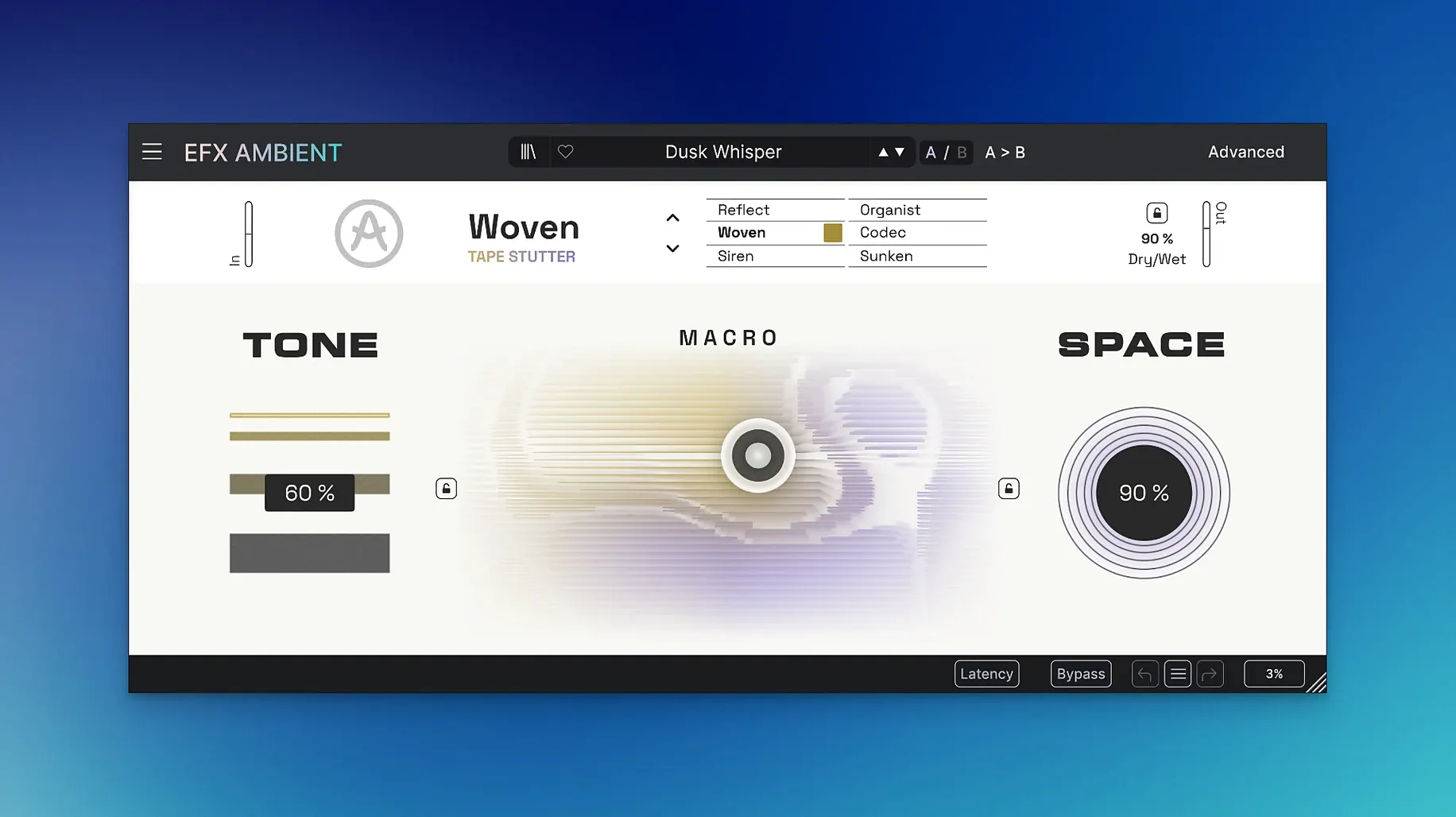
The catalogue note
Arturia Efx AMBIENT runs on macOS 11.0 or later and works on both Intel and Apple Silicon Macs. It is part of the FX Collection 6 and is designed for generating ambient textures and spatial transitions.
Motion and depth controls
The plugin offers motion and depth parameters that let you shift the sound quickly. An expressive 2D Macro control ties these together, so you can modulate several parameters at once. Six distinct operating modes are included, covering pitch shifting and other time-based processing. The Advanced panel gives you detailed control over time-based sound shaping, which helps when you need precise timing for unusual transitions.
How it sounds in a mix
Efx AMBIENT combines several audio-processing technologies into one interface. The six modes give you different flavours of ambience, from subtle space to full-on pitch-shifted washes. In practice, the motion and depth controls are what make it useful for transitions and build-ups. You can set a slow depth swell or a fast pitch wobble without diving into submenus. The 2D Macro control speeds up the workflow when you want to change the character across a section. It is a focused tool for ambient design rather than a general reverb.
Similar plugins on the Mac
If you work with ambient textures on a Mac, you have likely come across a few alternatives. Eventide Blackhole is a well-known reverb that pushes decay times into infinity and creates massive, evolving spaces. It is simpler in structure than Efx AMBIENT — fewer modes, no pitch shifting or reverse — but its sound is immediately recognisable. Soundtoys Little Plate gives you a classic EMT 140 emulation with a very specific character; it does not try to do what Efx AMBIENT does, but for straight ambience it is hard to beat. Output Portal is closer in spirit: it combines granular processing with reverb and modulation, and its XY pad resembles the 2D Macro control here. Portal leans toward glitch and granular, whereas Efx AMBIENT stays more in the spectral and feedback realm. None of these replace the six-mode structure or the Advanced panel for time-based shaping that Arturia built.
Fix plugin not showing in your DAW
Users sometimes report that the plugin does not show up in their DAW after installation. This is usually a cache issue. Restart the DAW, and if that does not work, rescan plugins from the DAW's preferences. On some Macs running macOS 11.0 or later, the system may flag the installer because it is not notarised — this is expected with the version provided here. If you see a security warning, open System Preferences, go to Security & Privacy and allow the installer to run. Another point: the plugin is 64-bit only, so it will not work in older 32-bit hosts. If you are on an Intel Mac and use a DAW that still runs in 32-bit mode, you need to switch to the 64-bit version of the host.
Building a slow pad under a vocal verse
I had a track that needed a slow, evolving pad underneath a vocal verse. The existing reverb was too static, so I inserted Efx AMBIENT on an auxiliary channel. I started with the default mode, which gives a soft blurred texture, and turned the motion control up to about 60 per cent. The sound began to breathe gently. Then I moved the depth control further — the texture started shifting in pitch, creating a subtle movement that felt organic. I switched to the reverse mode for the pre-chorus section, automated the 2D Macro to sweep from bottom-left to top-right over eight bars, and the transition came alive. The Advanced panel let me dial in the exact decay time so the tail did not clutter the vocal. The whole setup took maybe three minutes, and the result was exactly what the arrangement needed.
Cycle six modes on a sustained chord first
Start by cycling through all six modes on a simple sustained chord or a drone. Listen to how each mode colours the sound — some are subtle, others dramatic. Spend time with the 2D Macro control: map it to a MIDI controller if you have one, and record automation lanes to see how it behaves over time. The motion and depth controls respond differently in each mode, so test them with both slow and fast movements. Do not overlook the Advanced panel — it is where you refine the timing for pads and transitions. Arturia Efx AMBIENT creates evolving soundscapes with textured, unpredictable layers for experimental producers. The build is compatible with both ARM and x86 Macs, so it should work on any machine running macOS 11.0 or later. A useful habit: save a few presets early on. That way you can recall a favourite texture without rebuilding it from scratch next session.
Changes in this build
- Initial release version 1.0.0.
Before it goes on the Mac
- macOS 11.0 or later (Big Sur and newer).
- Intel or Apple Silicon processor.
- Interface language: English.
Questions from the room
How many operating modes does Efx AMBIENT have?
It has six distinct modes, including one that uses pitch shifting.
What is the 2D Macro control for?
It lets you modulate multiple motion and depth parameters at once with a single gesture.
Installing it on the Mac
- Open the downloaded disk image.
- Run the standard installer.
Notes from the control room
Sign in or open a catalogue account to leave a note.
No notes from the room yet. If you have used this build for a week, a short note helps the next person.
Also filed under Logic Pro Plugins
The whole Logic Pro Plugins rack Arturia FX Collection2026.02 Logic Pro Plugins 16.1 GB
 Arturia V Collection 11 Pro2025.20.26 Logic Pro Plugins 53.8 GB
 Ample Sound Ample Guitar LP III4.0.1 Logic Pro Plugins 9.2 GB
 BABY Audio Crystalline1.5 Logic Pro Plugins 107 MB
 AIR Music Technology Hype1.2.1 Logic Pro Plugins 801 MB
 AIR Music Technology AIR Vocal FX Collection1.2.1 Logic Pro Plugins 218 MB
 Bogren Digital Ampknob BDE 1201.0.246 Logic Pro Plugins 325 MB
 Bogren Digital Ampknob BDH 66o6 Plus1.2.118 Logic Pro Plugins 253 MB